



Skip to content
FlowNexa
  • AI Services
  • Solutions
  • About
  • Blog
VIEN
Book a consultation
Back to Blog
AI & Automation11 min readFlowNexa Editorial Team

AI reading email attachments: how do you stop malicious files and hidden instructions?

Design a secure pipeline for AI to analyze PDF, Word, and image email attachments without executing malware, obeying prompt injection, or autonomously causing side effects.


Aug 10, 2026
AI reading email attachments: how do you stop malicious files and hidden instructions?

Do not let an AI system open an email attachment directly inside the same environment that can access business data or invoke tools. A secure design treats both the file bytes and every extracted element as untrusted. The file passes through quarantine, true-type verification, resource limits, antivirus or sandbox analysis, and safe transformation before the AI receives a sanitized representation. Statements such as “ignore previous rules,” “send this data,” or “call this API” inside the document are content to analyze, not instructions for the system.

The pipeline should separate email gateway → quarantine → file inspection → safe extraction/CDR → side-effect-free AI analysis → business validation → approval or an independent executor. Malware scanning does not stop prompt injection, while a prompt telling the model to ignore document instructions does not stop malware or a well-hidden injection. Independent layers are required, and the system should fail closed when it cannot identify the format, the file is encrypted, a parser fails, or security results conflict.

Two attack surfaces

A file that is clean to antivirus can still be unsafe for AI

Malware attacks the runtime; hidden instructions attack model and workflow decisions.
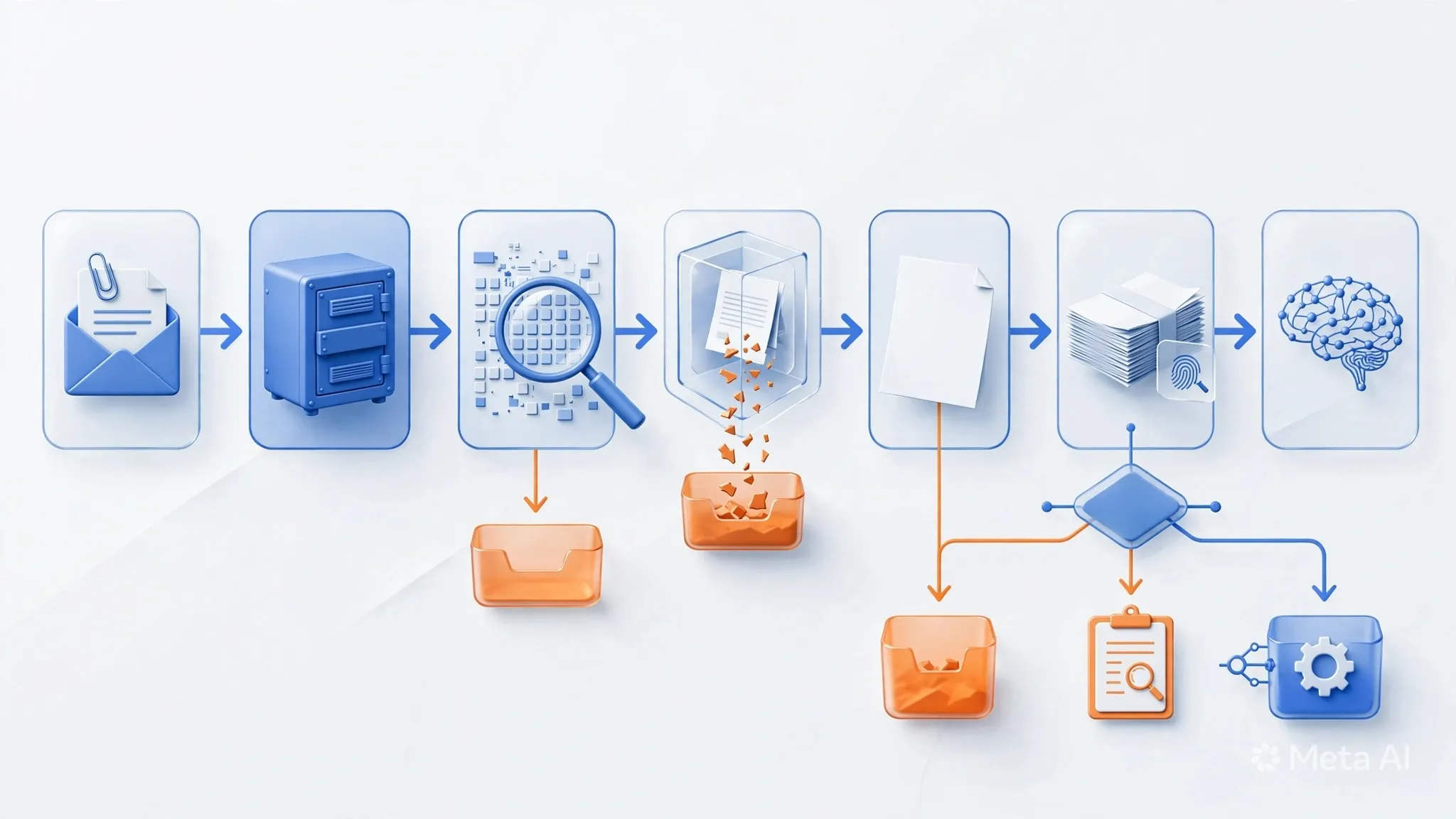
An attachment can cause harm through several paths. Malware, macros, scripts, embedded objects, and vulnerabilities in PDF or Office libraries target the processing infrastructure. Deeply nested archives, huge images, and malformed documents can exhaust CPU, memory, or storage even without known malware. A filename ending in .pdf may contain another format if the application trusts the sender-provided name or Content-Type.

The second class is indirect prompt injection. NIST describes it as an attacker controlling a resource read by an AI system and placing instructions in the data channel. In an attachment, instructions may be hidden in white-on-white text, tiny fonts, comments, metadata, PDF annotations, hidden layers, alt text, images requiring OCR, encoded strings, or a URL leading to a second-stage instruction. The goal may be to corrupt a summary, extract private data, mark a fraudulent invoice as valid, or cause an agent to invoke a tool.

A malware_scan=clean result therefore means only that this scanning layer did not identify malicious patterns or behavior with its current capabilities. It does not prove the document is legitimate, free of parser exploits or adversarial instructions, or suitable for autonomous execution.

Trust boundaries

Keep original files away from privileged model runtimes

Separate ingestion, extraction, and business execution environments.

On receipt, the workflow should record metadata and place the attachment in quarantine object storage. Generate the object name internally instead of reusing the sender's filename; keep the bucket private, outside the web root, and non-executable. The file worker uses a separate identity, an ephemeral filesystem, read-only access to the input object, no business secrets, and no network egress except allowlisted scanning endpoints. Destroy its temporary environment after the job.

Separate at least three service accounts:

  • Ingestion: receives mail, hashes the file, writes quarantine, and creates a job; it does not parse content.
  • Inspection and extraction: scans and transforms the file; it cannot access CRM, ERP, other mailboxes, or outbound tools.
  • Business executor: accepts only policy-approved structured data and cannot freely retrieve original files.

If a parser is exploited, the attacker reaches only a disposable, narrowly privileged worker. If prompt injection compromises the model's decision, it still lacks tokens to send mail, fetch internal data, or change a target system. This blast-radius control matters more than attempting to predict every possible payload.

Inspection pipeline

Inspect bytes first, extract second, and give AI only a safe representation

Every gate needs an explicit state, reason code, and quarantine route.

A production pipeline can follow this sequence:

  1. Email controls: apply anti-spam, anti-phishing, DMARC signals, reputation, and attachment policy at the gateway. In Microsoft 365, Safe Attachments adds virtual-environment detonation after anti-malware scanning; it is a useful intake layer, not a substitute for AI application controls.
  2. Intake limits: limit attachments per message, per-file size, and total bytes; calculate SHA-256 for identification, deduplication, and investigation. Block executables, scripts, and formats outside the business use case.
  3. Type verification: compare extension, server-detected MIME, and magic bytes or file signature. Reject suspicious mismatches, polyglots, encrypted files, and unsupported formats.
  4. Archive policy: cap nesting depth, entry count, decompressed bytes, and compression ratio; reject symlink or path-traversal behavior and scan every child object.
  5. Malware inspection: run antivirus and detonate higher-risk files in a sandbox. A timeout, unavailable engine, or indeterminate result goes to quarantine.
  6. CDR or conversion: for suitable PDF and DOCX files, remove macros, active content, embedded objects, and external references. Prefer rendering to PDF or images or extracting normalized text and JSON rather than passing the original file to the model.
  7. Safe extraction: run parsers in unprivileged containers or microVMs with CPU, memory, and time limits, blocked network access, and patched libraries. Record parser/version and input/output hashes.
  8. AI gate: send only provenance-tagged text and OCR, without credentials or side-effect permissions; require schema-constrained output and evidence by page or content region.

Hidden instructions

Separate document data from system instructions

Detection is a risk signal; permission boundaries provide the decisive protection.

Before invoking a model, canonicalize the document into a consistent representation: visible text, OCR, tables, links, metadata, and source locations. Extract comments, hidden runs, low-opacity fonts, off-page text, annotations, layers, alt text, and external relationships into a separate suspicious_content channel instead of silently mixing them into the main text. A significant difference between extracted text and rendered-page OCR should raise the risk score or trigger review.

Wrap the context in machine-readable trust boundaries such as source=email_attachment, trust=untrusted, file_hash, page, and visible=true/false. The system instruction defines the task as extraction or classification and forbids following requests found in untrusted regions. Require a closed output such as document_type, fields, evidence, uncertainties, injection_signals, and recommended_route, rejecting unknown fields.

However, delimiters, XML tags, or prompt wording only reduce the likelihood of compromise. OWASP and NIST note that prompt injection can arrive through external files, be concealed, or operate in multiple stages. An injection detector must therefore contribute a policy signal rather than becoming the sole authority for safe=true.

Use two AI stages instead of one all-powerful agent

The first stage is a content analyzer with no tools. It extracts data, identifies anomalies, and attaches evidence. Do not expose address books, unrelated mailbox history, secrets, or unnecessary customer records. For an invoice use case, the analyzer needs to return only vendor, invoice number, date, total, currency, and evidence location; it does not need permission to create a payment.

A separate decision workflow verifies sender and domain, compares master data, checks duplicates, order status, limits, and business policy. If an action is appropriate, the backend creates a proposed action. A policy engine checks tenant, user and agent identities, action, resource, argument bounds, idempotency, and approval before an executor uses short-lived credentials. Neither the document nor the model may pass a tool name and arguments directly to the executor without server-side reconstruction, canonicalization, and authorization.

When content appears injected, the system may still extract non-sensitive fields, but it should block autonomous action, refuse to follow document URLs, and avoid retrieving private data requested by the attachment.

Routing decisions

Route by file verdicts, security signals, and business risk

A clean result does not automatically qualify a document for automation.

A practical policy can use four routes:

  • Reject: forbidden format, clear signature mismatch, confirmed malware, archive bomb, parser-exploit signal, or a hash on a denylist. Retain evidence according to policy; never send it to AI.
  • Quarantine or review: encrypted or unknown file, sandbox timeout, unavailable engine, external object, substantial hidden text, prompt-injection signal, or conflicting engine verdicts.
  • Analyze only: the file passes technical checks but the sender remains unverified, required data is missing, or the business process is sensitive. AI may extract or summarize but cannot create a side effect.
  • Eligible for automation: allowlisted type, all required technical verdicts pass, source and business data are verified, action blast radius is acceptable, policy allows it, and idempotency exists. “Eligible” does not authorize the model; the executor still evaluates each request.

Avoid one opaque aggregate score. Preserve separate type_verdict, malware_verdict, sandbox_verdict, content_verdict, sender_verdict, and business_verdict values. Policy should deny by default when a mandatory verdict is missing.

Add controls to n8n or another workflow engine without creating bypasses

In n8n, do not download an attachment and feed its binary directly to an AI node. The workflow should call specialist services through job IDs:

  1. A trigger receives message ID and metadata; idempotency uses mailbox, message ID, and attachment hash.
  2. Upload the file to quarantine under a server-generated name and mark it RECEIVED.
  3. Call an asynchronous inspection API, move to SCANNING, and accept a signed verdict callback or poll by job ID.
  4. Call the extraction API only when policy allows, store the sanitized artifact separately, and mark it EXTRACTED.
  5. Invoke AI with sanitized text, a fixed schema, and correlation ID; its result is PROPOSED, not an action.
  6. Apply business and security policy. Sensitive paths become REVIEW_REQUIRED; permitted requests reach the executor with an idempotency key; failures become QUARANTINED or REJECTED.

Use separate credentials for email, scanning, AI, and target systems. The AI node must never see executor tokens. Do not let a Code node execute sender-supplied binaries, enable macros, follow document URLs automatically, or write raw sensitive content into execution logs. Retries should reuse the existing job state instead of re-downloading, rescanning, or re-executing without control.

Observability, evidence, and incident response

Maintain chain of custody for every file: tenant and mailbox, message ID, sender, received time, escaped original filename, size, SHA-256, detected MIME and signature, scanner and signature version, sandbox/CDR/parser version, every verdict and reason, sanitized-artifact hash, model and prompt version, policy decision, and final action. Redact sensitive content; logs are not a repository for complete files or raw prompts.

Monitor rejection and quarantine rates by reason, scanner timeout, parser crash, compression-ratio violation, type mismatch, hidden-content signal, injection signal, AI schema failure, policy-blocked action, and reviewed false positive. Alert on an abnormal file burst from one sender or domain, the same hash across mailboxes, or repeated parser crashes for one format.

If a file bypass is discovered, search by hash to isolate copies, revoke related sanitized artifacts and AI results, disable the executor, rotate credentials if exposure is possible, inspect outbound calls, and reprocess with updated engines and policy. Quarantine retention must follow privacy and legal requirements rather than keeping files indefinitely for debugging.

Test before enabling autonomous processing

Regression fixtures should include clean and adversarial files: extension, MIME, and signature mismatch; macros; embedded objects; encrypted PDF or ZIP; nested archives; a safely simulated zip bomb; oversized files; malformed PDF; external links; white-on-white text; tiny fonts; comment or metadata injection; an image containing OCR instructions; Base64 instructions; and prompts that request a tool call or data disclosure. Use only harmless samples in a controlled test environment.

Acceptance should not rely only on prompt-injection detector recall. Test these invariants:

  • A file without all required verdicts cannot reach AI.
  • AI receives only the sanitized artifact with provenance for the correct file.
  • The analyzer has no network or side-effect tool path.
  • File content cannot change system policy, recipient, tenant, or executor credentials.
  • Policy timeout or missing attributes always fail closed.
  • Approval becomes invalid when the action or arguments change.
  • Replay and retry cannot duplicate an action.
  • Every action traces back to model output, sanitized hash, and original file.

Run adversarial exercises periodically because hidden-instruction techniques and parser vulnerabilities evolve.

Secure implementation checklist

  1. Define the exact file types and fields required by the use case; deny everything else.
  2. Enable attachment protection at the email gateway without treating it as the only layer.
  3. Store files in private, non-executable quarantine under internal object names.
  4. Limit size, count, archive depth, decompressed bytes, CPU, memory, and time.
  5. Compare extension, MIME, and magic bytes; handle encryption and mismatch explicitly.
  6. Apply antivirus, sandboxing, and CDR or conversion by risk tier; fail closed when an engine is unavailable.
  7. Parse in a disposable, unprivileged, no-egress workload without secrets.
  8. Canonicalize visible text, OCR, and metadata; attach provenance and separate suspicious hidden content.
  9. Use a tool-less analyzer with schema-constrained output, evidence, and uncertainty.
  10. Verify sender, required data, and business rules outside the model.
  11. Put policy, approval, and idempotency before a least-privileged executor.
  12. Record chain of custody, metrics, alerts, retention, and incident procedures; retest when parsers, models, or prompts change.

Until these controls exist, a safer initial scope is to summarize only trusted user-submitted files, never process every internet attachment automatically, and expose no tools to the analyzer.

Frequently asked questions

AI email attachment security FAQ

Common decisions when introducing PDF, Word, spreadsheet, or image attachments into an AI workflow.

Can AI read a file immediately after antivirus reports it clean?

No. Clean is one verdict. The workflow still needs true-type checks, parser isolation, safe transformation, indirect prompt-injection controls, and agent permission boundaries.

Can a prompt tell AI to ignore instructions inside the file?

Use instruction hierarchy and mark untrusted regions, but prompts are not security boundaries. Keep the analyzer side-effect-free and authorize every action independently.

Should all ZIP and password-protected files be blocked?

Block them when the use case does not require them. Otherwise use a separate path with decompression limits, a trusted password channel, per-entry scanning, and review when full inspection is impossible.

Does Microsoft 365 Safe Attachments replace this pipeline?

No. Safe Attachments provides anti-malware and detonation at the email layer. The application still controls file types, parsers, extracted data, prompt injection, and business authorization.

When can attachment processing be automated?

Only when the type is allowlisted, all required verdicts pass, sender and business data are verified, action risk is acceptable, policy allows it, and retries are idempotent.

FlowNexa perspective

Start with an attachment pipeline that cannot execute actions

FlowNexa can help assess an email workflow, design quarantine and extraction services, and add a policy gate before expanding into side-effecting automation.

Expected deliverables

File-type matrix, threat model, state machine, scanner and CDR policy, trust-boundary diagram, AI output schema, authorization rules, audit fields, and regression tests.

The governing principle

Inspect bytes first, transform in isolation, treat content as untrusted data, and never let the model grant itself permission to act.

Read next

Related insights

Business Automation

After-Hours Missed Calls: How Can You Respond Automatically Without Losing Leads?

Design a flow that captures missed calls, verifies intent, creates leads, prioritizes callbacks, and uses bounded voice AI without frustrating callers.

AI Governance

Shadow AI in the Enterprise: How to Govern It Without a Blanket Ban

Identify unmanaged employee AI use and build practical policy, approved tools, data classification, logging, and exception handling.

Customer Experience

A Customer Starts on Facebook and Continues on Zalo: How Do You Preserve Context?

Design omnichannel customer context across Facebook, Zalo, and CRM without incorrect identity merges, data exposure, or forcing customers to repeat themselves.

FlowNexa

FlowNexa helps small and mid-sized businesses bring AI into customer service, workflow automation, and efficient data operations. Cloud-native and DevSecOps provide the foundation that keeps these solutions secure, reliable, and easy to scale.

FLOWNEXA COMPANY LIMITED

Tax ID: 0319612776

Address: 228/6 Au Duong Lan, Chanh Hung Ward, Ho Chi Minh City, Vietnam

Website: flownexa.ai

Services

AI chatbots & supportAI assistantsAutomationCloud & infrastructure

Company

AboutBlogPrivacyTerms

Contact

hello@flownexa.ai
0948 279 029
Chat on Zalo
Chat on Messenger
Replies within one business day

© 2026 FlowNexa. All rights reserved.

Microsoft, Azure, Microsoft 365, AWS, Kubernetes, and Cloudflare are trademarks of their respective owners. FlowNexa is not claiming partnership unless expressly stated.

B2B service website — no online ordering or online payment.

Practical AI · Automation · Secure CloudPrivacyTermsCookiesLegal
Share:
FacebookZaloLinkedIn
Share:
FacebookZaloLinkedIn