





Customers submit a form, but Sales forgets to follow up: what should you automate?
Design an automated workflow that captures form leads, assigns sales owners, enforces response SLAs, sends reminders, escalates overdue leads, and prevents duplicates.

When customers submit a form but Sales forgets to call them back, another notification email is not the solution. Each submission should become a lead with a named owner, response deadlines, a status, and an activity history. The workflow should validate the data, prevent duplicates, assign a representative, create an SLA-bound task, remind the owner, and escalate when the lead has not been acknowledged or contacted.
The automation boundary also matters. The system can capture, prioritize, and route the request; Sales remains responsible for the conversation, discovery, and outcome. This design removes the dependency on whether one person remembers to check an inbox.
Problem
Why does a new-form email still allow leads to fall through the cracks?
A notification communicates an event; it does not establish ownership, a deadline, or control.
An email sent to a shared inbox rarely answers four essential questions: who owns the lead, when a response is due, whether contact has occurred, and who intervenes after a breach. The message can be buried under internal mail, forwarded to the wrong person, or acted on by two representatives at once.
The goal is therefore not to “send a faster alert.” It is to create an auditable lifecycle: new → assigned → acknowledged → contacted → qualified/disqualified → closed. Every transition needs a timestamp, an actor, and a reason. Email, Teams, or Slack is a reminder channel; the CRM or lead store is the system of record.
Architecture
What is the minimum viable workflow?
Separate intake from assignment, SLA monitoring, and failure handling.
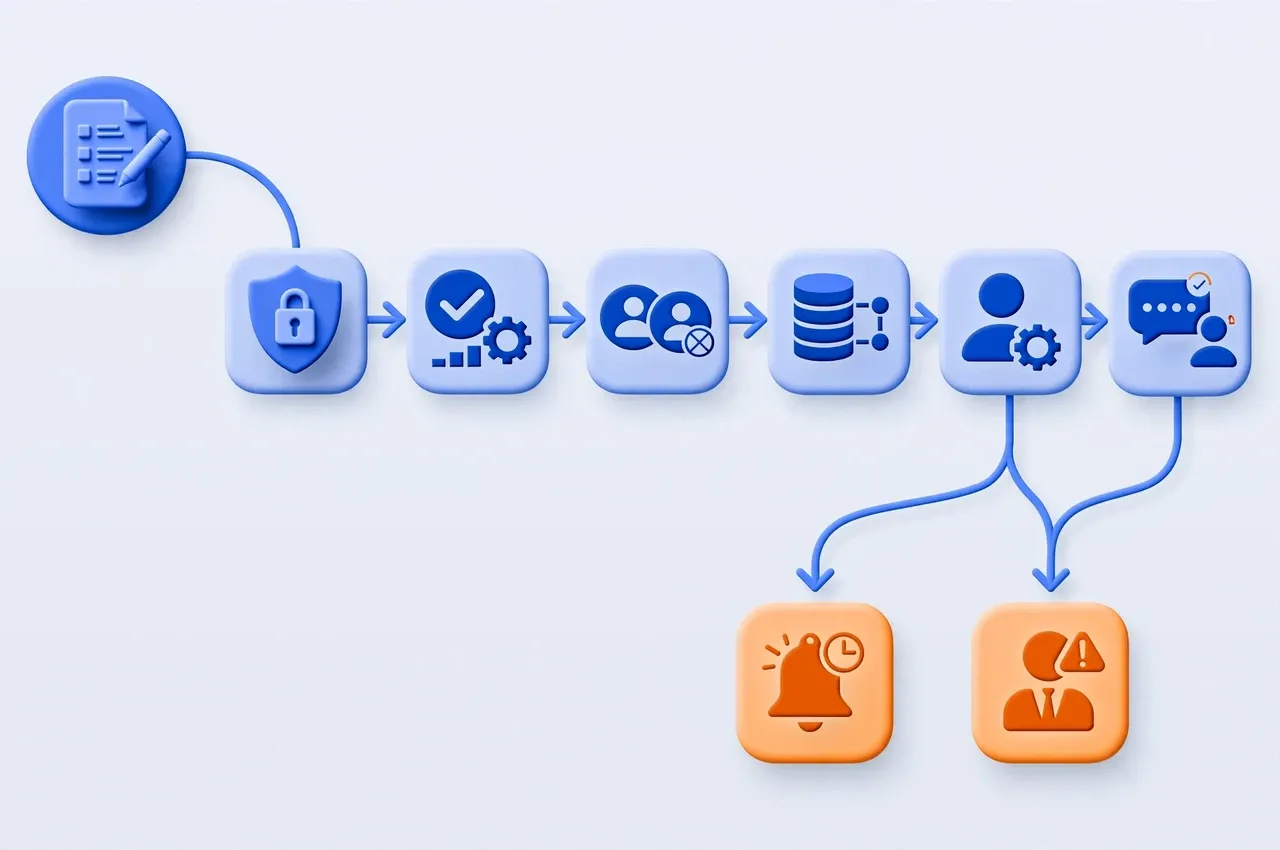
A practical flow works as follows: the form emits a webhook; the workflow verifies the sender and normalizes the name, email, and phone number; the system creates a submission_id or idempotency key; the CRM searches for an existing lead before creating one; routing rules select the sales team; the workflow assigns an owner, creates a task and deadlines, sends an acknowledgement to the customer, and emits an audit event; an SLA monitor then reminds or escalates as required.
Microsoft documents form-response triggers and custom notifications in Power Automate. Salesforce supports criteria-based lead assignment rules. HubSpot supports rotating ownership across eligible users. These are useful building blocks, but a reliable design still needs explicit states, deduplication, and operational visibility.
Data
Step 1: normalize input and prevent duplicate leads
Retries are safe only when the same submission cannot create extra records or tasks.
At minimum, capture a name, one valid contact channel, the request, source or campaign, submission time, and consent where applicable. Lowercase email addresses, convert phone numbers to one canonical format, and trim whitespace before matching.
Prefer the unique submission ID provided by the form platform. If none exists, derive a key from form_id + submission_timestamp + normalized_email/phone and enforce it with a unique constraint. If an event is redelivered or a workflow retries, return the existing lead instead of creating another lead, task, and acknowledgement. Do not deduplicate on email alone: the same person may submit a genuinely new request, while a shared address may represent several people. Define a time window and merge policy around the actual business process.
Assignment
Step 2: route to the right representative and always provide a fallback
Round-robin is a starting point, not a complete routing strategy.
Routing rules may consider product, territory, language, account size, existing relationships, and on-call schedules. Within an equally qualified group, round-robin can distribute leads more evenly. HubSpot's documentation notes that rotation counters belong to the individual action and may reset when owners are added or removed, so assignment must be retested after membership changes.
Only assign active users who are able to receive leads. If no eligible owner exists, place the record in an unassigned queue, alert Sales Operations, and apply a shorter queue SLA. The workflow must not report success while the owner field is empty.
SLA
Step 3: track actions, not notification delivery
An SLA is complete only when there is evidence of acknowledgement or contact.
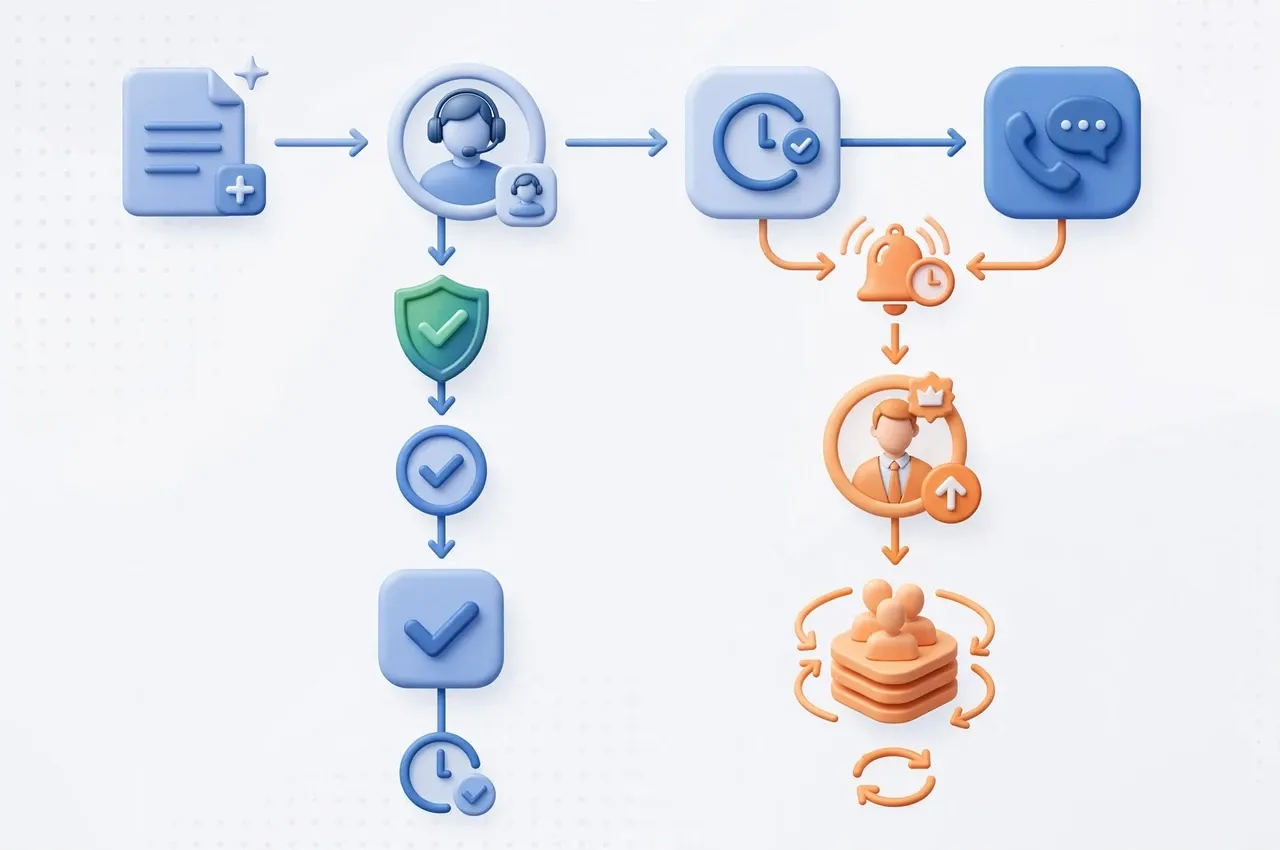
Set SLAs by priority and business hours rather than using one hard-coded number for every lead. As an illustrative policy, a high-priority lead might require acknowledgement within 10 business minutes and a first contact attempt within 30; standard leads could use longer thresholds. Each company should select targets that match team capacity and service commitments.
Create at least ack_due_at and contact_due_at. Clicking “Accepted” stops acknowledgement reminders, but it does not prove that a call was made. Complete the contact milestone only when the CRM records a call, a personalized email, a booked meeting, or another valid outcome. After a breach, remind the owner, alert the team lead, and then move the lead to a queue or reassign it according to policy. Microsoft also documents escalation when an assignee does not act within the allotted time.
Experience
Step 4: respond immediately without pretending that Sales has acted
The acknowledgement should set expectations and request only necessary information.
After the lead has been stored successfully, send an acknowledgement containing the request ID, a concise summary, the expected response window, and a safe way to add information. State clearly that the system received the request; do not imply that a representative has already reviewed it.
Do not push the full sensitive payload into chat. Internal alerts should expose only the minimum necessary details and link to an access-controlled CRM record. Protect webhooks with HTTPS, signature or secret verification where supported, replay protection, rate limits, and logs that redact personal data. Separate credentials for the form, CRM, and email systems, granting each the minimum required permissions.
Implementation
A reference setup for n8n, a CRM, and Microsoft 365
A resilient implementation uses separate intake, SLA monitoring, and error workflows.
Split the implementation into three small workflows:
- Lead intake: Production webhook → verify → normalize → idempotency check → CRM upsert → owner assignment → task creation → acknowledgement → audit event. n8n provides separate test and production webhook URLs; after testing, publish the workflow and configure the form with the production URL.
- SLA monitor: Run on a schedule, query leads that are not
acknowledged/contactedand whose deadlines are approaching or breached, then remind, escalate, or reassign. Querying by state and deadline is usually clearer than keeping thousands of workflow executions waiting. - Error handler: Receive failures from the intake flow, classify transient versus permanent errors, retry timeouts, 429s, and 5xx responses with bounded backoff, and send nonrecoverable cases to an operations queue with an alert.
If there is no CRM yet, Dataverse, a SharePoint List, or PostgreSQL can be an interim system of record. Avoid Excel as the main state store when multiple users and workflows update records concurrently.
Minimum record
Fields that tell the workflow where a lead stands
A clear schema supports accurate reminders, SLA calculations, and incident investigation.
Identity
lead_id, submission_id, form_id, source, campaign, and normalized contact keys.
Ownership
owner_id, team_id, assignment_rule_version, assigned_at, and fallback_queue.
SLA and state
status, priority, ack_due_at, contact_due_at, acknowledged_at, first_contacted_at, and outcome.
Audit
workflow_execution_id, reminder_count, escalated_at, reassigned_at, actor, and reason.
Measurement
Which dashboard proves that the automation works?
Do not stop at the workflow success count.
Measure owner-assignment rate, acknowledgement SLA attainment, first-contact SLA attainment, median and p90 time to first contact, unassigned rate, escalation and reassignment counts, duplicate-submission rate, and CRM synchronization failures. Add business outcomes such as qualified rate, meetings booked, and conversion by source.
Keep technical and business metrics distinct. A workflow can have a 99% execution success rate while failing the business if owners never call. Conversely, one technical retry need not affect the customer when idempotency works. Alert immediately when an unassigned lead appears, the overdue backlog rises continuously, or the webhook receives no events for an unusual period relative to its baseline.
Testing
Production-readiness checklist
Adverse scenarios matter more than one successful submission.
- Submit the same payload twice: expect one lead, one task, and one acknowledgement.
- Time out the CRM after it creates a lead: a retry must find the existing record.
- Disable an owner or mark them unavailable: route to a fallback owner or queue.
- Omit email but provide a valid phone number: follow the defined contact policy.
- Match no routing rule: set
unassignedand alert Sales Operations. - Acknowledge without contacting: the
contact_due_atreminder must still run. - Return 429 or 5xx from an API: apply bounded backoff; do not retry authentication failures forever.
- Change round-robin membership: recheck distribution and audit the rule version.
- Test authorization: chat alerts reveal no sensitive payload and representatives see only permitted leads.
- Disable the CRM or notification channel: retain the event for safe replay and raise an alert rather than losing it silently.
FAQ
Frequently asked questions about automated lead follow-up
Practical decisions to make before implementation.
Is an email alert to Sales sufficient?
No. An email does not establish ownership, a deadline, or a contact outcome. Create an owned, SLA-bound lead or task; use email as one reminder channel.
Do we need a CRM before automating?
Not necessarily at the beginning, but you do need a store with unique IDs, states, access controls, and change history. PostgreSQL, Dataverse, or a SharePoint List can be an interim step; move to a CRM as the sales process matures.
When should reminders and escalation occur?
There is no universal threshold. Segment by priority, business hours, and sales capacity. Measure the current p90 response time, choose a target the team can meet, and tighten it based on evidence.
Should AI qualify and route leads automatically?
AI can suggest intent, summarize a request, or propose priority. Mandatory rules, permissions, and fallbacks should not rely entirely on probabilistic output. Send low-confidence cases to a verification queue.
How do we prevent two representatives from contacting the same person?
Maintain one effective owner at a time, use concurrency-safe lead acceptance, enforce idempotency, and store state in the CRM. Record every reassignment.
Can a workflow failure lose a lead?
It should not. Acknowledge the webhook only after durable storage, retry transient failures, alert on permanent failures, and keep a queue for safe replay.
FlowNexa
Turn every form into a measurable sales process
FlowNexa can help review your current lead flow, define practical SLAs, and design automation across forms, CRM, Microsoft 365, or n8n based on your operating model.
Start with one form
Choose a form with clear business value and establish a baseline before automating.
Roll out with control
Pilot with one sales group and verify routing, retries, escalation, and dashboards before expanding.
