Skip to content
FlowNexa
  • AI Services
  • Solutions
  • About
  • Blog
VIEN
Book a consultation
Back to Blog
Data Governance4 min readFlowNexa Editorial Team

Duplicate Customers in CRM: How Do You Merge Without Combining the Wrong People?

Design duplicate detection with identity keys, confidence, review queues, merge policy, and recovery controls.


Aug 17, 2026
Duplicate Customers in CRM: How Do You Merge Without Combining the Wrong People?

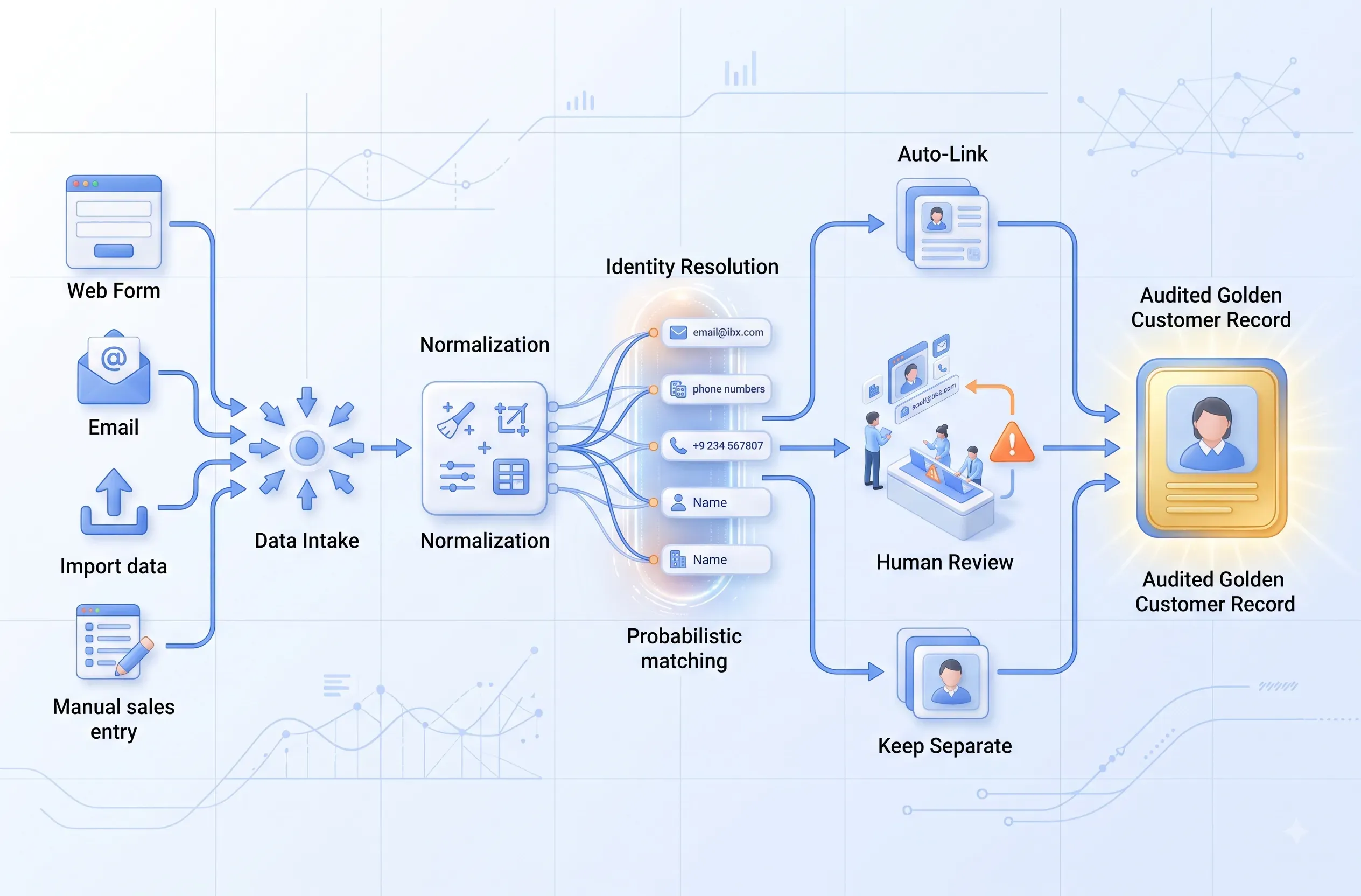
Duplicate CRM customers should not be resolved with a “merge everything” button. A safe process normalizes data, uses deterministic identifiers whenever possible, scores uncertain matches, and automatically consolidates records only when evidence is strong. Pairs with conflicting email, phone, company, or transaction history belong in a review queue.

The objective is one trustworthy customer profile that preserves source lineage, change history, and a recovery path. Under-merging fragments the customer for Sales; a wrong merge can expose one person’s conversations, quotations, or transactions to another. Accuracy therefore matters more than the number of records removed.

Causes

Why does the CRM keep creating duplicate customers?

Data arrives through different channels without a shared identifier or normalization policy.

One customer may submit a work email, call from a personal number, message through a display name, and be entered again by Sales. Spreadsheet imports add whitespace, case differences, or inconsistent country codes. Retried webhooks create another record when integrations lack idempotency. Company-domain changes and employee turnover weaken old identifiers.

HubSpot documents deduplication of contacts by email and companies by domain, with record IDs or unique properties available for imports. The broader principle is to prefer deterministic keys before fuzzy matching. See HubSpot deduplication.

Before cleaning the backlog, stop new duplicates: validate form and API inputs, normalize email and phone, retain source-specific external IDs, use idempotency keys, and upsert instead of blind create operations.

Signals

The CRM has an identity problem, not merely dirty data

Inspect the impact on Sales, Support, and reporting.

One person, multiple owners

Several representatives follow up because every record looks like a separate lead.

Fragmented history

Emails, tickets, quotations, and orders live on different profiles.

Inflated customer count

Reported customers increase while real customers do not.

Wrong context

Automation uses stale or incorrectly merged profile data.

Design

Build identity resolution in three tiers

Separate certain matches, uncertain matches, and records that must stay distinct.

Tier one is deterministic matching: verified customer ID, normalized exact email, verified phone, or external account ID. Tier two is composite matching across name, company, email domain, phone, address, and relationship history. Signals may be weighted, but a strong contradiction should block automatic merging. Tier three is human review for similar records without sufficient evidence.

Use three outcomes: same_identity, possible_duplicate, and distinct. Only same_identity pairs covered by tested rules may auto-link. Possible duplicates enter a queue with evidence, differences, and a proposed surviving record. Distinct pairs should be suppressed so the system does not repeatedly suggest them.

CRM tooling can surface candidate pairs, but the business still owns matching policy. HubSpot supports reviewing, merging, rejecting, and applying duplicate rules; see duplicate record management.

Merge policy

Decide which value wins before consolidation

A merge is a business change, not merely a database operation.

Select the surviving record by source trust, recency, verification, and business relationships—not simply the newest record. Define a field-level strategy: keep verified, keep newest trusted, union a set, or require review. Do not freely concatenate notes that may contain sensitive context. Preserve lineage for email, phone, consent, owner, and lifecycle stage.

Before a batch merge, export a snapshot or create a merge journal containing source IDs, surviving ID, field changes, actor, rule version, and timestamp. Run a dry run to inspect pair volume, conflicts, and downstream impact. After merging, verify workflow enrollment, audiences, ownership, deal associations, and permissions. CRM merge behavior may not be directly reversible; HubSpot advises reviewing effects and explains how the surviving record combines activities, associations, and properties in its merge documentation.

Do not auto-merge records with financial transactions, complaints, different tenants, or different access boundaries without specialized review.

KPIs

Measure identity quality, not just deleted records

Use sampled review to detect both missed duplicates and incorrect merges.

Duplicate creation rate

New duplicates per 1,000 records created.

Auto-merge precision

Correct automatic merges in an independently reviewed sample.

Review backlog age

Time uncertain pairs remain unresolved.

Wrong-merge incidents

Incorrect merges, affected scope, and recovery time.

FAQ

Frequently asked questions about CRM duplicates

Automate only when evidence and recovery are clear.

Should phone number be the unique key?

Not by default. Numbers can be shared, recycled, or mistyped. Treat them as strong evidence only after normalization and verification.

Can AI decide merges automatically?

AI can suggest and explain signals. Automatic merging still needs deterministic policy, evaluated thresholds, and a low-risk scope.

Should we clean old records or stop new duplicates first?

Stop new duplicate creation first, then process the backlog in measured batches with snapshots.

Can we delete the duplicate instead of merging?

Only when activity, associations, consent, and audit evidence cannot be lost. Controlled consolidation is usually safer than direct deletion.

FlowNexa

Build trusted customer identity before scaling automation

FlowNexa can help analyze data sources, design matching rules, create review queues, and implement audited merge operations for the existing CRM.

Start with one object

Pilot contacts or companies before processing the entire CRM.

Measure false merges

Do not trade accuracy for a rapid reduction in record count.

Read next

Related insights

Enterprise AI Agents

From Chatbot to AI Agent: When Should a Business Upgrade?

Distinguish chatbots from AI agents through planning, tool use, state changes, task completion, and controlled guardrails.

Business Productivity

The Meeting Has Minutes but Work Is Still Late: How Far Should Action-Item Automation Go?

Turn meeting content into owned, dated, sourced, confirmed tasks without letting AI assign responsibility incorrectly.

AI Agent

After-Hours AI Voice Agent: How Much Should You Automate?

Define scope, voice architecture, tool permissions, human handoff, privacy, and QA for an after-hours AI Voice Agent.

FlowNexa

FlowNexa helps small and mid-sized businesses bring AI into customer service, workflow automation, and efficient data operations. Cloud-native and DevSecOps provide the foundation that keeps these solutions secure, reliable, and easy to scale.

FLOWNEXA COMPANY LIMITED

Tax ID: 0319612776

Address: 228/6 Au Duong Lan, Chanh Hung Ward, Ho Chi Minh City, Vietnam

Website: flownexa.ai

Services

AI chatbots & supportAI assistantsAutomationCloud & infrastructure

Company

AboutBlogPrivacyTerms

Contact

hello@flownexa.ai
0948 279 029
Chat on Zalo
Chat on Messenger
Replies within one business day

© 2026 FlowNexa. All rights reserved.

Microsoft, Azure, Microsoft 365, AWS, Kubernetes, and Cloudflare are trademarks of their respective owners. FlowNexa is not claiming partnership unless expressly stated.

B2B service website — no online ordering or online payment.

Practical AI · Automation · Secure CloudPrivacyTermsCookiesLegal
Share:
FacebookZaloLinkedIn
Share:
FacebookZaloLinkedIn