Skip to content
FlowNexa
  • AI Services
  • Solutions
  • About
  • Blog
VIEN
Book a consultation
Back to Blog
DevSecOps18 min readFlowNexa Team

Practical DevSecOps for Business Websites: CI/CD, GitOps, Kubernetes, and Monitoring

How FlowNexa deploys a Next.js website and Strapi CMS on Kubernetes with CI/CD, security scanning, a GitOps deployment branch, monitoring, backup, and restore drills.

Updated: Aug 7, 2026
Practical DevSecOps for Business Websites: CI/CD, GitOps, Kubernetes, and Monitoring

When a business website moves into production, the question is no longer simply “how do we deploy?”. The more important question is: how do we deploy safely, with control, rollback capability, testing, security gates, and long-term operational stability?

That is why FlowNexa built its website around DevSecOps and GitOps from the start. Instead of manual deploys from a laptop or direct edits on a server, every change flows through testing pipelines, image builds, security scans, manifest updates, and controlled Kubernetes rollouts.

FlowNexa currently runs its public website on Next.js, its CMS on Strapi, and deploys both to Kubernetes for staging and production. Beyond CI/CD, the platform includes monitoring, backup, restore drills, and production resource dashboards.
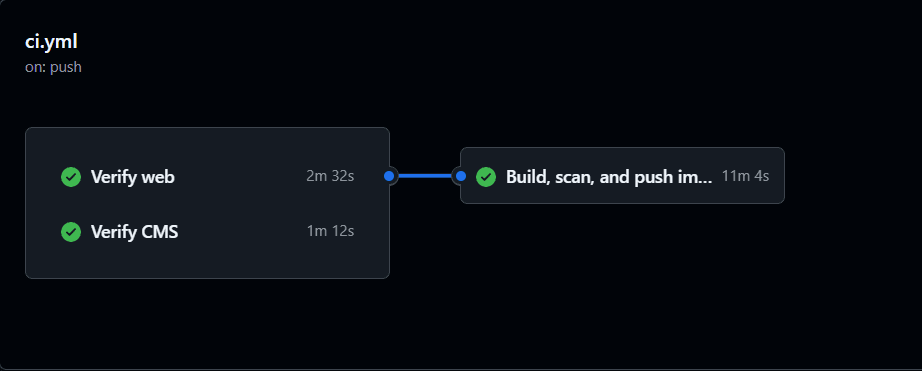
GitHub Actions pipeline tổng quan cho FlowNexa web và CMS
GitHub Actions pipeline kiểm tra web, CMS và build image trước khi release

Production readiness

Why production websites need more than one deploy command

Once a website has a CMS, multiple environments, SEO, backups, monitoring, and real production traffic, risk grows quickly if deployment stays manual.

Common problems

Risks when deployment is just one command

Unknown running version

Production no longer has a precise trace of which image or commit is live.

No security scan

Releases go straight to production without a quality gate or vulnerability scan.

Staging/production drift

Environments diverge over time, so rehearsal loses meaning.

Hard rollback

Images or manifests are not versioned clearly when you need to return to a stable build.

Operator dependency

Deployment depends on individual experience instead of a controlled process.

No post-deploy verify

There is no routine for backup, restore, and monitoring checks after release.

FlowNexa addresses this with a DevSecOps process that is automation-first, secure-by-default, and GitOps-ready.

Architecture

High-level architecture

Public Next.js website, Strapi CMS, PostgreSQL, persistent volumes for media uploads, and separate staging and production Kubernetes environments.

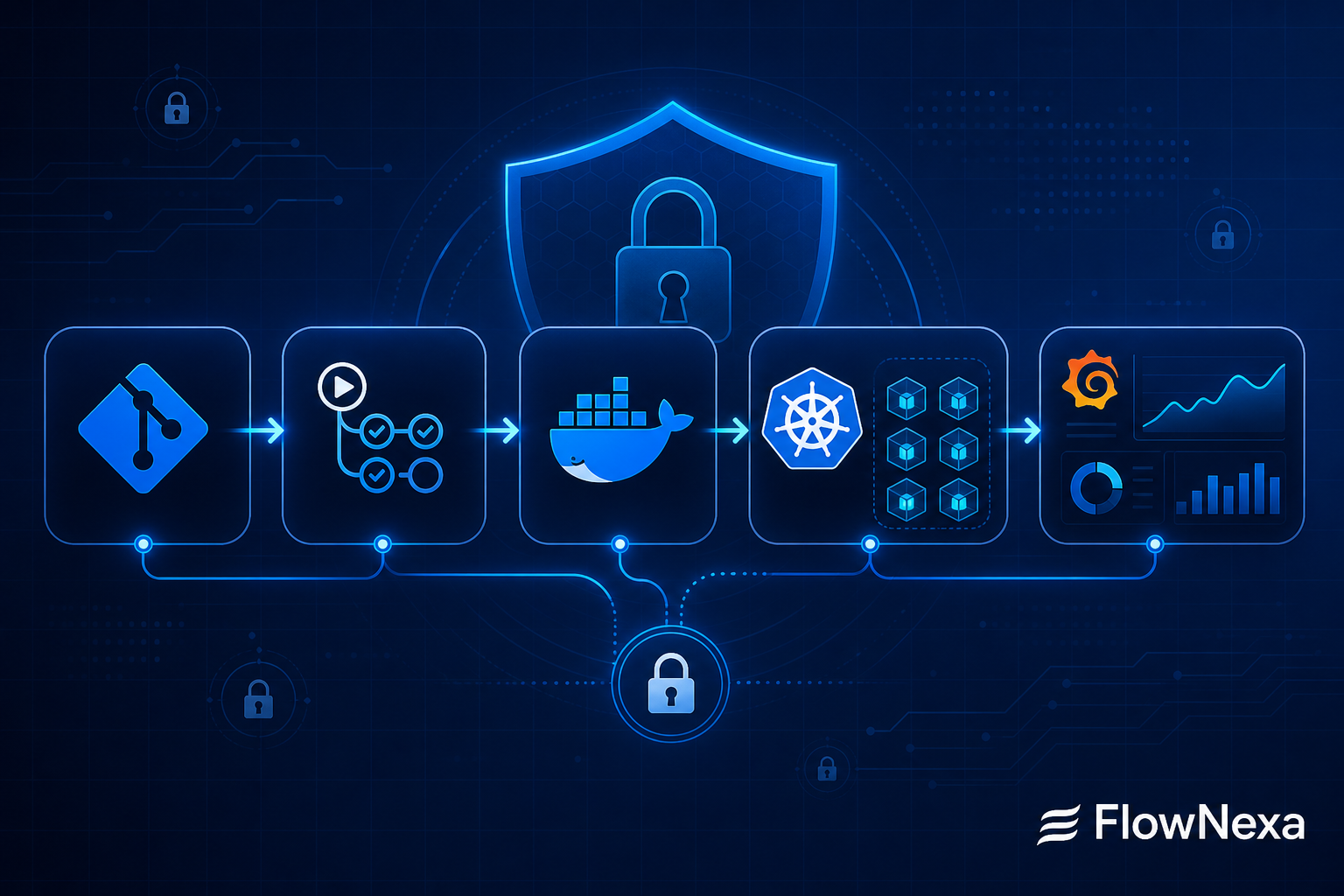
Developer ↓ Pull Request / Merge to main ↓ GitHub Actions CI ↓ Verify web + Verify CMS ↓ SonarQube quality gate + security scan ↓ Build Docker images ↓ Trivy image vulnerability scan ↓ Push image with immutable tag ↓ Update Kubernetes manifests ↓ GitOps deployment branch ↓ Staging / Production Kubernetes ↓ Prometheus + Grafana monitoring ↓ Backup / Restore drill / Alerting

CI pipeline

CI on main: verify before building images

Images are built and published only after both web and CMS verify jobs pass.

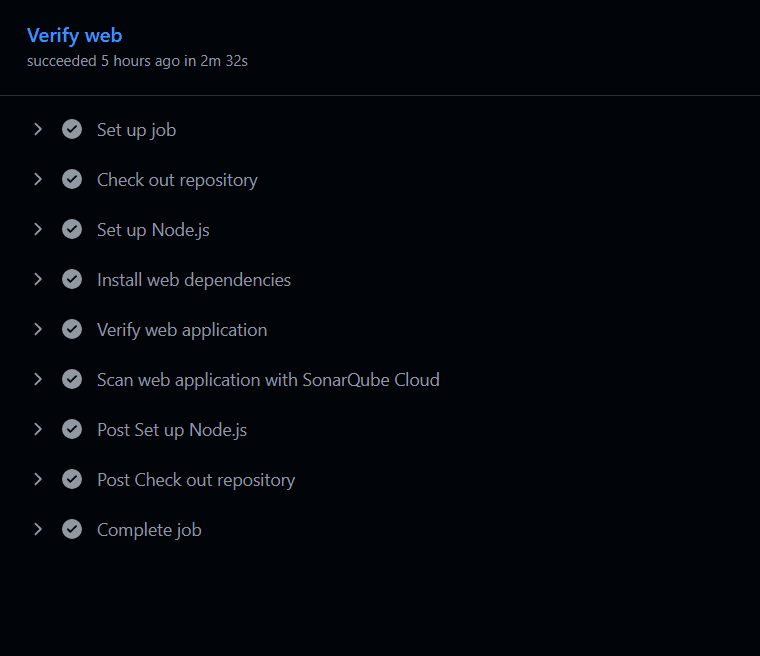
Verify web

Next.js application verification pipeline

Checkout repository

Pull source code from the main branch.

Setup Node.js

Standardize the runtime for verification.

Install dependencies

Install dependencies before running checks.

Verify web application

Run lint, typecheck, test, and build for the web app.

SonarQube Cloud scan

Run the quality gate and security scan before image build.

Chi tiết job Verify web trong GitHub Actions
Job Verify web chạy kiểm tra ứng dụng Next.js và scan với SonarQube Cloud

The CMS pipeline runs a separate verify job for Strapi. The key point is that images are built and published only after both web and CMS verification succeed. This reduces the chance of pushing a broken image to the registry and makes the pipeline the first control layer before release.

DevSecOps gate

Security and quality belong in the pipeline

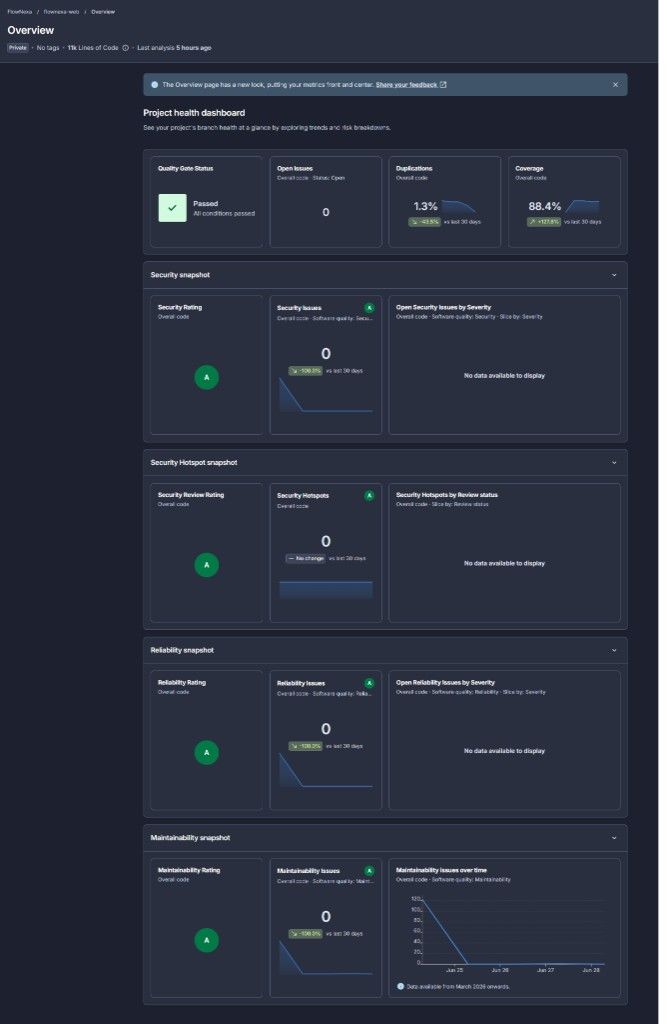
SonarQube Cloud checks the quality gate, coverage, security, reliability, maintainability, duplications, and security hotspots.

SonarQube project health dashboard của FlowNexa web
SonarQube Quality Gate kiểm tra chất lượng code, coverage và security issues

Operating principle

If the quality gate or security scan fails, the pipeline must stop. After source verification, Docker images are scanned with Trivy. HIGH or CRITICAL vulnerabilities must be addressed before the image is used in production.

Immutable tags

Build images with immutable tags

FlowNexa uses image tags based on the commit short SHA, for example flownexa-web:<short-sha> and flownexa-cms:<short-sha>.

Benefits

Why production should not rely on the latest tag

Exact traceability

Know exactly which version is running in staging or production.

Commit linkage

Trace a production image back to its source commit quickly.

Fast rollback

Return to a previous image tag when production incidents happen.

Less confusion

Avoid ambiguity when a moving latest tag is overwritten.

Release transparency

Make deployment history clearer for the whole team.

GitOps

GitOps deployment branch: separate source code from deployment state

The main branch owns source code and CI; the deployment branch owns Kubernetes manifests and the image tag in use.

main branch ↓ CI verify + security scan ↓ Build and push image ↓ Update deployment branch ↓ GitOps controller sync ↓ Kubernetes rollout GitOps is not only about Argo CD or Flux. Its biggest value is that every production change has history, review, versioning, and a clear rollback path.

Staging

Staging is production rehearsal

Staging is not just for previewing UI. It is where the full release flow is validated before go-live.

Staging checklist

Important staging steps

Deploy the new image

Roll out an image that already passed verify and scan steps.

Verify web and CMS

Check rendering, APIs, and content behavior.

Validate CMS media

Upload and delete media in the CMS, then confirm website rendering.

Backup and restore drill

Run drills for database and uploads before production.

Capture UI/UX

Capture multiple viewports, themes, and languages to catch layout issues.

Check runtime errors

Look for console errors, network failures, missing assets, and layout overflow.

Kubernetes

Production readiness on Kubernetes

A production-ready system needs more than a successful deployment.

Operations

Important operational factors at FlowNexa

Web HPA

The web app runs multiple replicas and scales with HPA.

Single CMS replica

CMS stays at one replica while media uploads use an RWO persistent volume.

PostgreSQL PVC

Database metadata has its own persistent volume.

Uploads PVC

CMS uploads use a separate persistent volume from the database.

Dual backup

Back up both database and uploads with a dedicated backup volume.

Verify and monitoring

Run production verify scripts after deploy, plus monitoring and alerting.

Operable architecture

Scaling to many replicas is not always correct if the storage backend is not ready. While media uploads remain on a local PVC, scaling CMS replicas can create file consistency risk.

Monitoring

Post-deploy monitoring: the part CI/CD often forgets

After deployment, the more important question is: is the system actually healthy?

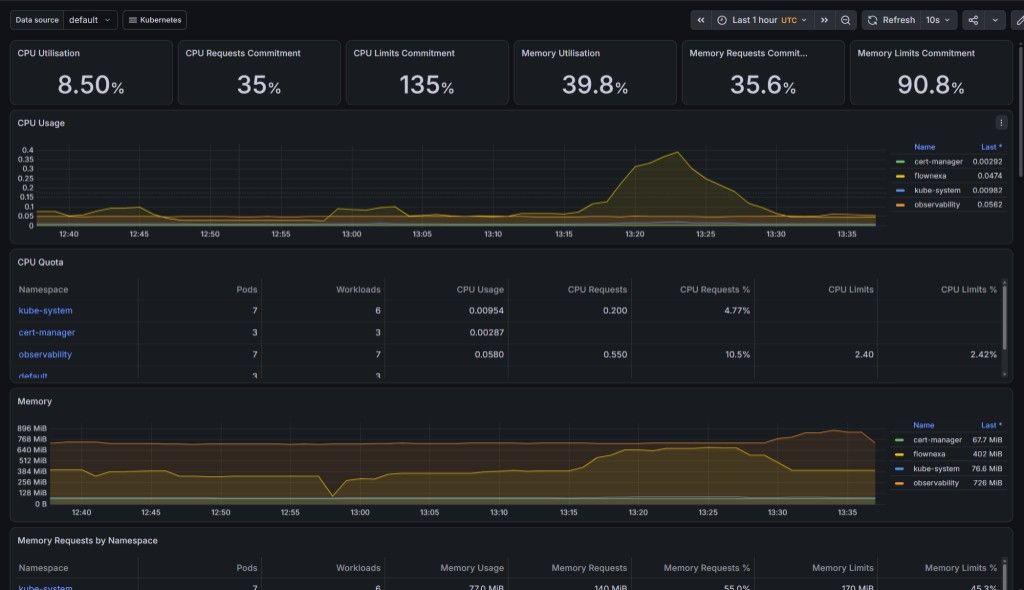
Grafana Kubernetes cluster monitoring dashboard
Grafana dashboard theo dõi CPU, memory và tài nguyên Kubernetes cluster

Runtime metrics

Metric groups worth tracking

CPU and memory

Utilization, requests, and limits by namespace.

Workloads and pods

Running pods and workloads with abnormal resource usage.

Post-deploy trends

Detect CPU or memory spikes after a new release.

Resource configuration

Evaluate whether requests and limits are configured sensibly.

Storage monitoring

Monitoring storage: database, uploads, and backups

For CMS-backed websites, CPU and RAM monitoring alone is not enough.

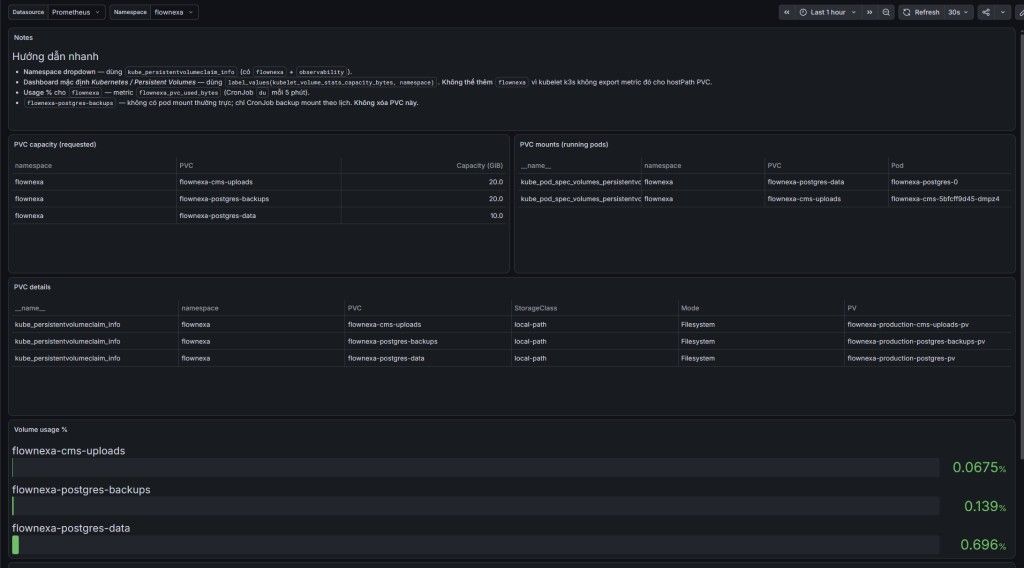
Grafana PVC storage monitoring dashboard cho FlowNexa
Dashboard theo dõi PVC cho CMS uploads, PostgreSQL data và backup volume

PVC dashboard

What the PVC dashboard tells operators

Mount mapping

Which PVC is mounted by which pod.

Requested capacity

Requested storage for each PVC.

StorageClass

StorageClass and access mode in use.

Usage percentage

Volume usage percentage to catch disk pressure early.

Backup volume

Whether the backup volume exists and is used as intended.

Backup principle

A backup that has never been restored is not yet a trustworthy backup. Restore drills surface incomplete backup files, permission issues, bad volume mounts, broken restore scripts, or missing media uploads early.

From FlowNexa delivery

Practical lessons

DevSecOps is a lifecycle

It is not just adding a scanner. Security, quality, and automation belong across the SDLC.

GitOps manages state

Every production change has history, review, and a rollback path.

Monitoring answers operations

Is the system healthy, is storage filling up, and are backups running?

Production readiness is continuous

Test, deploy, observe, back up, restore, and improve in a loop.

Conclusion

Business websites need production readiness, not just deployability

CI verify, SonarQube, Trivy scanning, immutable tags, a GitOps branch, Kubernetes staging/production, Grafana monitoring, PVC tracking, backup, and restore drills.

FlowNexa helps businesses design and deliver web, CMS, and SaaS platforms with a cloud-native, automation-first, and secure-by-default approach. We can help with CI/CD pipeline design, application containerization, Kubernetes deployment, GitOps workflows, security scanning in CI, monitoring/logging/alerting, backup/restore strategy, and standardized release/rollback processes.

If your team wants to move from manual deployment to a more production-ready release process, DevSecOps and GitOps are a strong investment.

Read next

Related insights

Customer Experience

A Customer Starts on Facebook and Continues on Zalo: How Do You Preserve Context?

Design omnichannel customer context across Facebook, Zalo, and CRM without incorrect identity merges, data exposure, or forcing customers to repeat themselves.

Workflow Automation

Automation Says Success but the Business Process Failed: Verify the Outcome

Separate technical success from business success and design workflows with outcome assertions, reconciliation, audit trails, and recovery.

Business Automation

Quotation Sent, Customer Silent: Automate Follow-Up Without Becoming Annoying

Design a quotation follow-up process with ownership, SLAs, behavioral signals, and stop conditions so Sales protects opportunities without pressuring customers.

FlowNexa

FlowNexa helps small and mid-sized businesses bring AI into customer service, workflow automation, and efficient data operations. Cloud-native and DevSecOps provide the foundation that keeps these solutions secure, reliable, and easy to scale.

FLOWNEXA COMPANY LIMITED

Tax ID: 0319612776

Address: 228/6 Au Duong Lan, Chanh Hung Ward, Ho Chi Minh City, Vietnam

Website: flownexa.ai

Services

AI chatbots & supportAI assistantsAutomationCloud & infrastructure

Company

AboutBlogPrivacyTerms

Contact

hello@flownexa.ai
0948 279 029
Chat on Zalo
Chat on Messenger
Replies within one business day

© 2026 FlowNexa. All rights reserved.

Microsoft, Azure, Microsoft 365, AWS, Kubernetes, and Cloudflare are trademarks of their respective owners. FlowNexa is not claiming partnership unless expressly stated.

B2B service website — no online ordering or online payment.

Practical AI · Automation · Secure CloudPrivacyTermsCookiesLegal
Share:
FacebookZaloLinkedIn
Share:
FacebookZaloLinkedIn