



Quotation Sent, Customer Silent: Automate Follow-Up Without Becoming Annoying
Design a quotation follow-up process with ownership, SLAs, behavioral signals, and stop conditions so Sales protects opportunities without pressuring customers.


When a quotation has been sent and the customer goes quiet, a business should not choose between abandoning the opportunity and repeatedly chasing the customer. The better approach is a follow-up process driven by quotation status, customer interest, opportunity value, and the expected decision window. The system creates tasks, reminds the right owner, and recommends the next step; Sales retains judgment for important conversations.
A reliable workflow answers five questions: which quotation is waiting, who owns it, when contact is appropriate, which channel should be used, and what condition stops the process. The goal is not to send more messages. It is to ensure every opportunity is handled consistently, with context and an auditable history.
Problem
Why do quotations disappear into a gap after sending?
A delivered email does not mean the opportunity is being managed.
A common scenario is that a salesperson prepares a quotation, sends it, and moves to the next task. The CRM records a “sent” activity but no next deadline. When the customer does not reply, nobody knows whether they are evaluating, missed the email, need clarification, or chose another supplier.
The root cause is usually procedural: ownership is unclear; every opportunity uses the same waiting period; quotation data is disconnected from the CRM; and there is no explicit ending state such as won, lost, postponed, or no response. Automation that merely schedules more emails amplifies this lack of control.
CRM platforms can create tasks, deadlines, and reminders after sales activities. The tooling becomes useful only after responsibilities and stopping rules are defined. HubSpot documents one implementation of tasks and follow-up reminders.
Signals
Your follow-up process has a control gap
Inspect operational data instead of asking whether Sales remembers each customer.
No next action
The quotation is sent but has no scheduled next contact.
Multiple people contact the customer
Unclear ownership creates duplicate or conflicting messages.
One schedule for every deal
Large, small, warm, and cold opportunities receive the same sequence.
No stopping rule
The workflow continues after a decline or a request to reconnect later.
Design
How should a quotation follow-up flow work?
Use automation to enforce process discipline, not to replace sales judgment.
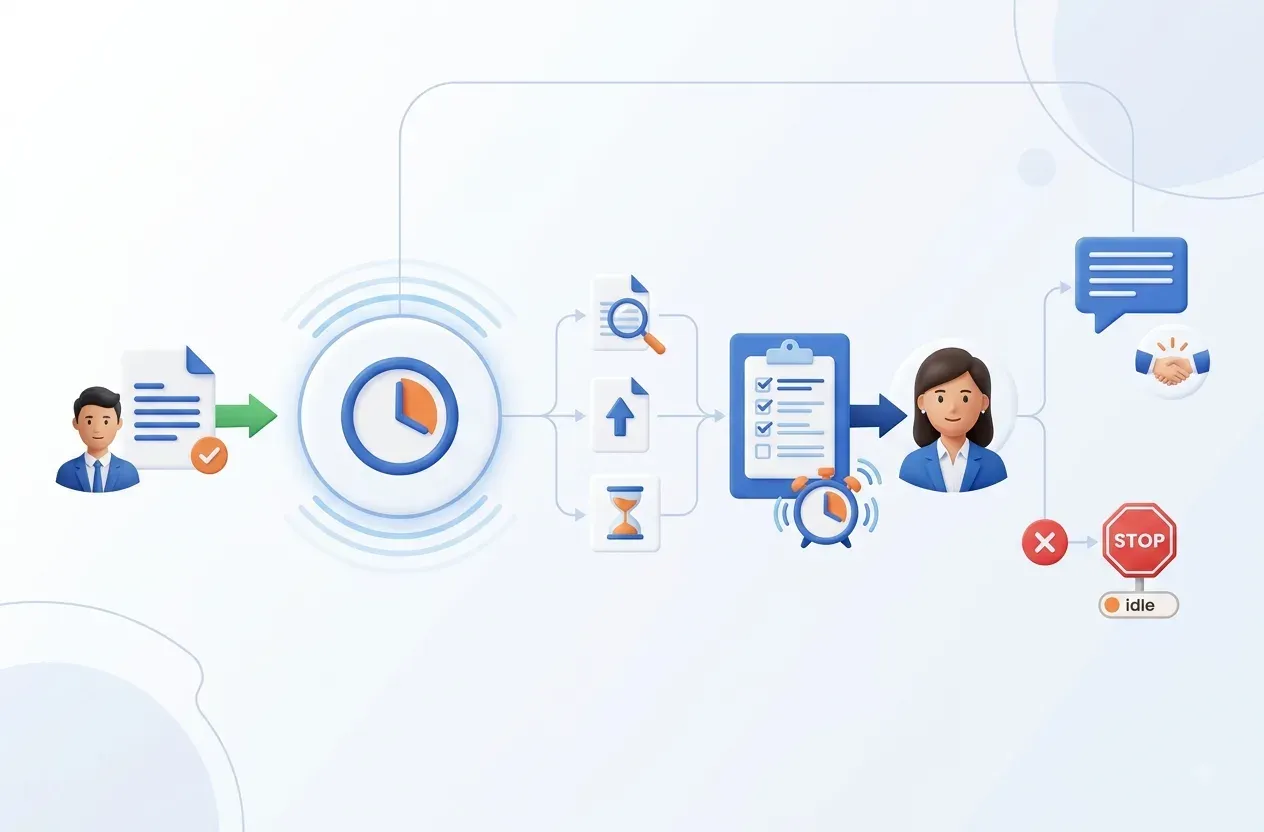
The proposed flow starts only after a quotation is created successfully and linked to the correct customer, deal, and owner. The system stores quotation_id, version, value, sent time, channel, and next_action_at. After the appropriate waiting window, it checks replies, deal-state changes, and only those behavioral signals the business is entitled to use.
If the customer has replied, the workflow stops automation and returns the conversation to the owner. If not, it creates a contextual task rather than a generic notification. Low-value, standardized opportunities may receive a pre-approved message; strategic deals should require a salesperson to review and send it. After the maximum number of attempts, the deal moves to nurture or no response instead of continuing indefinitely.
Each action needs an idempotency key based on quotation, version, and follow-up step. When a quotation changes, the old sequence must be cancelled. Modern CRM workflows provide triggers, delays, tasks, and removal conditions; HubSpot describes these building blocks.

Controls
Follow up at the right time while respecting the customer
Frequency is only one control; context, consent, and suppression matter more.
Do not treat an “email opened” signal as definitive buying intent. Some mail systems block or preload content, so this signal may help prioritize work but should not trigger aggressive messaging by itself. A follow-up should reference the correct quotation, offer a clear next choice, and let the customer stop or reschedule contact.
Maintain suppression rules for customers who declined, complained, opted out, or are already in an active human conversation. Apply contact-frequency limits across all campaigns, not just one workflow. Owner changes, status transitions, and contact attempts should be recorded in an audit trail.
Before production, run shadow mode for one or two sales cycles. Let the system recommend tasks without sending. Compare recommendations with actual sales actions, tune SLAs by product type, and enable automated sending only for low-risk segments.
Measurement
Measure outcomes, not the number of emails sent
Track cohorts by quotation type and opportunity value.
Coverage
Percentage of quotations with a valid owner and next action.
Time to follow-up
Delay between the required action time and the actual action.
Response rate
Customer replies after each step, separated by automated and human contact.
Stop accuracy
Sequences correctly stopped after a reply, decline, or reschedule request.
FAQ
Frequently asked questions about quotation follow-up
Start with a controlled process and add automation gradually.
How long should we wait before following up?
There is no universal interval. Set the SLA according to quotation complexity, opportunity value, commitments already made, and the customer’s expected decision date.
Should every email be sent automatically?
Only standardized, low-risk messages should be fully automated. Strategic deals, special terms, or active complaints need review or direct contact from the owner.
What if the customer never replies?
Move the opportunity to nurture or no response after the defined attempt limit. Do not allow an endless sequence.
Can we pilot this with Excel instead of a CRM?
Yes, if the data has stable IDs, owners, states, and change history. Control concurrent edits and never use the spreadsheet row number as the business identifier.
FlowNexa
Turn follow-up into an accountable process
FlowNexa can help review the quotation journey, define practical SLAs, and implement a workflow aligned with your CRM, email systems, and existing sales practices.
Start with one pipeline
Choose one product group or sales team and establish a measurable baseline.
Keep control
Automate task reminders first and enable sending only when data and policy are ready.


