



Automation Says Success but the Business Process Failed: Verify the Outcome
Separate technical success from business success and design workflows with outcome assertions, reconciliation, audit trails, and recovery.


A workflow is successful only when the intended business outcome has occurred and evidence confirms it. An HTTP 200 response, a green execution, or a row written to an intermediate table proves that a technical step completed. It does not prove that the customer received the email, the correct order was created, the invoice was approved, or the CRM reflects the final state.
To prevent false success, define the business outcome before building the workflow, add an outcome assertion at the end, reconcile the source with the destination, and route exceptions into retry, repair, or human review. This is the difference between automation that runs and a process that remains dependable in production.
The gap
How is technical success different from business success?
API success is not always customer success.
Consider a workflow that receives an order, calls an invoice API, and sends an email. The invoice API returns 200 but creates a draft; the email service accepts the request but the address later bounces; the last node still completes. The dashboard is green while the customer has no valid invoice.
This happens when the success criterion is placed at a system boundary rather than the final outcome. Other causes include eventual consistency, asynchronous processing, late webhooks, semantically wrong mappings that still pass schema validation, and APIs that return “accepted” rather than “completed.” Ordinary retries do not detect these cases because no exception is raised.
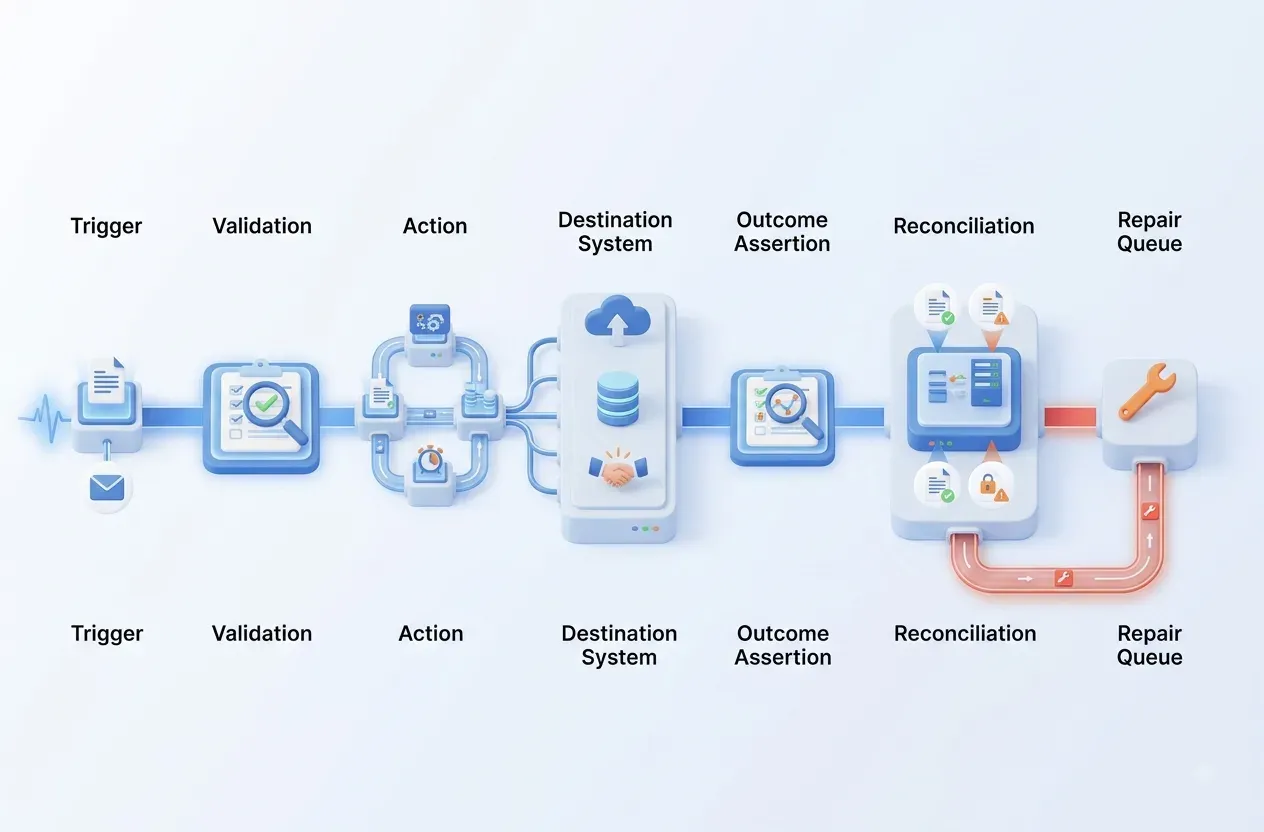
n8n documents exception handling and error workflows, but the business must also define business failure: a technically valid execution whose result fails acceptance criteria. See n8n guidance on graceful error handling.
False success
Four common failure patterns
Every node is green, but the outcome is wrong or incomplete.
Accepted, not completed
The API queued the request for later asynchronous processing.
Valid schema, wrong mapping
The payload passes validation but is attached to the wrong customer or order.
Partial success
The CRM updates while email, inventory, or accounting remains incomplete.
No final confirmation
The workflow never reads the destination state to prove completion.
Design
Add an outcome assertion to the end of the workflow
Every process needs a machine-verifiable definition of done.
Start with an outcome contract. For example, an order is complete only when it has a unique order_id, the total matches the source, status is confirmed, inventory is reserved, and notification delivery has reached an acceptable state. The contract identifies the source of truth for every condition.
After taking action, the workflow does not finish immediately. It waits for a callback or reads the destination state and executes the assertion. If processing remains within its allowed window, status is pending. Temporary failure enters retry with backoff. A mismatch creates a repair task containing the correlation ID and evidence from both systems. If the next action is irreversible, stop and require approval.
Use one correlation ID across the trigger, sub-workflows, APIs, and queues. OpenTelemetry describes context propagation as the mechanism that correlates traces, metrics, and logs across services; the same principle supports end-to-end transaction investigation. See OpenTelemetry context propagation.

Operations
Reconciliation is the safety net for automation
Not every mismatch appears immediately in an execution log.
Run an independent reconciliation job that compares source and destination within a bounded time window. Every captured payment should have an invoice; every qualified lead should have an owner; every confirmed booking should have a reservation ID in the PMS. The job should not silently repair everything on day one. Classify mismatches, collect evidence, and auto-repair only cases governed by deterministic, idempotent, and verifiable rules.
Separate execution_success_rate from business_completion_rate on dashboards. Add pending age, mismatch count, repair backlog, and time to reconcile. Alert by business impact: an email may be retried, while an incorrect total or wrong-customer update should fail closed.
Collect only the observability data you need and redact sensitive fields. OpenTelemetry provides a vendor-neutral framework for traces, metrics, and logs, while business outcomes still require carefully governed custom attributes. See the OpenTelemetry documentation.
Acceptance
Checklist before calling a workflow production-ready
Every “no” reveals an operational control gap.
Outcome contract
Completion criteria and sources of truth are explicit.
Read after write
A callback or destination-state check confirms the result.
Recovery path
Retry, repair, rollback, and manual review are distinct.
Reconciliation
An independent job detects missing or inconsistent transactions.
FAQ
Frequently asked questions about false success
Do not use a green execution as the final KPI.
Does HTTP 200 mean success?
Only for that request. Read the API semantics to determine whether the operation is completed or merely accepted.
Must every write be read back?
Not always. Apply stronger verification to financial transactions and bookings; lower-risk internal notifications may rely on retries.
Will reconciliation create excessive load?
Control it with watermarks, pagination, bounded windows, and comparisons of only essential fields. Avoid a full scan on every run.
When is automatic repair safe?
When the cause is deterministic, the operation is idempotent, no data is destroyed, and a post-repair assertion confirms the result.
FlowNexa
Measure automation by the business result
FlowNexa can help add outcome contracts, correlation IDs, reconciliation, and dashboards so workflow status reflects operational reality.
Choose one critical flow
Start with orders, leads, reports, or tickets where failure cost is visible.
Establish a baseline
Measure false success and repair backlog before scaling automation.


