Skip to content
FlowNexa
  • AI Services
  • Solutions
  • About
  • Blog
VIEN
Book a consultation
Back to Blog
Cloud & DevSecOps11 min readFlowNexa Editorial Team

When Should Businesses Move from On-Premises Infrastructure to Cloud?

Learn the signals that an on-premises environment no longer fits and how to decide whether to move to Cloud, retain workloads, or adopt Hybrid.

Updated: Aug 7, 2026
When Should Businesses Move from On-Premises Infrastructure to Cloud?

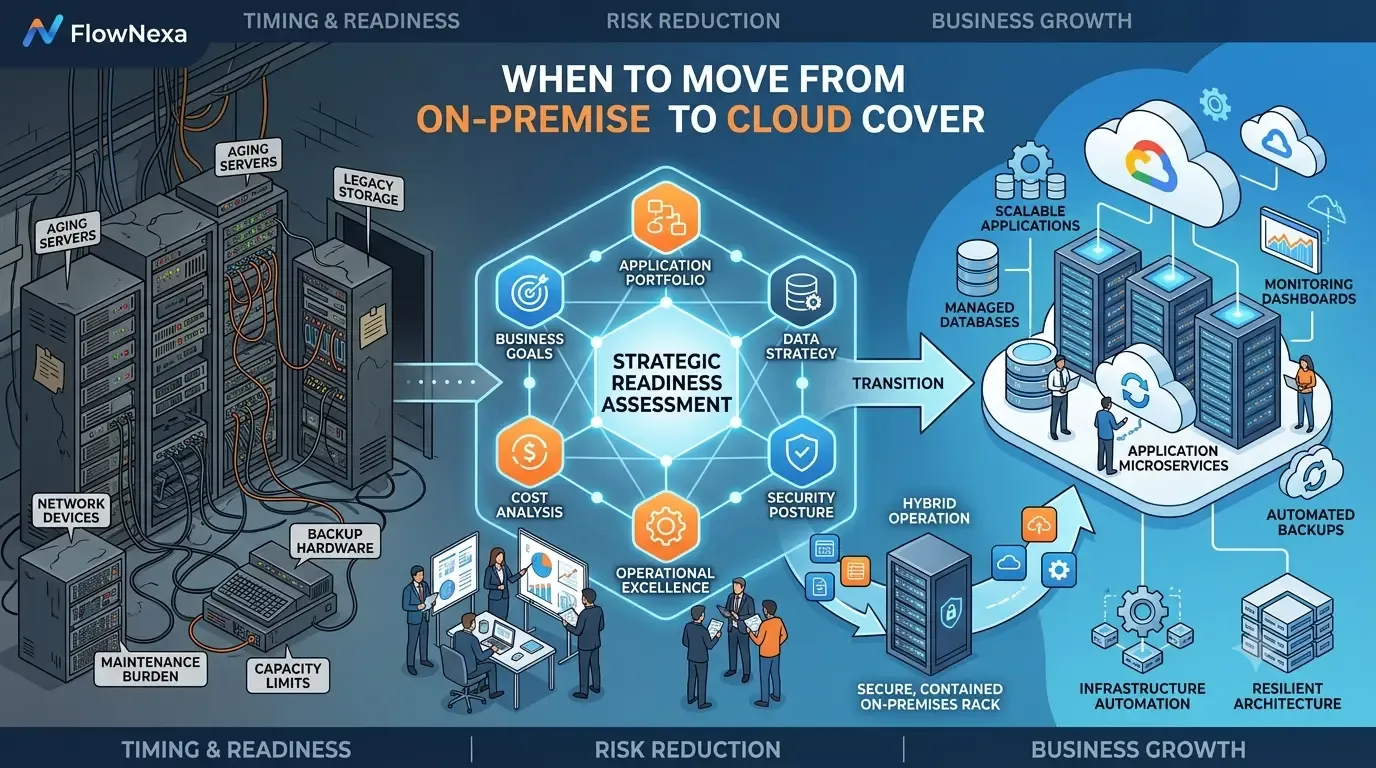
Not every business needs to move every system to Cloud immediately. However, when on-premises infrastructure begins to limit growth, increase operational risk, or create unpredictable cost, the current model should be reassessed.

The right decision is not whether Cloud is always better than on premises. The useful questions are which workloads should move, when they should move, what should remain, and whether the business is ready in terms of data, security, process, and people.

Core principle

A business should move to Cloud when the benefits in scalability, availability, security, delivery speed, and operations clearly outweigh the cost, risk, and complexity of migration.

Context

Why can an on-premises environment still work but no longer fit?

A system does not need to fail before it becomes a constraint on growth and resilience.
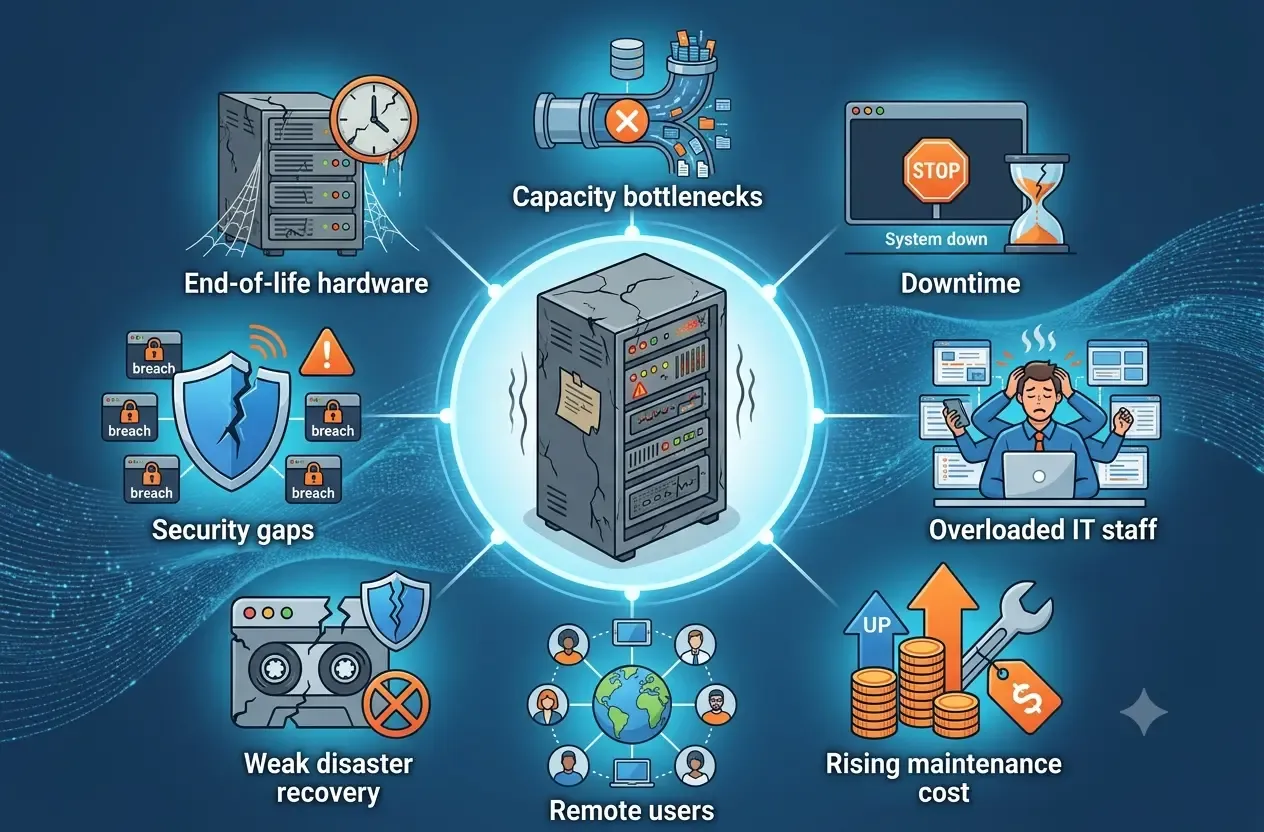
On-premises infrastructure is usually designed for the needs of a specific point in time. Over the years, businesses add applications, databases, storage, VPNs, backup, firewalls, and integrations. Without periodic review, the environment becomes dependent on aging hardware, a few key people, and manual operations.

Signals

Signs that a Cloud assessment should begin

Several signals appearing together usually indicate that the current environment no longer supports the business effectively.

Hardware is approaching end of life

Servers, storage, or network equipment require significant replacement investment.

Scaling is slow

Additional capacity requires purchasing hardware and manual deployment.

Downtime affects the business

The environment lacks HA, DR, or still contains single points of failure.

The IT team is overloaded

Most time is spent on patching, backup, troubleshooting, and routine operations.

Cost is difficult to predict

Maintenance, licensing, power, cooling, and replacement costs keep growing.

Remote work is increasing

Traditional VPN and internal access models are no longer flexible or secure.

Growth

When demand grows faster than hardware procurement

Cloud is useful when demand changes or new services must be launched quickly.

With on-premises infrastructure, businesses often buy excess capacity to prepare for growth. If forecasts are wrong, resources are wasted; if they are too low, capacity is unavailable when needed. Cloud enables faster provisioning and scaling.

Use cases

Growth scenarios suited to Cloud

Rapid provisioning creates a clear advantage.

Launching a new product

Standardize development, staging, and production faster.

Seasonal demand

Sales, booking, or campaign workloads can scale with demand.

Opening new branches

Users can access centralized services without local servers.

Expanding markets

Choose regions and services closer to users.

Reliability

When backups exist but recovery has not been proven

A backup is not the same as a working disaster-recovery plan.

Many organizations have backups but have never tested restoration, do not keep off-site copies, or still depend on the same server room. During ransomware, storage failure, fire, or human error, those backups may not restore operations within an acceptable time.

Reliability

Cloud can improve resilience when designed correctly

The benefit appears only when architecture, backup, and DR are implemented properly.

Multi-zone architecture

Reduce the impact of node or zone failure.

Separated backups

Store copies in another account, region, or storage tier.

Restore automation

Reduce dependence on manual recovery steps.

Monitoring and alerting

Detect failures and unusual behavior earlier.

DR drills

Validate real RTO and RPO.

Security

When security still depends on the internal network

Cloud is not automatically safer, but it provides stronger control and visibility when configured correctly.

Traditional models assume that users and systems inside the office network are trusted. Remote work, SaaS, and partner integrations weaken that boundary. Businesses increasingly need MFA, least privilege, centralized logging, encryption, and continuous monitoring.

Security signals

A Cloud assessment is appropriate when

These signs indicate that the current model needs modernization.

Shared administrative accounts

Auditability is weak and exposure has greater impact.

No centralized logging

Incident investigation is difficult.

Irregular patching

Legacy servers or applications delay updates.

Overly broad permissions

RBAC, MFA, and access reviews are missing.

Data requires stronger protection

Compliance and customer expectations are increasing.

Cost

When on-premises cost is greater than the server purchase

TCO should include people, operations, risk, and opportunity cost.

On-premises infrastructure includes hidden costs such as power, cooling, UPS, spare hardware, maintenance, licensing, backup, replacement, and incident response. Cloud also includes egress, managed services, support, and logging. Compare total cost of ownership rather than one server with one virtual machine.

Decision framework

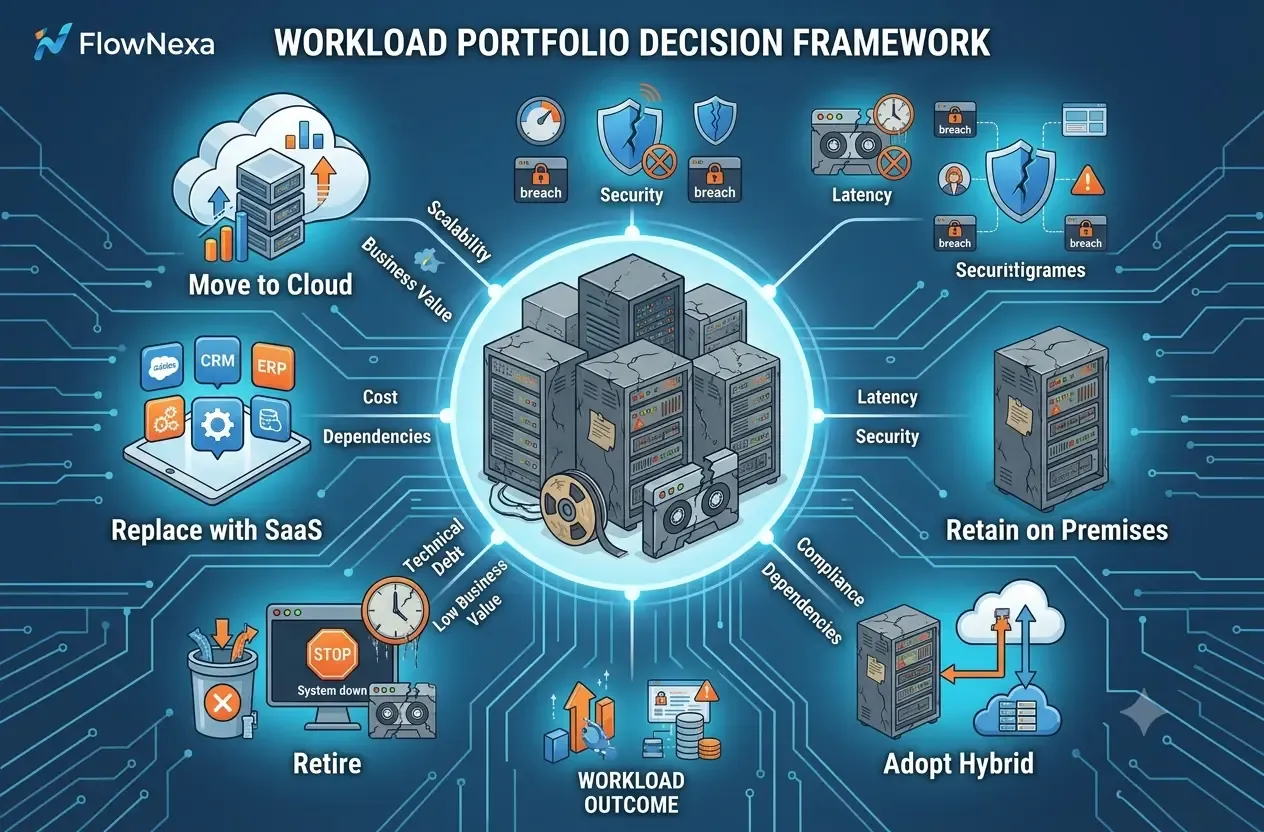
Not every workload should move

Each workload should be evaluated by value, risk, and fit.

Move to Cloud

Suitable for workloads needing scale, HA, managed services, or rapid delivery.

Retain on premises

Suitable for specialized latency, hardware, or unresolved constraints.

Hybrid

Suitable when migration must be phased while dependencies remain.

Replace with SaaS

Suitable when a legacy application can be replaced.

Retire

Remove workloads that no longer provide value.

When not to move yet

Cases that require more preparation

Migrating too early without assessment can create new risk and cost.

Blockers

The business is not ready when

These blockers should be resolved before pilot or cutover.

No inventory exists

Servers, applications, databases, integrations, and owners are not fully known.

Dependencies are unclear

API, SMTP, queue, cron, DNS, and firewall flows are not mapped.

No business owner exists

No one approves downtime and validation.

Data is not classified

Sensitivity, retention, and location requirements are unknown.

No rollback plan exists

Triggers, timing, and return procedures are undefined.

Operating cost is not estimated

Compute, storage, egress, logging, support, and licensing are missing.

Readiness

A checklist before deciding to migrate

A good assessment shows what should move, what should remain, and where to begin.

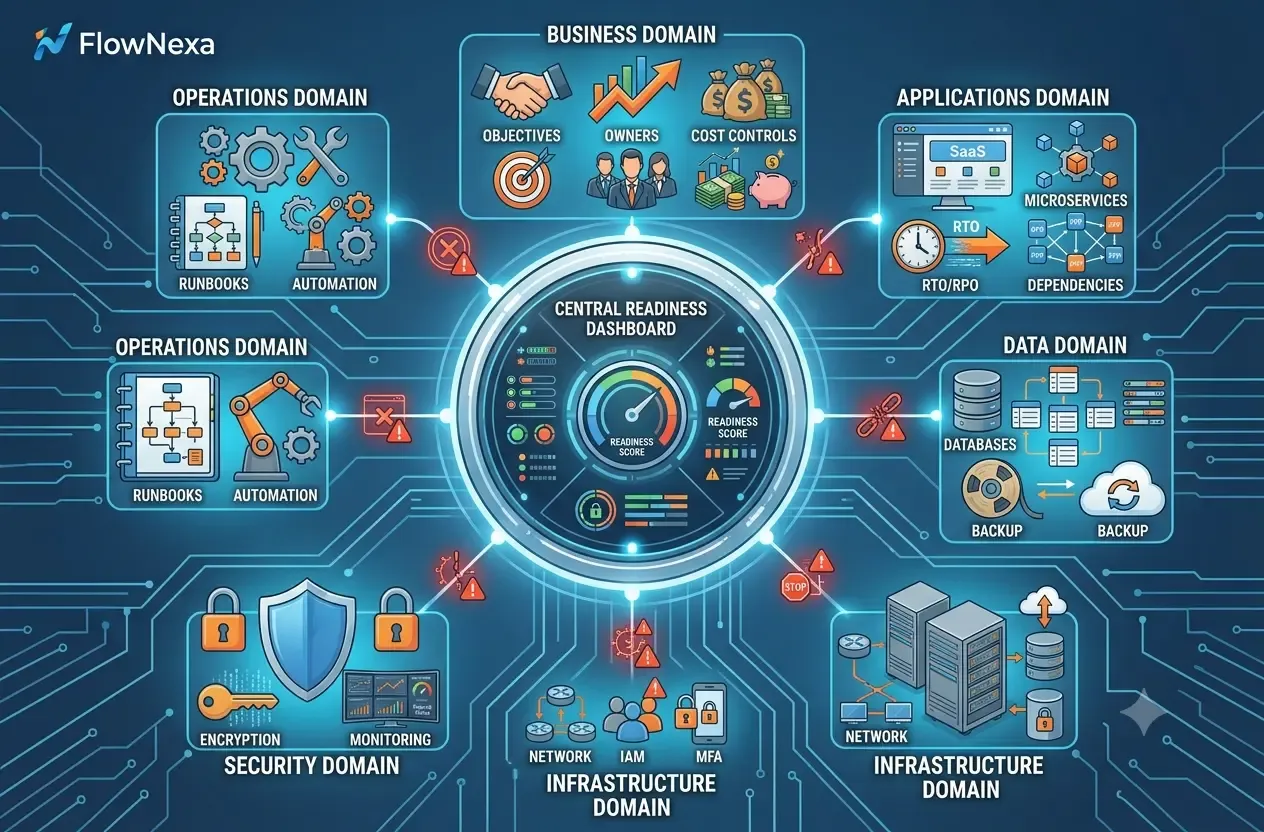
Readiness

Six areas to assess

Each area should have evidence, ownership, and a clear risk level.

Business

Goals, budget, timeline, owner, RTO, and RPO.

Application

Compatibility, runtime, dependencies, and 6R strategy.

Data

Volume, change rate, security, retention, and migration window.

Infrastructure

Network, DNS, identity, compute, storage, and integrations.

Security

IAM, MFA, encryption, logging, vulnerability, and compliance.

Operations

Monitoring, backup, runbooks, support, incidents, and cost control.

Roadmap

Begin with a pilot instead of a big-bang migration

A pilot validates architecture, performance, security, cost, and operations.

The pilot workload should be representative but have a limited blast radius. After the pilot, validate functionality, performance, security, backup, restore, monitoring, and actual cost before moving more critical workloads.

Pilot checklist

Go/no-go criteria

Cutover should not proceed without evidence for critical criteria.

Data is reconciled

Record counts, checksums, or business totals match.

Performance meets requirements

Latency, throughput, and utilization remain within target.

Backup and restore are tested

Success is not based only on a completed backup job.

Monitoring and alerts work

The operations team can detect and escalate issues.

Rollback is feasible

Triggers, owners, and return timing are defined.

Cost remains within range

Pilot cost does not deviate unexpectedly.

FlowNexa

How FlowNexa supports assessment and migration

The goal is the right roadmap rather than forcing every workload into Cloud.

Services

Three engagement stages

A business can begin with an assessment or choose an end-to-end migration.

Cloud Readiness Assessment

Inventory, dependency map, risk register, cost estimate, and migration roadmap.

Cloud Migration Project

Landing zone, Infrastructure as Code, pilot, migration, cutover, and validation.

Managed Cloud Operations

Monitoring, backup, security, cost optimization, and incident support.

FlowNexa's view

The right time to move to Cloud is when the business understands its goals, workloads, risks, and post-go-live operating model—not simply because Cloud is the current trend.

FAQ

Frequently asked questions

These answers help businesses identify the first step.

FAQ

Quick answers

The final decision depends on workloads, data, and operating capability.

Should every system move to Cloud?

Not necessarily. Many businesses are better suited to phased or Hybrid models.

When is aging hardware a migration signal?

When replacement is expensive, scaling is difficult, or downtime risk is increasing.

Is Cloud always cheaper?

No. TCO and cost controls must be evaluated.

Can a business start with a small workload?

Yes. A pilot is the safest way to validate architecture and operations.

Do small businesses need Cloud?

They may benefit from resilience, scalability, and reduced operational burden.

Does FlowNexa assess readiness first?

A Cloud readiness assessment can be completed before deciding to migrate.

FlowNexa Cloud Services

Assess the right timing and roadmap

FlowNexa can review infrastructure, applications, data, security, cost, and operational capability before proposing a roadmap.

Book a Cloud consultation

Discuss objectives, current infrastructure, risk, and budget.

Request a Cloud Readiness Assessment

Receive an inventory, risk register, cost estimate, and migration-strategy recommendation.

Read next

Related insights

Business Productivity

The Meeting Has Minutes but Work Is Still Late: How Far Should Action-Item Automation Go?

Turn meeting content into owned, dated, sourced, confirmed tasks without letting AI assign responsibility incorrectly.

AI Agent

After-Hours AI Voice Agent: How Much Should You Automate?

Define scope, voice architecture, tool permissions, human handoff, privacy, and QA for an after-hours AI Voice Agent.

Operations Automation

Multichannel Orders and Inventory: How Do You Prevent Overselling?

Design a central inventory authority, reservation ledger, idempotency, event synchronization, and reconciliation to prevent overselling.

FlowNexa

FlowNexa helps small and mid-sized businesses bring AI into customer service, workflow automation, and efficient data operations. Cloud-native and DevSecOps provide the foundation that keeps these solutions secure, reliable, and easy to scale.

FLOWNEXA COMPANY LIMITED

Tax ID: 0319612776

Address: 228/6 Au Duong Lan, Chanh Hung Ward, Ho Chi Minh City, Vietnam

Website: flownexa.ai

Services

AI chatbots & supportAI assistantsAutomationCloud & infrastructure

Company

AboutBlogPrivacyTerms

Contact

hello@flownexa.ai
0948 279 029
Chat on Zalo
Chat on Messenger
Replies within one business day

© 2026 FlowNexa. All rights reserved.

Microsoft, Azure, Microsoft 365, AWS, Kubernetes, and Cloudflare are trademarks of their respective owners. FlowNexa is not claiming partnership unless expressly stated.

B2B service website — no online ordering or online payment.

Practical AI · Automation · Secure CloudPrivacyTermsCookiesLegal
Share:
FacebookZaloLinkedIn
Share:
FacebookZaloLinkedIn