Zero Trust with Cloudflare: Protecting Business Domains, Email, and Infrastructure
A practical guide to building a Cloudflare Zero Trust foundation across DNS, domain security, SPF, DKIM, DMARC, WAF, Cloudflare Tunnel, Access, WARP, and Gateway.


In many small and medium-sized businesses, domains, email, websites, APIs, servers, and administrative tools are spread across different platforms. DNS may be managed by a registrar, email may run on Microsoft 365 or Google Workspace, applications may be hosted on a VPS or Kubernetes, and employees may access internal systems through a traditional VPN. Each component has its own controls, but there is often no unified policy for verifying users, devices, and individual access requests.
Zero Trust addresses this gap through a simple principle: no connection is trusted merely because it originates from an internal network. Every request should be evaluated using identity, device posture, context, and least-privilege authorization. Cloudflare allows organizations to begin with DNS, SSL/TLS, and WAF, then progressively adopt Cloudflare Tunnel, Access, WARP, and Gateway without redesigning the entire infrastructure at once.
Important distinction
Cloudflare does not replace an email provider such as Microsoft 365 or Google Workspace. It manages DNS and adds security controls, while the mail provider continues to send and receive email.
Guide
What are the main Cloudflare Zero Trust layers?
Implementation controls and decisions should be evaluated against real business risk.
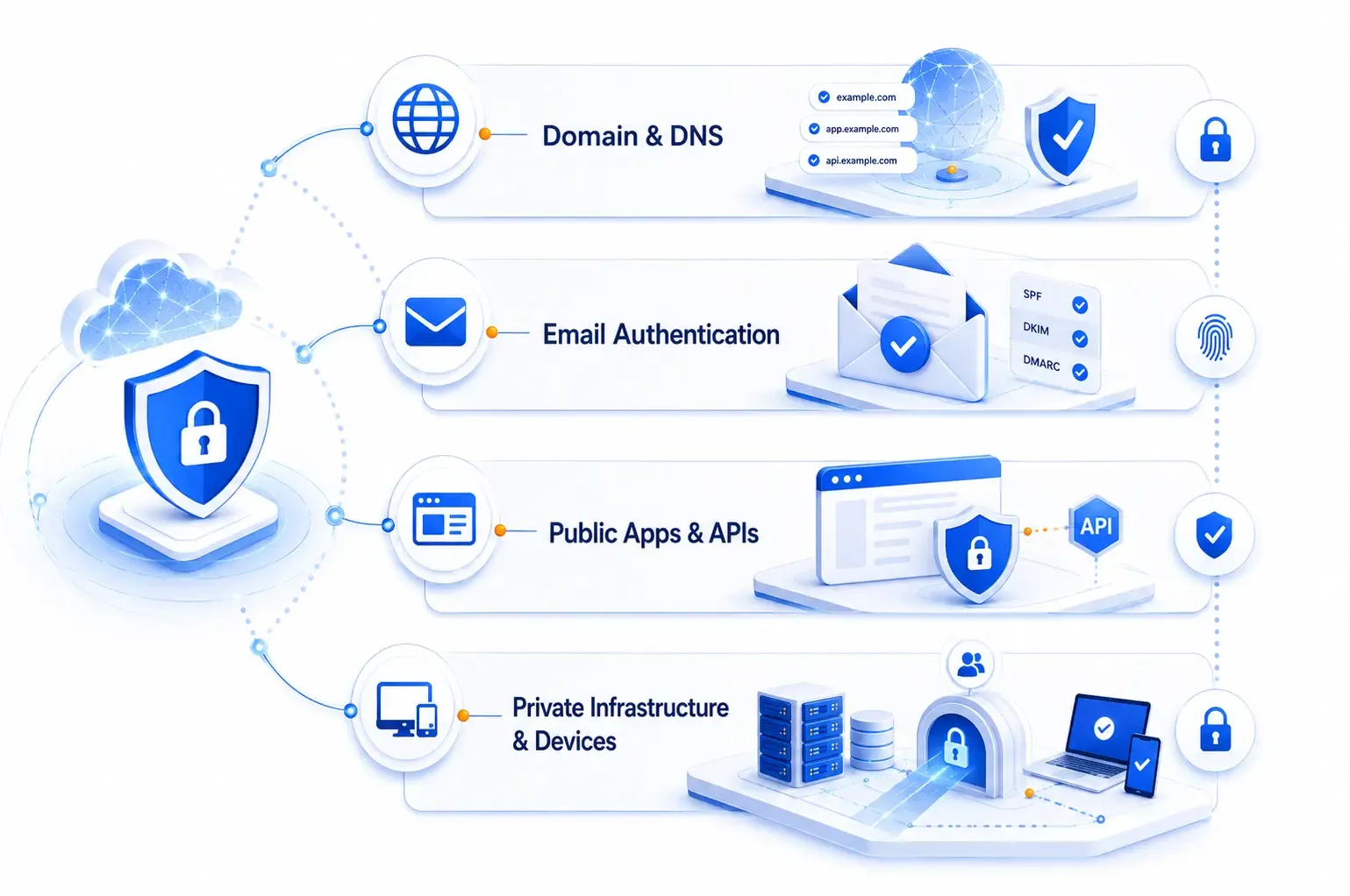
A practical architecture can be divided into four layers: domain and DNS protection; email and brand identity protection; protection for public websites and APIs; and identity-aware access to internal applications, servers, and private networks.

Guide
1. Protect domains and DNS: the foundation of the system
Implementation controls and decisions should be evaluated against real business risk.
Moving authoritative DNS to Cloudflare creates a central place to manage records, enable DNSSEC, control proxy behavior, audit changes, and automate configuration through APIs or Terraform. Changing nameservers is only the first step. A production zone must be reviewed carefully to determine which records should be proxied and which must remain DNS only.
Core DNS records
Implementation points
Apply these controls according to business risk, priority, and operational capacity.
A and AAAA map a hostname to IPv4 or IPv6
Web and API hostnames can be proxied when the protocol is supported.
CNAME maps one hostname to another and is commonly used for www, app, api, and SaaS integrations
This control should be configured, tested, and monitored for the production environment.
MX identifies the servers that receive email and must remain DNS only
This control should be configured, tested, and monitored for the production environment.
TXT is used for SPF, DKIM, DMARC, domain verification, and other security mechanisms
This control should be configured, tested, and monitored for the production environment.
CAA restricts which certificate authorities may issue TLS certificates for the domain
This control should be configured, tested, and monitored for the production environment.
SRV advertises a service, protocol, port, and target
This control should be configured, tested, and monitored for the production environment.
Do not proxy mail records
Hostnames used for SMTP, IMAP, POP3, or MX should not use the orange-cloud proxy. Standard Cloudflare reverse proxying does not proxy these mail protocols.
Production DNS baseline
Implementation points
Apply these controls according to business risk, priority, and operational capacity.
Require multi-factor authentication and prefer passkeys or security keys
This control should be configured, tested, and monitored for the production environment.
Use least-privilege API Tokens instead of the Global API Key
This control should be configured, tested, and monitored for the production environment.
Enable DNSSEC after nameserver migration is stable and confirm the DS record at the registrar
This control should be configured, tested, and monitored for the production environment.
Remove obsolete records, staging entries, unused IP addresses, and dangling DNS
This control should be configured, tested, and monitored for the production environment.
Use CAA when certificate issuance has been standardized
This control should be configured, tested, and monitored for the production environment.
Manage DNS with Terraform where possible to introduce review and history
This control should be configured, tested, and monitored for the production environment.
Separate DNS, security, and billing administration instead of sharing one account
This control should be configured, tested, and monitored for the production environment.
Guide
2. Protect business email with SPF, DKIM, and DMARC
Implementation controls and decisions should be evaluated against real business risk.
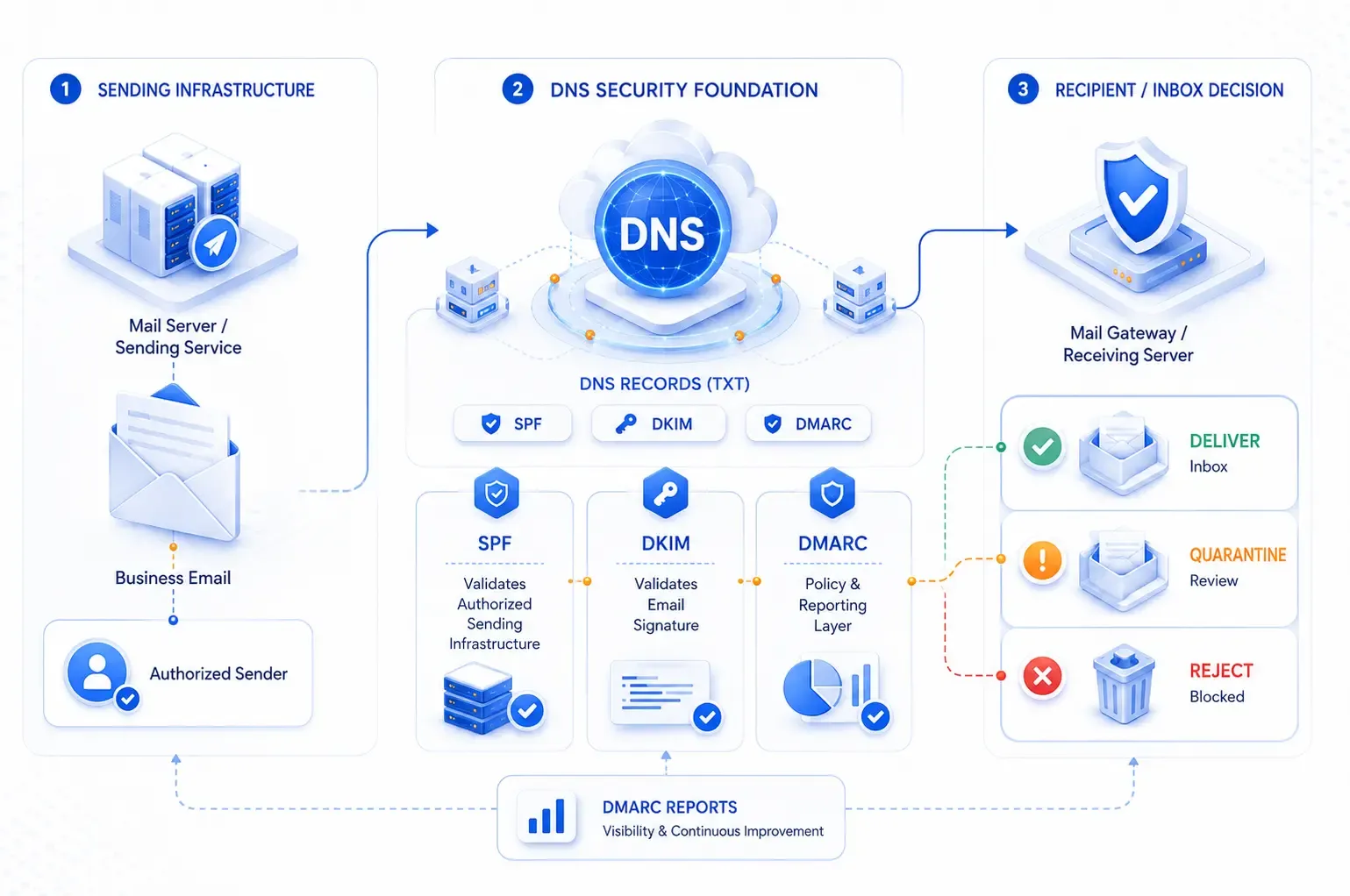
A domain can be impersonated even when the mail platform itself has not been compromised. Attackers can spoof the visible From address to deliver phishing, payment fraud, or credential theft campaigns. SPF, DKIM, and DMARC help receiving systems verify the sender and decide what to do with unauthenticated mail.

SPF: which systems may send email?
SPF is a TXT record at the root domain that lists the systems authorized to send on behalf of the domain. Organizations should inventory Microsoft 365, Google Workspace, CRM platforms, marketing tools, ticketing systems, and transactional email providers. A domain should have one SPF record; multiple senders must be combined into that record.
@ TXT "v=spf1 include:spf.protection.outlook.com -all"
This example applies to a domain that sends only through Microsoft 365. Production values must come from the providers actually in use.
DKIM: was the message signed by an authorized system?
DKIM uses a cryptographic signature to prove that the message was signed by a system holding the private key and that the signed content has not been modified. The public key is published in DNS, normally as a TXT or CNAME record under selector._domainkey.
selector1._domainkey CNAME selector1-example-com._domainkey.provider.example
DMARC: what should happen to spoofed mail?
DMARC requires SPF or DKIM to pass and the authenticated domain to align with the visible From domain. Start with p=none to collect reports, correct missing legitimate senders, then progress to quarantine and finally reject.
_dmarc TXT "v=DMARC1; p=none; rua=mailto:dmarc@yourdomain.com; adkim=s; aspf=s; pct=100"
Do not jump directly to p=reject
If SaaS, CRM, and business senders have not been fully inventoried, legitimate email may be rejected. Observe DMARC reports and enforce policy gradually.
Guide
3. Protect websites and APIs with Cloudflare WAF
Implementation controls and decisions should be evaluated against real business risk.
When a web or API hostname is proxied, traffic reaches Cloudflare's edge before the origin. Organizations can apply managed rules, custom rules, rate limiting, bot controls, and TLS policies. The goal is not to enable the strictest possible configuration; it is to reduce attack surface without creating excessive false positives.
Recommended baseline controls
Implementation points
Apply these controls according to business risk, priority, and operational capacity.
Managed WAF rules for common web vulnerabilities and malicious payloads
This control should be configured, tested, and monitored for the production environment.
Rate limits for login, password reset, OTP, and expensive API endpoints
This control should be configured, tested, and monitored for the production environment.
Managed Challenge for suspicious traffic when immediate blocking would be risky
This control should be configured, tested, and monitored for the production environment.
Restrict administrative paths or place them behind Cloudflare Access
This control should be configured, tested, and monitored for the production environment.
Allow only required HTTP methods per endpoint
This control should be configured, tested, and monitored for the production environment.
Use ASN, geography, and threat signals only when they match business requirements
This control should be configured, tested, and monitored for the production environment.
Never cache responses containing personal data, tokens, sessions, or tenant-specific content
This control should be configured, tested, and monitored for the production environment.
(http.request.uri.path eq "/api/auth/login" and http.request.method eq "POST")
This expression can identify login requests for a rate limiting rule. Thresholds should be based on real traffic, application behavior, and frontend retry logic.
Guide
4. Hide the origin with Cloudflare Tunnel
Implementation controls and decisions should be evaluated against real business risk.
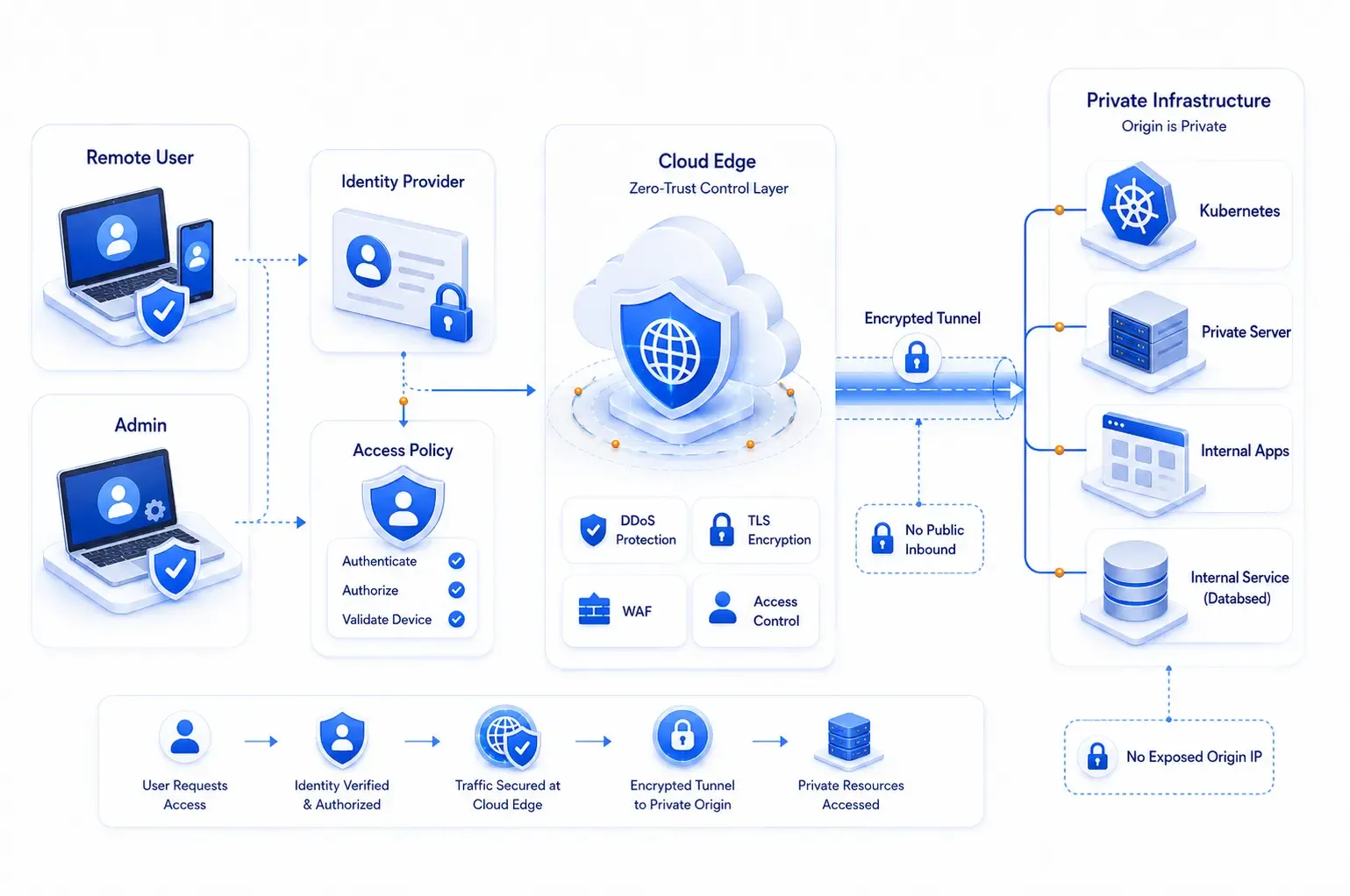
WAF can still be bypassed if an attacker discovers the public origin IP. Cloudflare Tunnel addresses this by allowing cloudflared to create outbound connections from a server or cluster to Cloudflare. The origin no longer needs an Internet-facing inbound port, and public access to reverse proxies, dashboards, or internal APIs can be removed.

Production deployment practices
Implementation points
Apply these controls according to business risk, priority, and operational capacity.
Run at least two cloudflared connectors for critical workloads
This control should be configured, tested, and monitored for the production environment.
Store tunnel tokens in Kubernetes Secrets, a secret manager, or a vault rather than images or repositories
This control should be configured, tested, and monitored for the production environment.
Restrict egress and service-account permissions
This control should be configured, tested, and monitored for the production environment.
Monitor connector health, restarts, latency, and connection errors
This control should be configured, tested, and monitored for the production environment.
Separate tunnels by environment or trust boundary
This control should be configured, tested, and monitored for the production environment.
On Kubernetes, use a PodDisruptionBudget and anti-affinity when multiple nodes are available
This control should be configured, tested, and monitored for the production environment.
Guide
5. Cloudflare Access: replace broad VPN access for internal applications
Implementation controls and decisions should be evaluated against real business risk.
Cloudflare Access places an identity-aware proxy in front of an application. Instead of trusting anyone connected to a VPN, Access can require authentication through Microsoft Entra ID, Google Workspace, or another identity provider and evaluate groups, email domains, MFA, and device signals.
Implementation points
Apply these controls according to business risk, priority, and operational capacity.
Only the DevOps group can reach Argo CD, Grafana, or infrastructure dashboards
This control should be configured, tested, and monitored for the production environment.
Only Finance can reach internal billing tools
This control should be configured, tested, and monitored for the production environment.
Contractors receive access to one application for a limited period
This control should be configured, tested, and monitored for the production environment.
Service-to-service traffic uses service tokens or mTLS
This control should be configured, tested, and monitored for the production environment.
Staging applications can be protected even when using public hostnames
This control should be configured, tested, and monitored for the production environment.
Access is more than a login screen
Policies should combine identity groups, device posture, and application sensitivity. Avoid a broad Allow rule for the entire corporate email domain when the application contains sensitive data.
Guide
6. WARP and Gateway: control devices and user traffic
Implementation controls and decisions should be evaluated against real business risk.
The Cloudflare One Client, formerly widely referred to as the WARP client, can encrypt and route device DNS or network traffic through Cloudflare. Gateway applies DNS, network, and HTTP policies to block phishing, malware, command-and-control infrastructure, and categories that violate company policy.
For private resources, Cloudflare Tunnel advertises private routes while enrolled devices access internal CIDRs through the client. This model supports SSH, RDP, databases, TCP or UDP services, and applications that should not be publicly exposed.
Practical starting policies
Implementation points
Apply these controls according to business risk, priority, and operational capacity.
Block malware, phishing, newly observed domains, and command-and-control categories as appropriate
This control should be configured, tested, and monitored for the production environment.
Block unmanaged DNS over HTTPS to reduce DNS policy bypass
This control should be configured, tested, and monitored for the production environment.
Require compliant devices for private networks and sensitive applications
This control should be configured, tested, and monitored for the production environment.
Separate policy for employees, contractors, and privileged devices
This control should be configured, tested, and monitored for the production environment.
Observe logs before blocking categories that may affect business workflows
This control should be configured, tested, and monitored for the production environment.
Guide
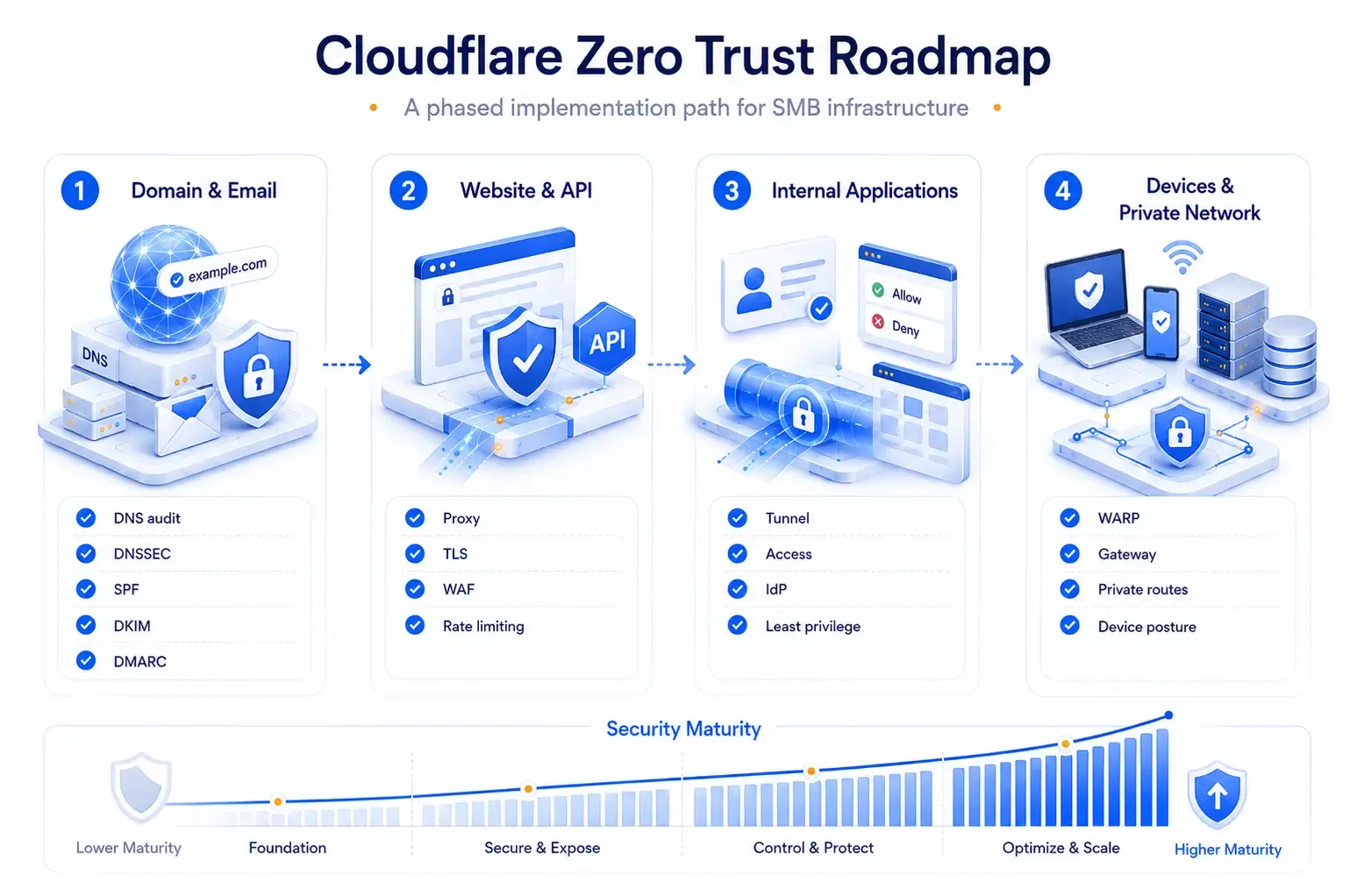
A phased Cloudflare Zero Trust roadmap for SMBs
Implementation controls and decisions should be evaluated against real business risk.

Phase 1 — Domain and email
Implementation points
Apply these controls according to business risk, priority, and operational capacity.
Move DNS to Cloudflare and audit every record
This control should be configured, tested, and monitored for the production environment.
Enable MFA, least-privilege API Tokens, and DNSSEC
This control should be configured, tested, and monitored for the production environment.
Standardize SPF and enable DKIM for every sender
This control should be configured, tested, and monitored for the production environment.
Deploy DMARC with p=none and review reports
This control should be configured, tested, and monitored for the production environment.
Remove unused records and subdomains
This control should be configured, tested, and monitored for the production environment.
Phase 2 — Websites and APIs
Implementation points
Apply these controls according to business risk, priority, and operational capacity.
Proxy supported web hostnames
This control should be configured, tested, and monitored for the production environment.
Use Full (strict) TLS with a valid origin certificate
This control should be configured, tested, and monitored for the production environment.
Enable managed WAF rules, rate limiting, and event review
This control should be configured, tested, and monitored for the production environment.
Implement HTTPS redirects, security headers, and safe cache rules
This control should be configured, tested, and monitored for the production environment.
Restrict origin traffic to Cloudflare where the architecture permits
This control should be configured, tested, and monitored for the production environment.
Phase 3 — Internal applications
Implementation points
Apply these controls according to business risk, priority, and operational capacity.
Deploy Cloudflare Tunnel with redundant connectors
This control should be configured, tested, and monitored for the production environment.
Protect dashboards with Access and an identity provider
This control should be configured, tested, and monitored for the production environment.
Authorize by group and deny by default
This control should be configured, tested, and monitored for the production environment.
Remove unnecessary public IPs and inbound firewall rules
This control should be configured, tested, and monitored for the production environment.
Use service tokens for automation
This control should be configured, tested, and monitored for the production environment.
Phase 4 — Devices and private networks
Implementation points
Apply these controls according to business risk, priority, and operational capacity.
Enroll devices with the Cloudflare One Client
This control should be configured, tested, and monitored for the production environment.
Apply Gateway DNS and network policies
This control should be configured, tested, and monitored for the production environment.
Connect private CIDRs through Tunnel
This control should be configured, tested, and monitored for the production environment.
Add device posture checks for sensitive resources
This control should be configured, tested, and monitored for the production environment.
Export logs to a SIEM or observability platform
This control should be configured, tested, and monitored for the production environment.
Guide
Common implementation mistakes
Implementation controls and decisions should be evaluated against real business risk.
Implementation points
Apply these controls according to business risk, priority, and operational capacity.
Proxying MX or mail hostnames and disrupting SMTP or IMAP
This control should be configured, tested, and monitored for the production environment.
Publishing multiple SPF records instead of one combined record
This control should be configured, tested, and monitored for the production environment.
Setting DMARC to p=reject before inventorying legitimate senders
This control should be configured, tested, and monitored for the production environment.
Allowing the entire corporate email domain into every internal application
This control should be configured, tested, and monitored for the production environment.
Leaving the origin public after introducing Cloudflare Tunnel
This control should be configured, tested, and monitored for the production environment.
Sharing broad API or tunnel credentials across environments
This control should be configured, tested, and monitored for the production environment.
Enabling aggressive WAF policies without monitoring false positives
This control should be configured, tested, and monitored for the production environment.
Treating Zero Trust as a one-time product purchase rather than an operating model
This control should be configured, tested, and monitored for the production environment.
Guide
Post-deployment operational checklist
Implementation controls and decisions should be evaluated against real business risk.
Implementation points
Apply these controls according to business risk, priority, and operational capacity.
Review DNS and subdomains at least quarterly
This control should be configured, tested, and monitored for the production environment.
Monitor DMARC reports and investigate unknown senders
This control should be configured, tested, and monitored for the production environment.
Review Access policies, identity groups, and expired contractor access
This control should be configured, tested, and monitored for the production environment.
Monitor WAF events, rate limits, and frequently blocked paths
This control should be configured, tested, and monitored for the production environment.
Check tunnel health and exercise connector failover
This control should be configured, tested, and monitored for the production environment.
Rotate API Tokens, service tokens, and tunnel credentials
This control should be configured, tested, and monitored for the production environment.
Test backup, incident response, and break-glass procedures
This control should be configured, tested, and monitored for the production environment.
Manage critical configuration through Terraform and pull-request review
This control should be configured, tested, and monitored for the production environment.
Guide
Conclusion
Implementation controls and decisions should be evaluated against real business risk.
Cloudflare Zero Trust does not need to begin as a large transformation program. For most SMBs, the most effective sequence is to secure domain and email first, protect websites and APIs with WAF, and then use Tunnel and Access to remove public exposure from internal applications. Once identity and device processes are mature, WARP and Gateway can extend policy to users and private networks.
The value is not measured by how many features are enabled. It comes from ensuring that every access request is verified, logged, and limited to a legitimate business need. That is how Zero Trust becomes an operational security model rather than a slogan.
FlowNexa
Build a Cloudflare Zero Trust roadmap for your current infrastructure
FlowNexa helps organizations assess DNS, email security, WAF, Cloudflare Tunnel, Access, and private networking, then build a phased implementation aligned with real risks, priorities, and budget.
Contact FlowNexa
https://flownexa.ai/en/contact