



Skip to content
FlowNexa
  • AI Services
  • Solutions
  • About
  • Blog
VIEN
Book a consultation
Back to Blog
Automation10 min readFlowNexa Editorial Team

Automating daily management reports from multiple data sources

Design an automated process that collects multiple data sources, validates quality, calculates KPIs, produces management reports, and distributes them securely each morning.


Aug 13, 2026
Automating daily management reports from multiple data sources

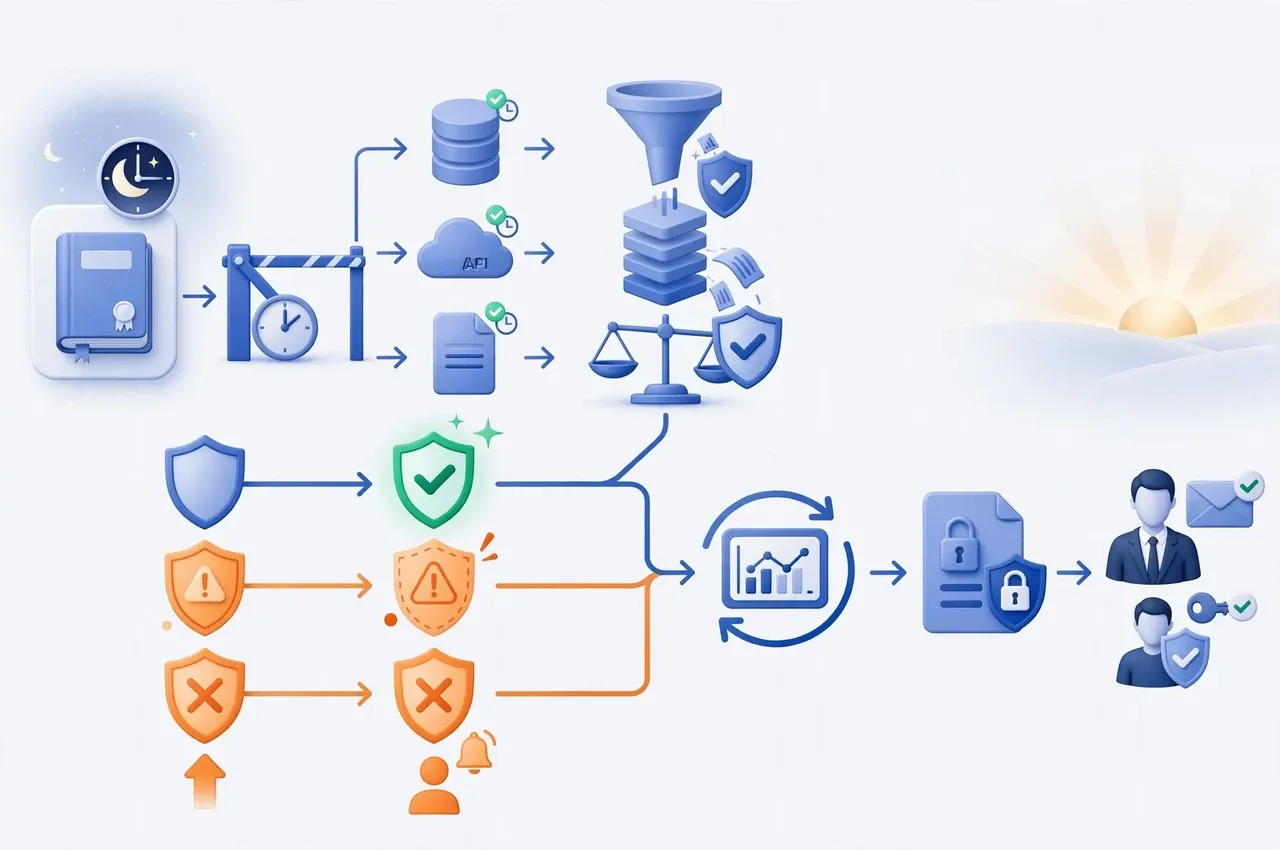
To automate a management report from multiple sources every morning, build a controlled pipeline: ingest on a schedule, preserve a snapshot for a defined cutoff, standardize data against shared definitions, run quality gates, calculate KPIs through a governed semantic layer, generate the report, and distribute it only after the release criteria pass. If a source is late or reconciliation fails, stop publication, alert the owner, and expose the report status rather than silently sending incomplete figures.

The primary goal is not a polished PDF or an email that arrives at 7:00 a.m. The report must show its reporting period, data-as-of time, source completeness, KPI definition version, release version, and each recipient's authorized scope.

Problem

Why is automatically merging spreadsheets not yet management reporting?

Automating manual steps does not automatically make the numbers trustworthy.

Sales may live in a CRM, revenue in an accounting platform, advertising cost across marketing platforms, receivables in an ERP, and operational data in Google Sheets or Excel. Each system has different customer identifiers, time zones, statuses, and update cycles. A direct merge can double-count an order, miss a late refund, or treat booked revenue and cash collected as the same measure.
Good reporting automation removes three dependencies: manual copying, formulas scattered across files, and managers guessing how current the report is. Source systems continue to own operational records, while KPI definitions and release status are governed centrally.

Answer

What architecture works for a morning management report?

Separate the data pipeline from presentation and distribution.

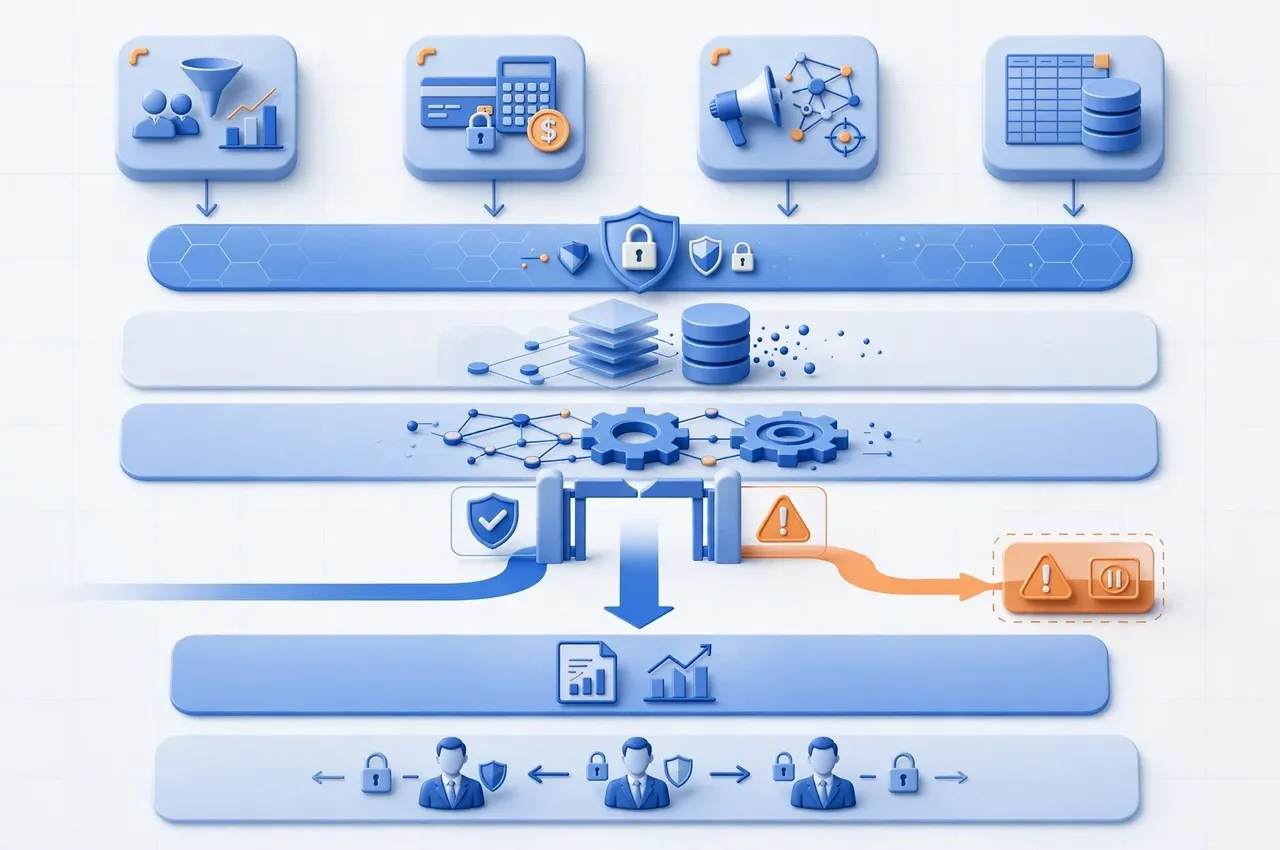
A reference architecture has six layers: sources for systems of record; ingestion through APIs, databases, files, or webhooks; raw/staging for near-original data and watermarks; transform/semantic for canonical keys, currency, time zones, and KPI definitions; quality gates for freshness, completeness, and reconciliation; and report/distribution for dashboard refresh, PDF export, or access-controlled links.

An orchestrator such as n8n, Power Automate, or Airflow coordinates execution and states, but complex KPI logic should not be buried in hard-to-test nodes. Version-controlled SQL/dbt or a dedicated service is more suitable for transformations. Power BI supports scheduled refresh, and Power Automate can export and email reports; those actions should occur only after upstream quality is confirmed.

Sources

Step 1: define a data contract before connecting each source

Every connector needs an owner, reconciliation key, update schedule, and failure behavior.

For each source, document its purpose, tables or endpoints, time zone, updated_at field, unique key, pagination, rate limits, backfill policy, sensitive fields, business owner, and technical owner. Add a freshness SLA—for example, how long before the reporting cutoff the sales source must be complete.

Prefer APIs or read replicas over manually downloaded files. Where Excel or CSV remains necessary, enforce file naming, schema, folder, upload deadline, and checksum conventions; never select the “latest file” without validating its business date. Store credentials in a secret manager, use read-only access where possible, and isolate environments. Keep raw personal data out of operational logs and email alerts.

Cutoff

Step 2: establish a reporting date instead of querying whatever exists at runtime

A 7:00 a.m. report does not mean every source is complete at 7:00 a.m.

Create reporting_date, cutoff_at, and run_id when the workflow starts. Every query uses the same reporting period rather than an ad hoc now() in each step. For a prior-day report, define which transactions belong to that day in the business time zone, how pending orders are treated, and what happens to adjustments received after cutoff.

Maintain a watermark per source for incremental loads while running a bounded backfill window for late-arriving data. Preserve a raw snapshot or batch ID so the released report can be reproduced. n8n's Schedule Trigger uses the workflow or instance time zone; a wrong setting can shift the reporting day. Set Asia/Ho_Chi_Minh or the relevant business time zone explicitly in production and test behavior around midnight.

Data model

Step 3: standardize once and reuse across reports

A KPI should have one owned, testable definition.

Build shared dimensions for date, branch, product, customer, and channel, then map sales, payment, cost, and operations facts to canonical keys. Keep order_created, order_completed, invoice_issued, cash_collected, and refund distinct rather than calling all of them revenue. For multiple currencies, retain the original amount, currency, exchange rate, rate date, and converted amount.

The semantic layer should define the formula, grain, filters, owner, and version for every KPI. “Net revenue,” for example, must state how VAT, refunds, canceled orders, and discounts are handled. When a formula changes, introduce a version or effective date rather than silently rewriting historical reports.

Quality

Step 4: place a quality gate before refresh and distribution

A technically successful workflow must still stop when the business data is wrong.

Minimum gates include freshness—sources have reached the expected period; schema—columns and types conform to contract; completeness—no missing dates, branches, or batches; uniqueness—business keys are not duplicated; referential integrity—facts map to dimensions; accepted values—statuses are valid; reconciliation—amounts or transaction counts agree with sources within an approved tolerance; and anomaly checks—unexpected changes are flagged.

dbt supports freshness thresholds and generic tests including unique, not_null, accepted_values, and relationships. These form a baseline, not a substitute for business reconciliation. For critical measures, compare daily or branch totals between source and warehouse, store the variance, and classify results as pass, warning, or blocking. A blocking gate must prevent release.

Release policy

Three report release states to support

Not every issue should be reduced to sending or withholding a report without context.

READY

All mandatory sources and quality gates pass; generate and distribute automatically.

DEGRADED

A noncritical source is late or a warning remains within tolerance; distribute only if policy permits, with a visible data-as-of notice.

BLOCKED

A critical source is missing, reconciliation fails, or a KPI is invalid; stop release, alert owners, and await a controlled rerun.

Distribution

Step 5: deliver the right version to the right person and data scope

Email attachments are convenient, but not always the safest channel.

Display reporting_date, data_as_of, freshness state, KPI version, and a dashboard link. If an immutable snapshot is required, export a PDF and store it with the run_id, checksum, source manifest, and gate results. Microsoft documents automated Power BI export and email distribution through Power Automate; Power BI subscriptions can also deliver a scheduled snapshot and link.

For sensitive figures, prefer authenticated links over attachments that persist in mailboxes. Apply row-level security or recipient-specific views: executives may see the organization, while regional managers see only their region. Source recipients from an owned, periodically reviewed configuration rather than hard-coding addresses in the workflow. Do not place personal email addresses in a semantic model without a justified purpose and appropriate controls.

Implementation

A reference workflow with n8n, a data store, and Power BI

Use idempotent sub-workflows so failed stages can be rerun safely.

A production flow can run as follows:

  1. Create run: Schedule Trigger creates run_id, reporting_date, and cutoff_at; a lock prevents concurrent duplicates.
  2. Extract: invoke one sub-workflow per source with timeouts, bounded exponential backoff, and concurrency/rate limits.
  3. Load: upsert raw/staging by source key and watermark; record row count, maximum timestamp, and checksum.
  4. Transform: run dependency-aware models that produce facts, dimensions, and KPI snapshots.
  5. Validate: execute freshness, schema, data tests, reconciliation, and anomaly thresholds.
  6. Release decision: assign READY, DEGRADED, or BLOCKED according to policy.
  7. Publish: trigger the Power BI dataset refresh and confirm completion before export. The Power BI REST API can trigger refresh, while export-to-file is asynchronous and must be polled rather than assumed complete.
  8. Distribute: send a link or PDF and persist delivery status and audit evidence.
  9. Close: finalize the run manifest, metrics, and retention.

Use report_type + reporting_date + version as the idempotency key. A rerun must not send a second email unless a new release version is created or an operator performs an audited resend.

Operations

Monitor freshness, quality, and ready time—not only workflow status

The operational objective is a correct, timely report, not a green execution badge.

Track the percentage of READY reports delivered on time, source freshness lag, extraction/transformation/refresh/export duration, row counts and deviations from baseline, warning and blocking gates, reconciliation variance, retries, cost per run, delivery success, resends, and recovery time. Power BI provides refresh summaries for schedules, capacity, and errors; the orchestration layer should still correlate the refresh identifier with the report run_id.

Alert based on impact. A late noncritical source may generate a warning; a late revenue or ledger source should page the owner and produce BLOCKED. The runbook must name owners, source-verification steps, backfill procedure, stage-specific rerun commands, DEGRADED conditions, and override authority. Every override needs a reason, approver, and expiry so that “send provisionally” does not become the default.

Testing

Checklist before delivering reports to management

Late and incorrect data scenarios matter more than one successful email test.

  • Run the same reporting_date twice: no duplicate data and no duplicate email for one release.
  • Time out a source after a partial response: the batch must not be marked complete.
  • Rename a column or change a type in a file: the schema gate blocks transformation.
  • Hold back the revenue source beyond its freshness SLA: the report becomes BLOCKED rather than silently reusing old figures.
  • Remove a dimension mapping: the relationship test records the orphaned keys.
  • Deliver a refund after cutoff: bounded backfill applies the policy and creates a new release version if necessary.
  • Fail the Power BI refresh or expire its credentials: do not export the old dashboard as a new report.
  • Keep the export API in processing: poll with a timeout and never send an empty file.
  • Confirm a Region A manager cannot access Region B; sensitive attachments cannot leave the allowed domain.
  • Trigger the wrong time zone or let two workers claim the job: the lock and reporting date prevent duplicate runs.
  • Verify warning and blocking gates take separate paths, and every override is audited.
  • Reproduce a released report from its raw batch, code version, and KPI version.

FAQ

Frequently asked questions about automated management reporting

Practical decisions to make before implementation.

Can we rely only on Power BI scheduled refresh?

For simple reports with stable sources, it may be sufficient. However, scheduled refresh does not prove that every source covers the same period, reconciles, and meets quality expectations. Critical management reports need upstream gates and a release state.

Do we need a data warehouse from day one?

Not every organization needs a large platform. PostgreSQL or a small Fabric warehouse may be enough initially, provided it has raw/staging layers, canonical keys, run history, and centralized KPI definitions.

Should n8n calculate every KPI?

Not for complex logic. n8n is well suited to orchestration, API calls, state management, and distribution. Put transformations in SQL/dbt or a version-controlled, automatically tested service.

Should a report be sent when a source is late?

It depends on source criticality and policy. Missing critical data should produce BLOCKED. A noncritical source may allow DEGRADED only when recipients can see the data-as-of time, omission, and impact.

Should we send Excel, PDF, or a dashboard link?

Use access-controlled links for interactive or sensitive data, PDF for an immutable snapshot, and Excel only where recipients need detailed data and export permissions are governed.

Can AI write the management commentary automatically?

It can draft commentary from approved KPIs, but it should not alter figures or invent causal explanations. Each observation must identify the comparison period and source, and distinguish observed facts from hypotheses.

How can recipients tell whether today's report is actually fresh?

Show reporting_date, per-source data_as_of, run status, and refresh completion time. The email delivery time is not evidence that the data is current.

FlowNexa

Build morning reports that remain trustworthy in production

FlowNexa can help map your sources, govern KPI definitions, and design reporting automation with n8n, Microsoft 365, Power BI, or an appropriate data stack.

Start with one report

Choose a high-effort report, identify its owners, cutoff, KPIs, and current error baseline.

Scale after validation

Pilot a small set of sources, test quality gates and runbooks, then add departments, KPIs, and recipients.

Read next

Related insights

Operations Automation

Multichannel Orders and Inventory: How Do You Prevent Overselling?

Design a central inventory authority, reservation ledger, idempotency, event synchronization, and reconciliation to prevent overselling.

AI Automation

AI Misreads an Invoice: What Controls Are Needed Before Accounting?

Design invoice processing with field-level confidence, business validation, reconciliation, risk-based review, and posting gates.

Data Governance

Duplicate Customers in CRM: How Do You Merge Without Combining the Wrong People?

Design duplicate detection with identity keys, confidence, review queues, merge policy, and recovery controls.

FlowNexa

FlowNexa helps small and mid-sized businesses bring AI into customer service, workflow automation, and efficient data operations. Cloud-native and DevSecOps provide the foundation that keeps these solutions secure, reliable, and easy to scale.

FLOWNEXA COMPANY LIMITED

Tax ID: 0319612776

Address: 228/6 Au Duong Lan, Chanh Hung Ward, Ho Chi Minh City, Vietnam

Website: flownexa.ai

Services

AI chatbots & supportAI assistantsAutomationCloud & infrastructure

Company

AboutBlogPrivacyTerms

Contact

hello@flownexa.ai
0948 279 029
Chat on Zalo
Chat on Messenger
Replies within one business day

© 2026 FlowNexa. All rights reserved.

Microsoft, Azure, Microsoft 365, AWS, Kubernetes, and Cloudflare are trademarks of their respective owners. FlowNexa is not claiming partnership unless expressly stated.

B2B service website — no online ordering or online payment.

Practical AI · Automation · Secure CloudPrivacyTermsCookiesLegal
Share:
FacebookZaloLinkedIn
Share:
FacebookZaloLinkedIn