Microsoft 365 Business Basic vs Standard: Which Plan Should an SME Choose?
A practical comparison of Microsoft 365 Business Basic and Standard across desktop apps, email, storage, Teams, cost and real SME use cases.


A 30-person company wants to replace hosted email and a mix of perpetual Office versions with Microsoft 365. Salespeople mostly use email, Teams and mobile devices; accountants work with large Excel files; managers often edit documents without reliable connectivity; field staff only need to view files and submit forms. Assigning Business Standard to everyone may pay for desktop apps many users do not need. Assigning Business Basic to everyone can quickly constrain finance and management.
The short answer: choose Business Basic when a user can work primarily in a browser and on mobile; choose Business Standard when licensed desktop Word, Excel, PowerPoint and Outlook, offline work or complex documents are operational requirements. An SME does not need one plan for the entire company. A role-based mix of Basic and Standard is often more efficient, provided licensing, devices and access are managed consistently in the same tenant.
Email is not the deciding difference
Both Business Basic and Standard provide a business email, collaboration and storage foundation. The difference that most often changes the decision is whether users require Microsoft 365 desktop applications and reliable offline work.
Quick verdict

Basic for cloud-first work, Standard for desktop-dependent users
Choose by how each group creates, processes and shares documents—not by job title alone.
Two plans
When does each option create clear value?
Both serve organizations within the 300-user Business-plan limit, but they fit different working patterns.
Choose Business Basic
For people working mainly through web or mobile Outlook, Word, Excel and PowerPoint, with Teams, domain email, OneDrive and SharePoint, and reliable connectivity.
Choose Business Standard
For people who need desktop apps, offline editing, desktop Outlook, advanced Excel, complex documents or compatible add-ins.
Mix the plans
For SMEs with varied roles: Basic for frontline or cloud-first staff; Standard for finance, operations, management and advanced content creators.
Evaluate Business Premium
If the primary requirement is device management, endpoint protection or advanced threat defense, Basic versus Standard is too narrow; assess Business Premium as well.

Comparison
Where are Business Basic and Standard alike or different?
This table focuses on the differences that commonly change an SME purchasing decision.
| Criterion | Business Basic | Business Standard |
|---|---|---|
| Word, Excel, PowerPoint and Outlook | Web and mobile | Desktop, web and mobile |
| Desktop app entitlement | Not included | Included, within license device limits |
| Offline work | Limited by web/mobile apps | Stronger through desktop apps |
| Custom-domain business email | Included | Included |
| Exchange Online mailbox | 50 GB | 50 GB |
| OneDrive | 1 TB/user | 1 TB/user |
| Teams | Depends on the selected with-Teams SKU | Depends on the selected with-Teams SKU |
| SharePoint, Planner, Forms and Bookings | Included according to the current plan description | Included according to the current plan description |
| Best fit | Email, collaboration and lighter cloud work | Advanced desktop document creation and processing |
| Business family limit | Up to 300 users across the Business plan family | Up to 300 users across the Business plan family |
Features and packaging may vary by market, purchase date and with-Teams or without-Teams SKU. Confirm the exact SKU in the quotation rather than relying only on the words Basic or Standard.
The key difference
Are desktop applications worth the additional cost?
The answer depends on document complexity and whether browser-only work is genuinely viable.
Business Basic is not email-only. Users still receive business email, Teams when a with-Teams SKU is purchased, OneDrive, SharePoint and web/mobile versions of common applications. For groups that stay online, process straightforward files and collaborate in a browser, it can be sufficient and cost-efficient.
Business Standard creates value when desktop software supports revenue or operations: accountants working in large workbooks, HR teams using mail merge, managers editing documents on flights, marketing teams building complex presentations, or users relying on desktop Outlook and compatible add-ins. In those cases, compare the price difference with the cost of workarounds and lost time—not with the license price alone.
Pre-purchase test
Four questions that identify a real Standard requirement
Several yes answers suggest that Business Basic could introduce hidden cost for that user.
Do they work offline regularly?
Desktop apps keep work moving during travel or unreliable connectivity.
Do they use complex Excel files?
Large workbooks, macros, add-ins and advanced data workflows should be piloted in the web app before selecting Basic.
Do they depend on desktop Outlook?
Test shared mailboxes, archives, add-ins, signatures and working habits before moving to web-only use.
Do they create more than they review?
People producing complex documents usually gain more value from Standard than users who mainly view or approve content.
Cost
Do not build a budget from an old price table
Microsoft packaging varies by market; SKU, Teams, Copilot, tax and commitment terms all affect total cost.
As referenced on 20 July 2026, Microsoft's Vietnam page lists Business Basic with Teams at USD 3.50/user/month on an annual commitment, excluding tax, and the without-Teams variant at USD 2.70. The same page currently emphasizes Business Standard bundled with Microsoft 365 Copilot Business rather than presenting a simple standalone Standard price. Microsoft's US page, meanwhile, lists standalone Standard at USD 12.50/user/month paid annually.
These figures are time-bound references, not final Vietnam sales quotations. CSP pricing, exchange rates, VAT, promotions, with-Teams or without-Teams packaging, Copilot and commitment terms can change the total. Require every quotation to state the exact SKU, quantity, commitment term, billing frequency, tax, promotional expiry and cancellation conditions.
30-person example
Allocate by role instead of assigning Standard to everyone
This illustrative model helps avoid both capability gaps and license overspend.
12 field employees — Basic
They mainly use email, Teams, forms, document viewing and mobile or browser-based updates.
8 sales users — pilot first
Basic may fit cloud-first workflows; use Standard for users needing desktop Outlook, offline quotations or CRM add-ins.
6 finance and operations users — Standard
They regularly need desktop Excel, complex documents, offline work or integrated applications.
4 managers — Standard or Premium
Use Standard for desktop needs; evaluate Premium where sensitive data and devices require stronger management and protection.
One license does not have to fit everyone
Good license design assigns the right capability to the right role, then reviews usage as responsibilities change. A mixed-plan approach only works with a clear joiner, mover and leaver process.
Security and operations
Basic or Standard does not determine the entire security posture
Both plans still require a tenant security baseline and operating process from day one.
Security baseline
Six controls to implement with either plan
Licenses provide capabilities; configuration and operations determine actual risk.
Enforce MFA and protect administrators
Separate administrative identities from daily accounts and minimize Global Administrator assignments.
Authenticate the email domain
Deploy SPF, DKIM and DMARC through a monitored rollout to reduce domain spoofing.
Standardize sharing controls
Set external sharing rules for OneDrive, SharePoint and Teams according to data classification.
Implement offboarding
Revoke sessions, block sign-in, transfer data ownership and process mailboxes through a tested runbook.
Design retention and backup
Do not assume service retention is equivalent to an independent backup; define restore requirements and test them.
Review licenses and changes
Periodically review inactive users, spare licenses, admin roles, forwarding rules and security alerts.

Implementation
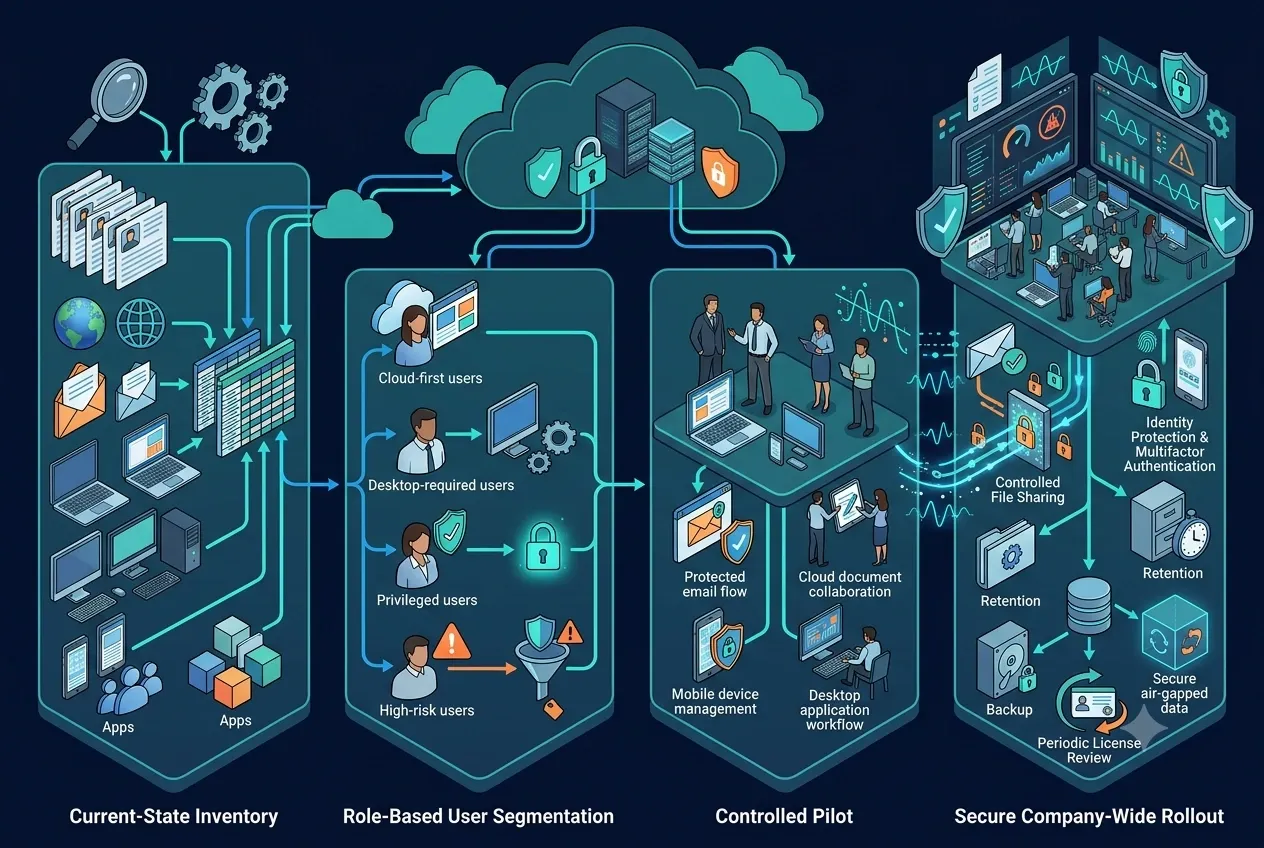
A four-step selection and rollout plan
Do not buy the full license quantity before inventorying users, devices, data and dependencies.
Roadmap
From assessment to license optimization
A small pilot validates assumptions before company-wide rollout.
1. Inventory
List users, roles, devices, current Office versions, mailboxes, domains, file shares, add-ins and SMTP-dependent applications.
2. Segment
Identify web-only, desktop-required, privileged and high-risk groups, with an owner for each license decision.
3. Pilot
Test Basic and Standard with representatives from each group across mail flow, file compatibility, offline work, mobile and support.
4. Roll out and review
Deploy in waves, train users, apply the security baseline and reassess licensing after 30–60 days.
Common mistakes
Five purchasing mistakes that increase cost or risk
Most failures come from missing assessment and governance—not from one plan being universally better.
Avoid
Do not buy first and find a use later
Inventory, a pilot and scheduled reviews prevent each of these mistakes.
Giving Standard to every account
Shared mailboxes, service identities and web-only users may not need the same SKU as advanced document creators.
Choosing Basic only because it is cheaper
Excel, Outlook and offline-work workarounds can cost more time than the license savings.
Ignoring the exact SKU
With-Teams, without-Teams and Copilot bundles have different scope and pricing.
Treating cloud as backup
Retention, recycle bins and availability do not automatically meet every recovery or record-retention requirement.
Neglecting adoption
Standard creates little value if users continue sharing company files through unmanaged personal applications.
FAQ
Frequently asked questions
These answers help SMEs narrow the choice before requesting a quotation.
Quick answers
What to know before purchasing
Final entitlements must still be confirmed for the exact SKU and market at purchase time.
Does Basic include custom-domain email?
Yes. Business Basic includes custom business email; the company must own and verify its domain and configure DNS correctly.
Can Basic install desktop Word and Excel?
It does not include the desktop application entitlement provided by Business Standard; Basic focuses on web and mobile apps.
Can Basic and Standard be mixed?
Different users can receive different plans in one tenant, subject to the current Business-family limit and SKU conditions.
Is Standard more secure than Basic?
Standard primarily adds desktop applications and related work capabilities. Evaluate Business Premium for advanced device management and protection.
Does Microsoft 365 replace backup?
Do not assume so. Define retention, RPO/RTO, deletion and ransomware scenarios, and the required restore process.
Buy direct or through a CSP?
Direct purchase can fit capable internal IT teams. A CSP can add invoicing, license advice, migration, security configuration and scoped operational support.
Conclusion
Let real work decide between Basic and Standard
The cheapest plan may not have the lowest total cost, and the plan with more features may not create more value.
Business Basic is a strong fit for business email, collaboration and cloud-first work. Business Standard fits users for whom desktop applications, offline work and advanced document processing are operational requirements. For many Vietnamese SMEs, the best design is a role-based mix of both plans, a common security baseline and a license review after real usage data becomes available.
Before purchasing, require a clear mapping between each user, their work requirements, the selected SKU, cost, risk and approver. That turns licensing from a fixed expense into a controlled operating decision.
FlowNexa Microsoft 365
Request a business license assessment
FlowNexa inventories users, domains, devices, data and security requirements before recommending Basic, Standard or a mixed model.
Request a Microsoft 365 assessment
Receive a licensing recommendation, tenant plan, email migration approach, security baseline and support scope designed for a Vietnamese SME.