


What Is MCP (Model Context Protocol), and Does Your Business Need It?
MCP explained for businesses: host, client, server; tools, resources, prompts; when to use it instead of an n8n workflow or a direct API, the security risks, and a checklist for a safe rollout.
Short answer: MCP (Model Context Protocol) is an open standard for connecting AI applications to external systems such as a CRM, inventory software, documents, or databases. The official documentation compares it to "a USB-C port for AI applications": build a connection once (an MCP server) and any AI application that supports MCP can reuse it. A business needs MCP when several AI applications must reach the same system and the AI has to choose its own steps. For fixed processes whose steps are known in advance, an n8n workflow or a direct API call is usually simpler and easier to control.
Anthropic open-sourced MCP in November 2024. On 9 December 2025 the Linux Foundation formed the Agentic AI Foundation (AAIF) with MCP as one of its founding contributions, alongside Block’s goose and OpenAI’s AGENTS.md; the announcement counted more than 10,000 published MCP servers. This article explains MCP at the level a business owner or IT lead needs to make a decision, without going into code.
How it works
How MCP works: host, client, and server
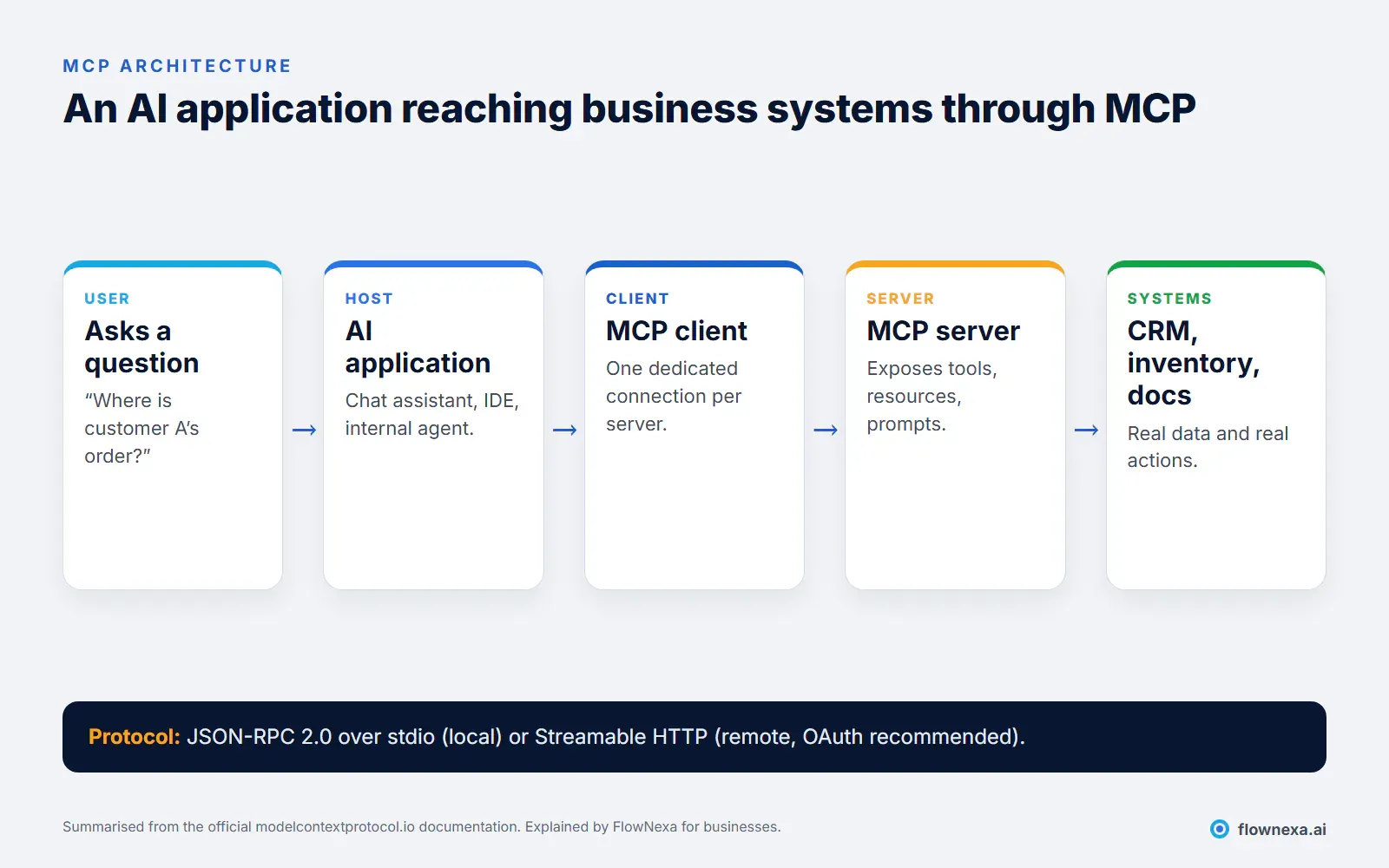
According to the MCP architecture documentation, there are three roles:
- Host: the AI application people interact with, such as a chat assistant, a coding tool, or an internal agent.
- Client: a component inside the host; each client keeps one dedicated connection to one server.
- Server: a program that provides context and capabilities to clients, running locally or remotely. For example, an MCP server for your CRM or for a document folder.
Underneath, MCP has two layers. The data layer uses JSON-RPC 2.0 for requests, responses, and notifications. The transport layer has two options: stdio for processes on the same machine and Streamable HTTP for remote servers. For HTTP, MCP recommends OAuth to obtain authentication tokens, and it also supports bearer tokens, API keys, and custom headers.
An example: a staff member asks an AI assistant "Where is customer A’s order?". The host sees the tools that the sales system’s MCP server exposes, the model picks the order-lookup tool, the client sends the request, and the server calls the real system and returns the result. The "conversation between AI and system" is standardised; "who may look up whose orders" is still yours to design.
Primitives
Tools, resources, prompts: what does a server provide?
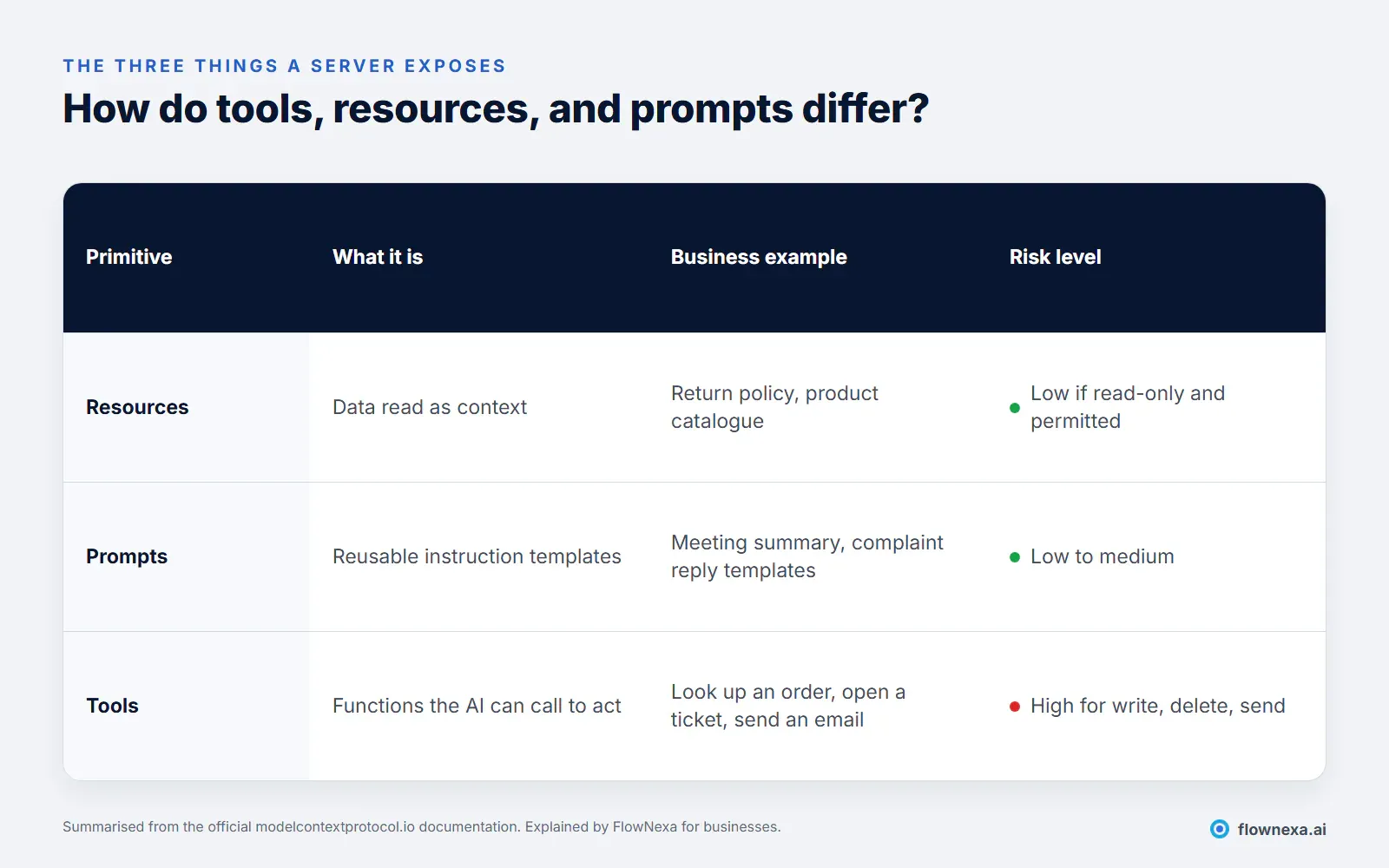
An MCP server exposes three main kinds of primitives:
- Resources: data read as context, such as a return policy, a product catalogue, or a document’s contents.
- Prompts: reusable instruction templates, such as a meeting summary template or a complaint reply template.
- Tools: functions the AI can call to get things done, such as looking up an order, opening a support ticket, or sending an email.
Each kind has a list method (for example tools/list) and a method to retrieve or execute it. On the client side, the architecture documentation describes elicitation, which lets a server ask the user for more information when it needs it.
For a business, the most practical lens is risk: read-only resources are low risk if the data is correctly permissioned; tools that write, delete, or send externally are where risk concentrates. How many tools should an AI agent have explains why a few clear tools usually beat many overlapping ones.
Decision
When should a business use MCP?
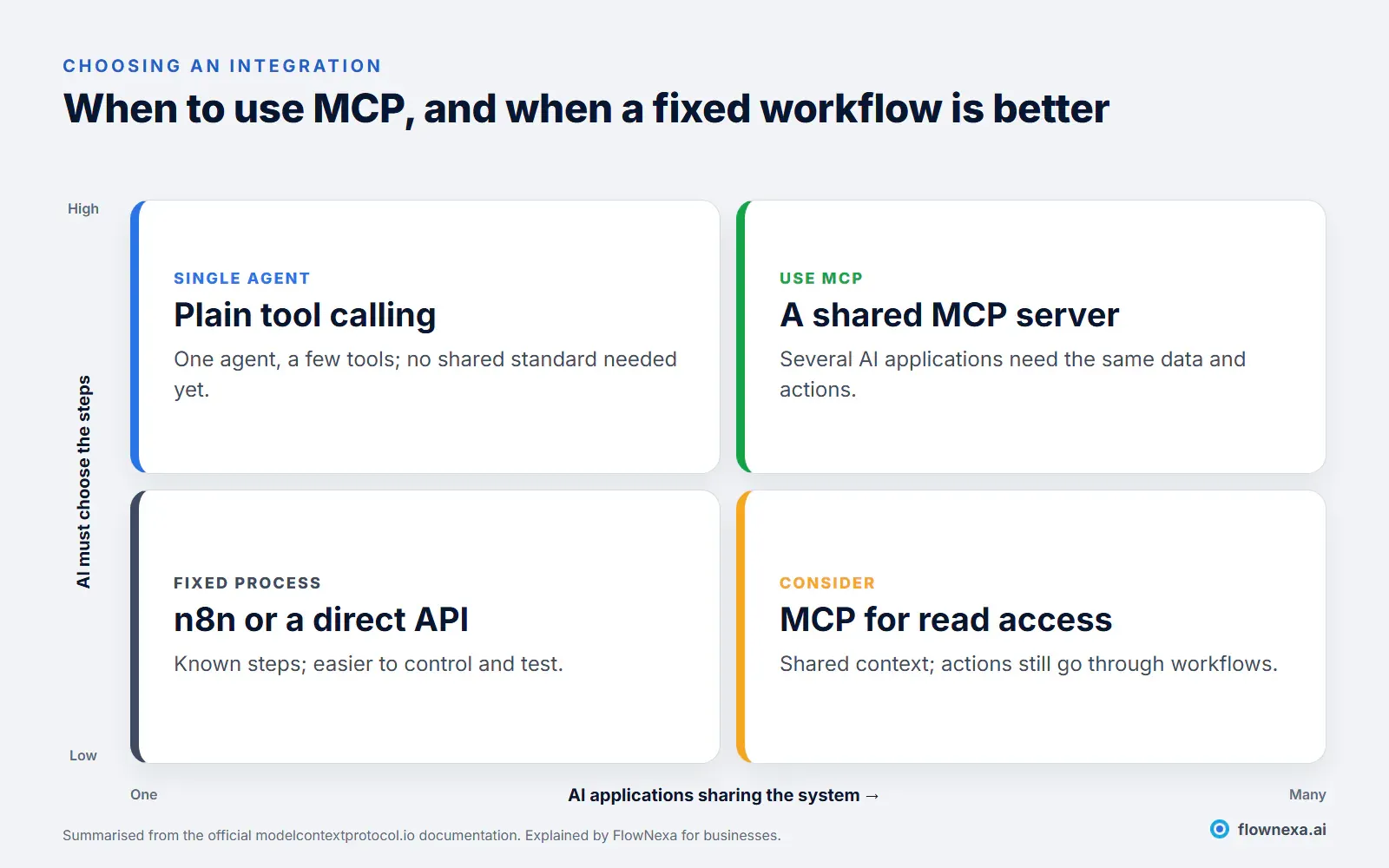
MCP is not something every business must have. Ask two questions:
1. Do several AI applications need the same system? If a staff chat assistant, a customer service agent, and an analytics tool all need CRM data, one shared MCP server avoids building three connections with three permission models.
2. Does the AI need to choose its own steps? If the process is always "receive email → extract details → open ticket → send confirmation", the steps are known. A fixed workflow is easier to test, predict, and hand over. Which processes should use n8n or AI agents goes deeper into this choice.
That gives four cases:
| Situation | Suggestion |
|---|---|
| One agent, a few tools, simple process | The platform’s own tool calling is enough; move to MCP as you grow |
| Several AI applications need the same data and actions | A shared MCP server with central permissions |
| Fixed steps that must be highly reliable | n8n or a direct API; AI handles only the language-understanding step |
| Shared context, but actions must be tightly controlled | MCP for read access; writes go through a checked workflow |
One benefit that is rarely mentioned: because MCP is an open standard, the connections you invest in are not locked to one AI model vendor. If you switch AI applications, your MCP servers still work as long as the new application supports MCP. That fits the principle of letting AI agents use multiple systems without centralising data.
Security
MCP security risks and how to reduce them
MCP makes connecting easier, and therefore makes granting access easier too. The MCP specification (version 2025-11-25) sets principles on user consent and control, data privacy, and tool safety, and acknowledges that the protocol cannot enforce them by itself; implementers must. Two lines from the tool safety principle are worth remembering:
- Descriptions of tool behaviour (such as annotations) should be considered untrusted unless they come from a trusted server.
- Hosts must obtain explicit user consent before invoking any tool.
The MCP security best practices page lists specific attacks. The ones most relevant to businesses:
- Confused deputy: an intermediary server uses its own authority on behalf of a client that should not have it. Mitigated with per-client consent and strict redirect URI checks.
- Token passthrough: a server accepts and forwards tokens that were not issued to it. The guidance says servers must not accept tokens not explicitly issued for them.
- SSRF: a server is abused to call internal addresses. Block private IP ranges, require HTTPS, and validate redirect targets.
- Local server compromise: installing an unknown MCP server on a staff laptop means running third-party code. Show the exact command before installation and run it in a sandbox.
- Overly broad scopes: grant permissions progressively and avoid "all access" tokens.
On top of that, every prompt injection risk still applies: content returned by a tool can carry planted instructions. See prompt injection and seven defence layers and designing a permission policy when an agent calls the wrong tool.
Rollout
An eight-step checklist for starting with MCP safely
- Start read-only. Your first MCP server exposes only resources and lookup tools. Add write actions once logging and approval exist.
- Authenticate per user. Prefer OAuth so the AI acts with the permissions of the person asking, not with one all-powerful service account for everyone.
- Narrow, expiring tokens. Each server gets its own credentials, kept in a secrets store, never in a config file on a personal laptop. The same principles as secure credential management in n8n.
- Install servers only from trusted sources. Read the code or use servers published by the software vendor itself; keep an allow-list.
- Review tool descriptions. The model reads them to decide what to do; vague or tampered descriptions can lead it astray.
- Human approval for risky actions. External emails, customer data changes, payments: the AI proposes, a person confirms.
- Log every tool call: who asked, which tool, which parameters, what happened, so you can trace incidents.
- A separate test environment. Test with dummy data before connecting real systems, in the spirit of guardrails before putting AI agents into production.
For software common in Vietnam, such as sales and accounting platforms, first check whether the vendor publishes an API and allows integration. Connecting AI to KiotViet, Haravan, Sapo, and MISA summarises what those platforms publish.
Q&A
Frequently asked questions
Does MCP replace APIs?
No. An MCP server usually calls the underlying system’s API. MCP standardises how AI applications discover and use those capabilities, so you do not rebuild the connection for each AI application.
Does a small business need MCP?
Usually not at first. With one chatbot or one automated process, a direct connection or an n8n workflow is simpler. MCP becomes worth considering as the number of AI applications and connected systems grows.
Is MCP secure?
The protocol has clear security guidance, but the specification states that it cannot enforce its safety principles itself. Security depends on the implementation: authentication, permission scopes, which servers are installed, and approval for risky actions.
How is MCP different from n8n?
n8n orchestrates a chain of pre-designed steps. MCP lets an AI application pick tools during a conversation. They work well together: an n8n workflow can be exposed as a tool through MCP, so the AI triggers a controlled process instead of doing every step itself.
Who owns MCP?
Anthropic open-sourced MCP in November 2024. According to the Linux Foundation’s announcement of 9 December 2025, MCP was one of the founding contributions to the Agentic AI Foundation, whose platinum members include AWS, Anthropic, Block, Bloomberg, Cloudflare, Google, Microsoft, and OpenAI.
Should we build our own MCP server for internal software?
You can, if the software has a stable API and someone will maintain the server. Start with a few read-only tools, write clear descriptions, test with dummy data, and put it through code review like any other software.
Sources
- MCP introduction and MCP architecture, official modelcontextprotocol.io documentation
- MCP specification, version 2025-11-25, security, trust, and safety principles
- MCP Security Best Practices, named attacks and mitigations
- Linux Foundation announcement of the Agentic AI Foundation, 9 December 2025
- Read and checked at the time of writing (November 2026); MCP is updated through dated specification versions, so check the latest one before you build
FlowNexa
Connect AI to your systems, with control
FlowNexa helps you choose the right integration (MCP, an n8n workflow, or a direct API) and design permissions, logging, and approvals before AI touches real data.
Connect AI to the business systems you already run.
n8n workflows and AI agents with guardrails.
Talk through the systems you want to connect.
