


Connecting AI to KiotViet, Haravan, Sapo, and MISA: What Works and What to Check First
What KiotViet, Haravan, Sapo, and MISA AMIS Accounting publish about APIs and webhooks, five AI scenarios ordered by risk, a safe integration architecture, and 10 technical questions to answer first.
Short answer: AI does not "read" sales or accounting software directly; it connects through the APIs and webhooks each platform provides. Haravan, Sapo, KiotViet, and MISA AMIS Accounting all publish documentation on APIs or webhooks, but with different scope. Start with read-only scenarios (prices, stock, reports), and only let AI write data (orders, vouchers) once approval, deduplication, and logging are in place.
Most Vietnamese SMEs run on a familiar sales platform and a familiar accounting package. When AI comes up, the natural questions are: can a chatbot answer with real stock levels, can it create orders, can it push vouchers to accounting?
The answer depends on three things: what API the platform publishes, whether your plan is allowed to use it, and how tight your own controls are. This article summarises what four popular platforms publish, which scenarios to pursue and which to hold off on, and a technical checklist before integrating.
FlowNexa is not an official partner of any platform named here. The information comes from public documentation at the time of writing and may change; confirm with your software vendor.
How it works
How does AI connect to sales and accounting software?
There are two main mechanisms:
- API (you call it): the AI system or workflow calls the software to fetch data (prices, stock, orders) or to create and update data. APIs always require authentication and usually have call limits.
- Webhook (it calls you): the software sends a notification when something happens, such as a new order, a paid order, or a new customer. The receiving system must respond quickly and verify that the notification came from the right source.
AI usually should not call the API directly. A safer approach is to place AI inside a workflow (for example n8n): the workflow handles API calls and fixed rules, while AI only handles steps that need language understanding, such as classifying requests, extracting details, or drafting replies.
Platforms
What do KiotViet, Haravan, Sapo, and MISA publish?
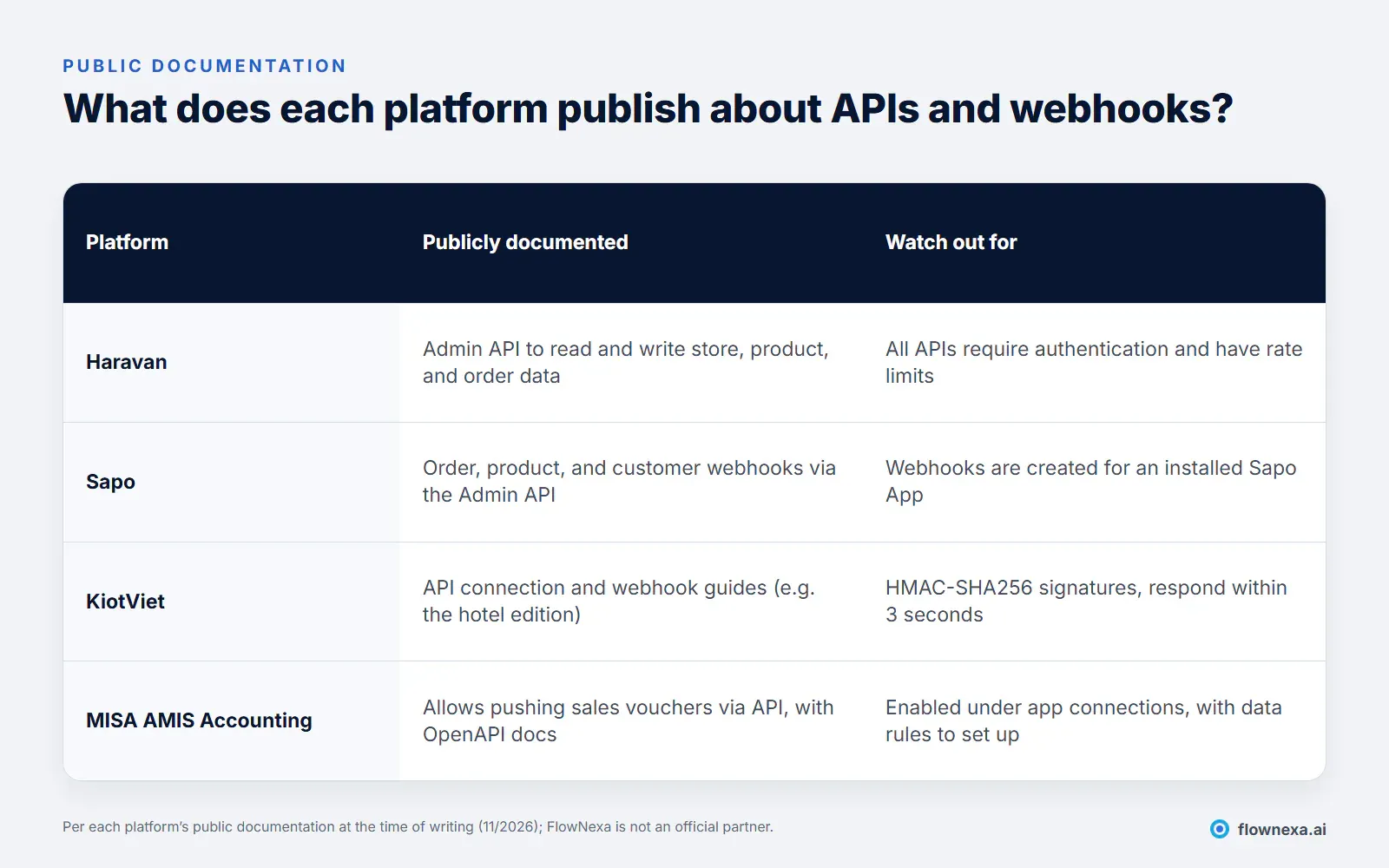
Details from each platform's public documentation:
- Haravan: its developer documentation describes an Admin API for reading and writing data about stores, products, orders, and more. All APIs require authentication and are rate limited.
- Sapo: its webhook guide lists events for orders (created, paid, cancelled, fulfilled…), products, customers, fulfillments, and refunds. Webhooks are managed through the Admin API; each needs a topic and a URL, and they are created for an installed Sapo App.
- KiotViet: publishes guides for API connections and webhook setup. In the hotel edition example, webhooks send booking, customer, invoice, and QR payment events as HTTP POST JSON with an
x-signatureheader using HMAC-SHA256; the receiving server must return 200 within 3 seconds. - MISA AMIS Accounting: its help centre explains how to allow other software to push data via an API connection, set data rules, and sync sales vouchers, with a link to OpenAPI documentation for developers.
The common point: public documentation is not a promise that your plan can use it. Before planning, ask your software vendor whether your current plan includes API access, what the call limits are, who authorises applications, and whether there is a test environment.
Scenarios
What should AI do first, and what should wait?
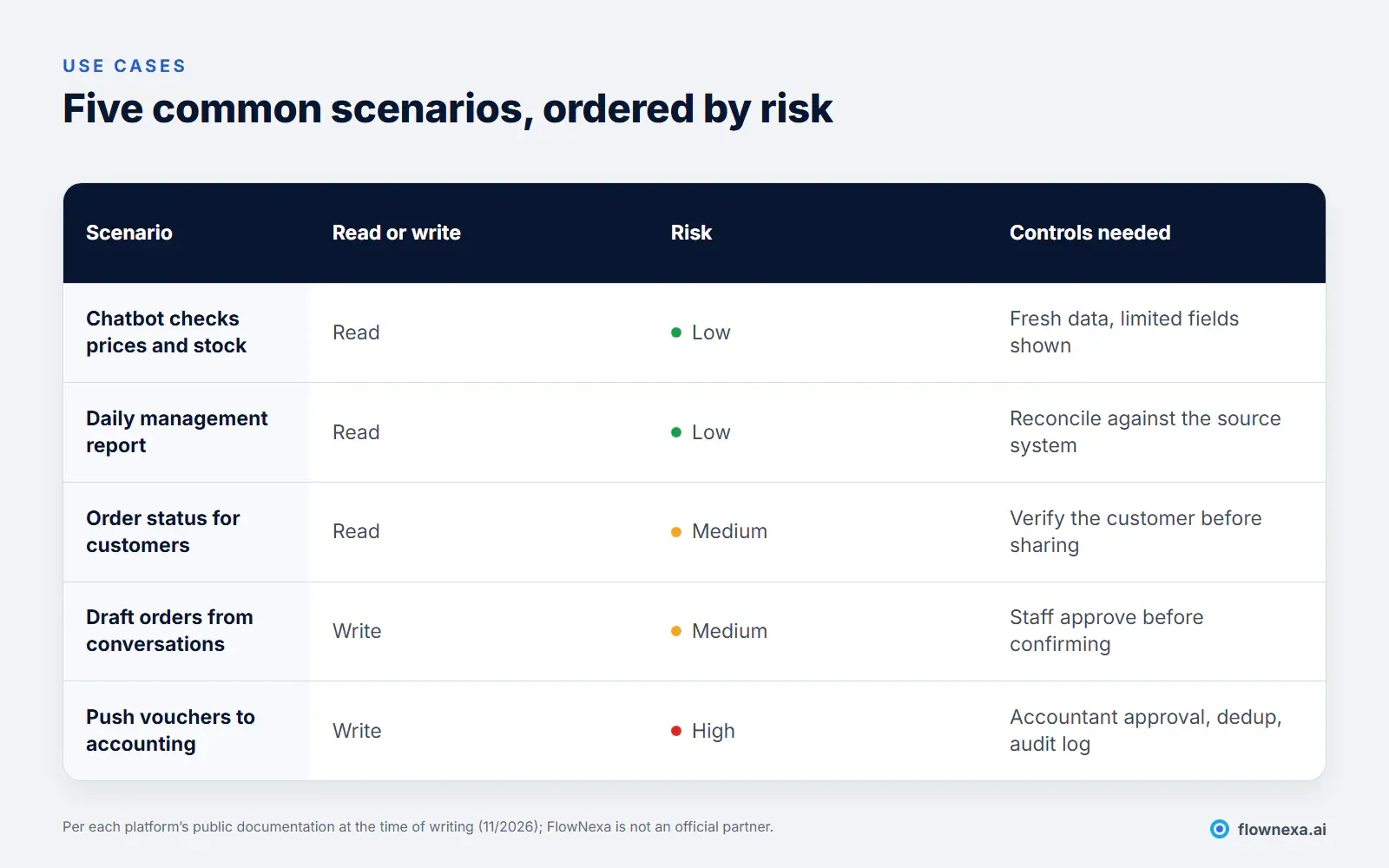
Read-only scenarios are the best starting point:
- A chatbot that checks real prices and stock. Instead of "please contact us to check availability", the chatbot queries the API and answers immediately. Limit the fields shown (for example "in stock" rather than exact quantities) and check that data updates in time, especially when selling on several channels; see multichannel orders and inventory.
- A daily management report. Combine revenue, orders, and receivables from sales and accounting into one summary; see automating daily management reports from multiple sources.
- Order status for customers. Useful, but verify the person asking owns the order before sharing anything, to avoid exposing another customer's address or phone number.
Write scenarios need an approval step:
- Draft orders from conversations. AI drafts an order from what the customer wrote; staff check and confirm it. Do not let AI confirm orders on its own.
- Pushing vouchers to accounting. This is the highest-risk scenario because it directly affects the books and taxes. It needs accountant approval, voucher deduplication, and a log of every change; see AI misreading invoices: controls before accounting.
Architecture
How do you design a safe integration flow?
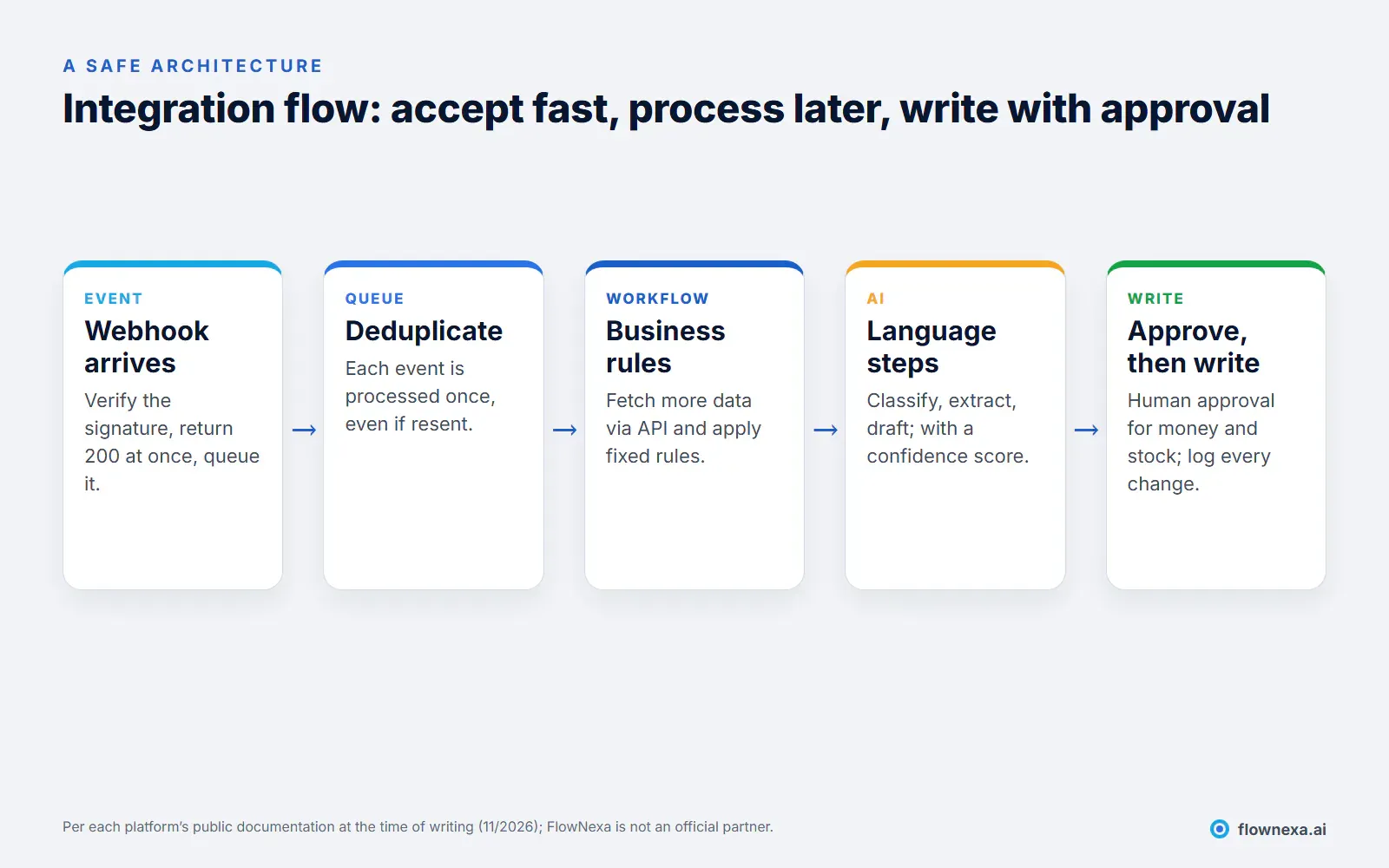
Five technical principles keep an integration reliable over time:
- Accept fast, process later. Webhooks may require a response within seconds (KiotViet states 3 seconds for its hotel edition example). Verify the signature, return 200 immediately, and queue the event; calls to AI or other APIs happen afterwards.
- Process each event once. Webhooks can be resent when the network is slow or something fails. Use the event ID to deduplicate; see processing duplicate webhooks only once and retrying without duplicate data.
- Least privilege. The integration app gets only the permissions it needs. A chatbot checking stock does not need permission to create payment vouchers. See designing permissions for AI agents.
- Protect API keys. Tokens and secrets belong in a credential store, not in source code or spreadsheets; see secure credential and API key management in n8n.
- Do not centralise everything. AI only needs to fetch the data for each question through the API, rather than copying the whole sales database; see AI agents using multiple systems without centralising data.
Example
A step-by-step example: the chatbot answers “is this in stock?”
Suppose a shop sells through its website and Zalo and manages stock in sales software with an API for reading products (an illustrative example, not tied to a specific platform):
- The customer asks: "Is the blue jacket in size L available?"
- AI understands the question: it extracts the product "jacket" and the attributes "size L, blue". If it is unsure which model is meant, the chatbot asks rather than guesses.
- The workflow calls the API: it finds the product by name and attributes and reads the stock of the matching variant. The workflow does this with fixed rules; AI is not allowed to compose arbitrary queries.
- Display rules apply: above a safety threshold (say 3), reply "in stock"; below it, reply "almost gone, would you like us to hold one?"; if out of stock, suggest another colour that is available.
- Hand off when needed: if the customer wants to reserve an item or order in bulk, pass to staff with a summary.
- Log it: store the question, the product checked, and the answer for review if a complaint comes in.
Only step 2 needs AI. The rest is clear business logic that is easy to test, which is why this scenario is low risk with immediate value: customers get an answer within seconds, even outside business hours.
Checklist
10 technical questions to answer before integrating
- Does your current software plan include API and webhook access?
- Is the data you need (prices, stock, orders, vouchers) in the public API?
- Who in the business authorises the application, and what do those permissions include?
- What are the API call limits, and are they enough at peak times?
- How do webhooks prove where they came from (signature, secret key)?
- How quickly must the receiver respond, and are failed notifications resent?
- Is there a test environment that does not touch real data?
- Which write operations need human approval, and who approves them?
- When the integration fails, who is alerted and what is the process?
- Where is the change log kept, and for how long?
Q&A
Frequently asked questions
Can a chatbot answer with real stock levels from my sales software?
Yes, if the software provides an API for reading stock and your plan can use it. Consider showing "in stock / out of stock" rather than exact quantities, and check update delays when selling on several channels.
Can AI create orders in my sales software?
Technically yes, if the API allows writing orders. But have AI create draft orders that staff confirm, at least at first, because errors in price, quantity, or address affect customers directly.
Should AI push vouchers straight into accounting software?
Only with accountant approval, deduplication, and a change log. Accounting vouchers affect the books and tax obligations, so this scenario needs the tightest controls.
Is FlowNexa a partner of KiotViet, Haravan, Sapo, or MISA?
No. This article is based on the platforms' public documentation. In a deployment, FlowNexa works with the APIs the business is authorised to use and recommends confirming API scope with the software vendor.
Can you integrate without an API?
Temporary approaches such as scheduled file exports are possible, but less reliable and harder to control. Avoid automating by simulating clicks in the user interface for money and stock data, because it breaks when the interface changes and is hard to audit.
Which scenario is the most sensible place to start?
A daily management report or a chatbot that checks prices and stock: read-only, low risk, and immediately useful. Once the read flows are stable, extend to draft orders and approved vouchers.
Sources
- Haravan Omni APIs, Haravan developer documentation
- Sapo Webhook, Sapo support centre (in Vietnamese)
- Webhook setup (hotel and guesthouse edition), KiotViet user guide (in Vietnamese)
- Connecting other applications via API, MISA AMIS Accounting help centre (in Vietnamese)
- All as of the time of writing (November 2026); actual API scope depends on each business's plan and version
FlowNexa
Connect AI to the systems you already use
FlowNexa reviews the APIs of your sales and accounting software, proposes read-only scenarios first, and designs approval steps for write operations.
Connect AI to PMS, CRM, ERP, and line-of-business software.
Workflows with AI steps, deduplication, and exception handling.
Management reports combined from several systems.
Talk through your current software and processes.
