


Workflow Approval Versioning: Execute the Request That Was Actually Approved
Bind approval to an exact revision, handle edits while a request waits, and reconcile downstream effects when the workflow cannot tell whether an action succeeded.
Short answer: Bind approval to an immutable revision of the request. Record the execution payload, who approved it, and when the approval expires. Recheck the conditions just before writing to the destination system. A change that affects the business outcome requires a new decision. If a previous call has an unknown outcome, reconcile it before trying again.
Take this illustrative example. A sales manager approves a VND 24 million quote. A salesperson later changes the recipient and payment terms. If the workflow resumes after a wait and reads the latest editable record, it can send a quote the manager never reviewed. The design below applies to quotes, purchase requests, document dispatch, and CRM changes that require review.
Approval scope
Define what the reviewer is actually agreeing to
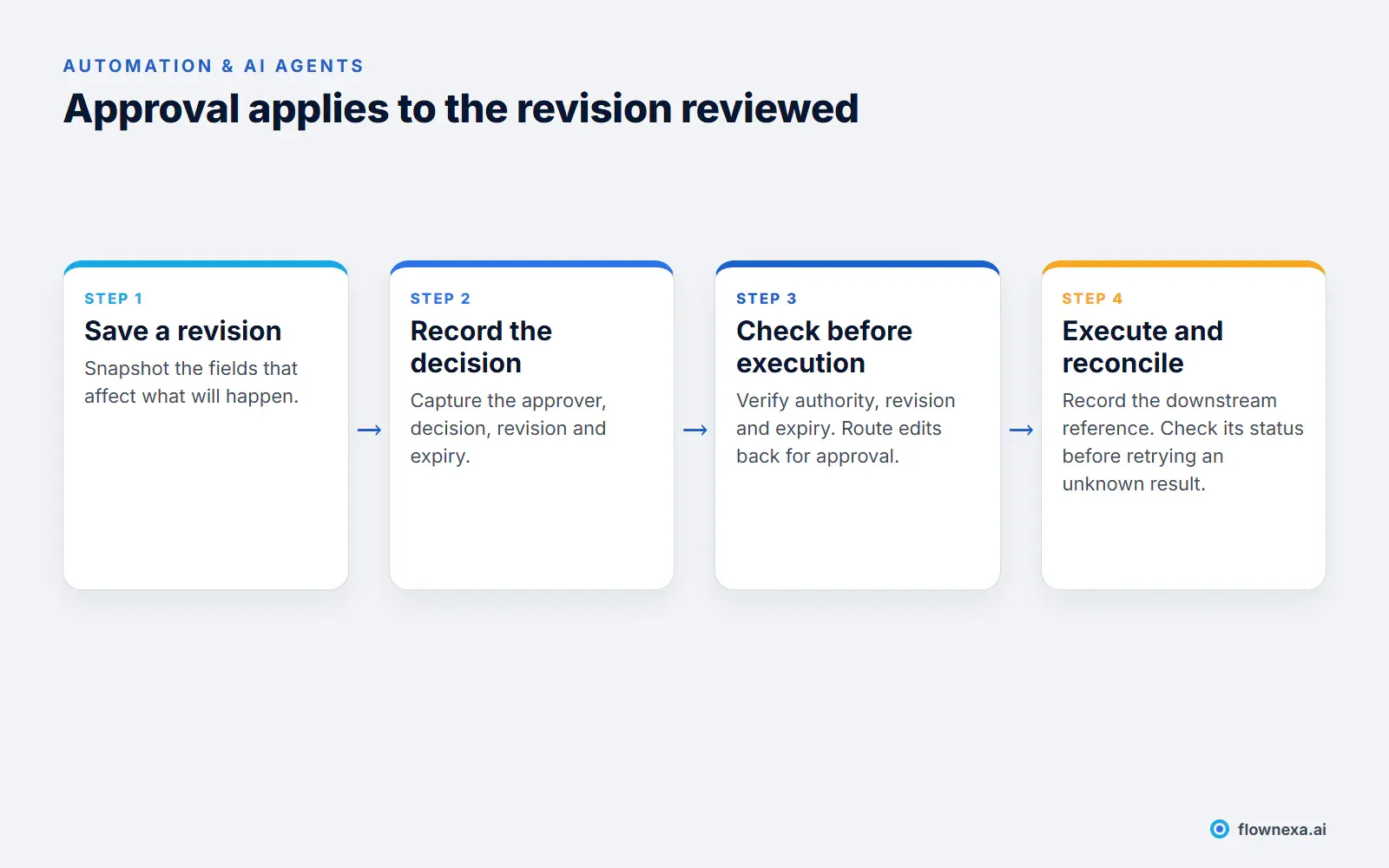
When sending a request for review, save a read-only revision with the request ID, revision number, action, destination, and fields that determine the business outcome. For a quote, those fields might include the legal entity, recipient, line items, total, currency, discount, terms, and attachments. If attachments can be overwritten, retain the exact version or reference an immutable copy. The reviewer should see the same payload the workflow will use for execution.
Separate business fields from internal tracking fields. Changing an internal watcher might be harmless. Changing the recipient, attachment, amount, or terms requires a new revision. Let the process owner define this list. If a reviewer can approve a range of prices or delivery dates, display those bounds in the review and check them again at execution. When the approved bounds do not cover a change, obtain a new decision.
At a minimum, an approval record should include the request and revision, decision, reviewer identity, timestamp, expiry, and rejection reason where relevant. Link it to the revision and the evidence of execution. A digest of canonical content can help check integrity. It cannot authenticate the reviewer or replace access control and audit records. For timing and escalation policies, see invoice approval with an SLA.
Lifecycle
Track approval separately from execution
| State | Transition condition | Workflow behaviour |
|---|---|---|
| Pending approval | Revision frozen and reviewer assigned | Show the target, proposed change, consequences, and deadline |
| Approved | Authorised reviewer, matching revision, valid decision | Queue the exact approved revision |
| No longer valid | Revision superseded, decision expired, or request withdrawn | Stop the old job and record the reason |
| Executing | Worker has conditionally claimed the operation | Use the approved payload for the downstream action |
| Needs reconciliation | Destination may have processed the request but the result is uncertain | Look up the operation reference or idempotency key |
| Completed | Destination effect is verified | Record the result and notify people of the actual outcome |
Set a policy for simultaneous reviewers. Depending on the process, the first valid decision may win, several reviewers may need to agree, or reviewers may take turns. Decide how reassignment works if an approver changes roles while a request waits. Email or chat can deliver the notification. Capture the decision through an authenticated interaction that explicitly shows the revision. Opening a link can happen without intent, including through automated scanning. An n8n Wait node can pause and resume execution. Keep a separate durable business record that allows the current approval and state to be inspected.
Claim the operation with a conditional update that checks its current state so two workers cannot act on the same job. If a worker stops after a claim, define how the job moves to reconciliation. A write to a downstream system usually cannot share the same database transaction as your own state update. Keep a status for cases where the downstream result has not been established. See the guide to verifying business outcomes in automation.
Execution
Recheck conditions when the action is about to take effect
Load the approved revision immediately before execution. Verify that the request is still active, the approval is still valid, the action is in scope, and the destination state allows the change. For a CRM update, supply the record version the reviewer saw if the destination supports conditional updates. A version mismatch can surface a concurrent edit. Pause and route the request to its owner for a decision on whether to rework and approve it again. An approval may remain historically valid even after an action ceases to be appropriate.
Assign a stable idempotency key to one action on one revision, for example using the request ID, revision, and action type. Reuse the same key on retries. Use an API that documents idempotency or a stable reference you can look up in the destination. A timeout can arrive after the destination has made the change. If a lookup cannot resolve the outcome, put it in a reconciliation queue. For a destination with neither idempotency nor reliable lookup, a human may need to verify the outcome before another attempt. See retrying n8n without duplicate data and handling duplicate webhook delivery.
An operations log should answer three questions: who approved which revision, which execution attempt was accepted, and where the result can be checked. Measure time awaiting a person separately from time spent processing the job. That distinction helps teams work out whether to adjust the approval SLA or address an integration fault. Limit access to recipient details, financial documents, and quoted terms in the logs.
Define the last point at which a request can be withdrawn. For example, a queued revision can be edited until a worker conditionally claims it. After that point, the interface shows that sending is in progress and records any correction request separately. If an edit must always stop an effect that has yet to occur, the destination needs a suitable condition at write time or a cancellation operation your team can verify. Reading the request again immediately before an external call still leaves a gap between the check and the write.
Distinguish a revision superseded before the claim from a withdrawal requested after the claim. That distinction tells staff whether they can submit a new revision immediately or must first reconcile the earlier operation. Test both sequences on the same kind of record, checking the workflow state and what each user sees.
Worked example
Test a quote that changes while waiting to be sent
- A salesperson submits revision 1 with a total of VND 24 million. A sales manager approves it. The send operation is queued and has not been claimed.
- The salesperson changes the recipient and payment terms. The system creates revision 2 and invalidates pending execution of revision 1.
- A worker receives the old job. The conditional check detects that the revision was superseded. It records the reason without sending the quote.
- The manager approves revision 2. The send call then times out. Operations looks up the issue reference and finds that the destination recorded a result. The workflow stores the existing reference and completes.
- If revision 1 had already been sent before the change, its evidence would be retained. The team can issue a correction under its normal process and obtain a decision for any new action.
Before running a pilot, test a duplicate decision, a late decision, an attachment edit, competing workers, and a timeout after a successful write. During the first two weeks, track requests superseded after approval, wait time by reviewer role, unknown outcomes, and reconciliation time. Assign an owner for unresolved cases, agree on when to hand them off, and define which evidence the reviewer should inspect. If AI drafts the proposal or selects a possible action, read the guide to production guardrails for AI agents.
Q&A
Frequently asked questions
Does a change to an internal note require another approval?
That depends on whether the note changes what will be executed or appears in the material the customer receives. Identify fields that invalidate approval before the workflow goes live.
Can we approve by email?
Email can take an authorised reviewer to a screen that shows the revision and captures an authenticated decision. Opening or forwarding the email does not record that decision.
What if approval expires while a job is in the queue?
Check expiry just before the effect occurs. Stop the job and request a fresh decision from an authorised reviewer if the action is still needed.
Does an idempotency key automatically prevent duplicate sends?
Only where the receiving system uses the key to identify the same operation. If the integration has no such support, use another reliable reference or reconcile an unknown outcome manually.
Does this pattern work with AI-drafted quotes?
Yes. Show the business fields the reviewer needs, validate limits and policy against the source systems, and retain the exact content that was approved.
Sources
- n8n Wait node documents the mechanics of pausing and resuming an execution.
- AWS Builders’ Library: Making retries safe with idempotent APIs describes the role of a caller-provided identifier in safe retries. The quote scenario is illustrative.
FlowNexa
Design approval controls for your workflow
Define reviewable fields, execution states, change handling, and evidence that the destination recorded the intended result.
