


AI Chatbots on Zalo OA: Requirements, Costs, and Limits to Know Before You Deploy (2026)
From 1 June 2026, only the Zalo OA Growth and Comprehensive plans unlock the API for chatbots. Verification requirements, plan prices, the 48-hour and 7-day rules, total cost, and a deployment checklist.
Short answer: To run a third-party AI chatbot on a Zalo OA in 2026, a business needs a verified OA, the Growth plan (Tăng trưởng, 2,500,000 VND a year including VAT) or the Comprehensive plan (Toàn diện) to unlock the API, and a linked Zalo Business Solutions account. A chatbot that replies as soon as a customer writes always stays inside the free 48-hour window, but proactive messages via the API can only be sent within 7 days of the customer's last interaction.
Zalo is the messaging app Vietnamese customers know best, so many businesses want a chatbot on their Zalo OA even before their website. What few realise is that from 1 June 2026, Zalo introduced new OA service plans, and not every plan lets an external chatbot connect. Pick the wrong plan and the chatbot will not run, even if the chatbot provider has finished its setup.
This article brings together the requirements, costs, and limits from Zalo's official pricing and guides so you can budget and set expectations correctly before rolling out. Zalo's policies can change; check the source pages at the end when you read this.
How it works
How does an AI chatbot connect to a Zalo OA?
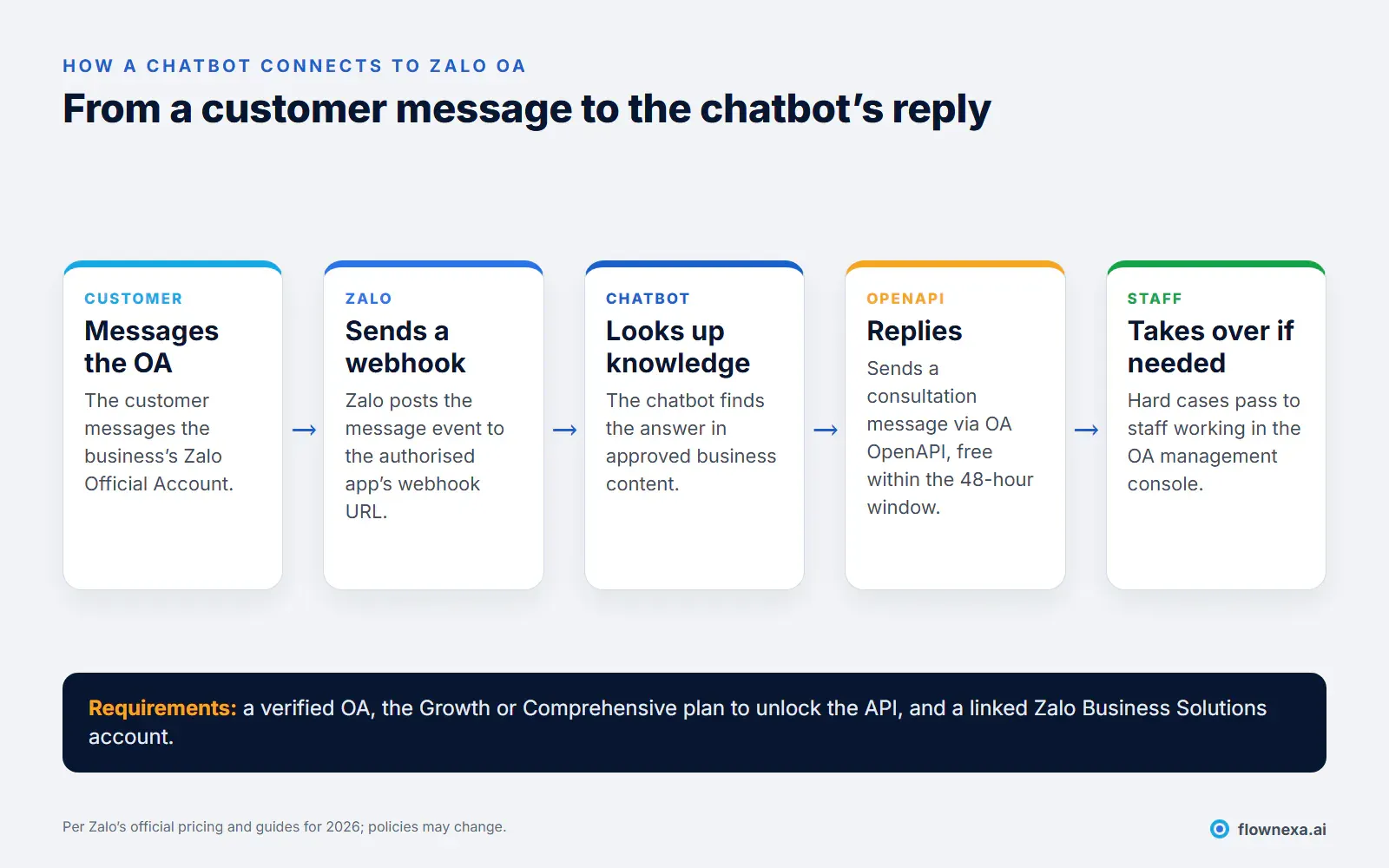
A third-party chatbot does not "run inside" Zalo. It works through two mechanisms Zalo provides to authorised apps:
- Webhook: when a customer messages the OA, Zalo sends an HTTP request containing the message to the webhook URL the app registered on Zalo for Developers.
- OA OpenAPI: the chatbot sends its reply back to the customer as a consultation message.
Because everything goes through the API, the OA's service plan determines whether the chatbot can work at all.
Requirements
What does a business need to prepare first?
According to Zalo's official pricing page, to buy a plan with API access and connect a chatbot, a business needs:
- A verified OA. The price list applies to OAs that have completed verification and been approved by Zalo. Unverified OAs cannot buy these plans.
- A Zalo Business Solutions (ZBS) account. The OA must be linked to a ZBS account with a topped-up balance before buying a plan.
- The right admin roles. The buyer needs OA admin (or plan management) rights and a senior admin, admin, or editor role on the ZBS account.
- The Growth or Comprehensive plan. According to the pricing FAQ, API integration is only available on these two plans.
- An authorised app. The chatbot provider's app is granted permission to receive events and send messages for the OA. Growth allows 3 authorised apps; Comprehensive has no limit.
If you do not have an OA yet, complete verification before signing a chatbot contract: it is often the slowest step and outside the chatbot provider's control.
Zalo-side cost
Which Zalo OA plan does a chatbot need, and what does it cost?
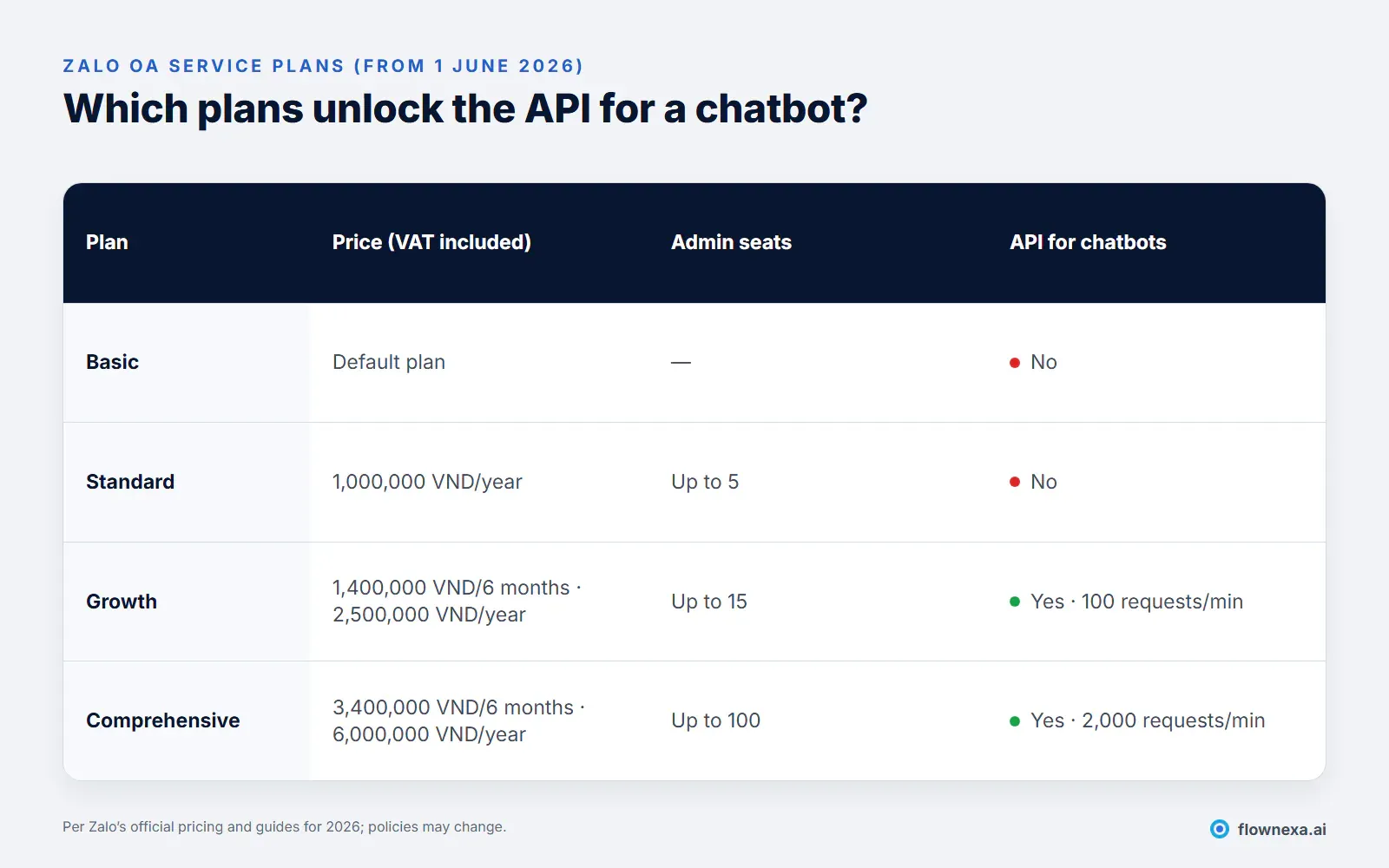
Other details in the official price list worth noting (the official Vietnamese plan names are Cơ bản (Basic), Tiêu chuẩn (Standard), Tăng trưởng (Growth), and Toàn diện (Comprehensive)):
- Prices include 10% VAT and apply from 1 June 2026.
- Monthly quota for consultation messages outside the 48-hour window: Growth and Comprehensive include monthly quotas (500 and 2,000 messages). Beyond the quota, each message costs 55 VND.
- Zalo's built-in chatbot scenarios: Growth includes chatbot and automation with 10 scenarios, Comprehensive 50. These are Zalo's scripted chatbots, not an AI chatbot that answers from your business documents.
- No refunds and no transfers to another OA. You can switch plans at any time, but the old plan is cancelled immediately and unused quota does not carry over. You cannot cancel immediately; you can only turn off auto-renewal, and the OA drops to Basic on expiry.
Reading the price list, most small and mid-sized businesses only need the Growth plan to run an AI chatbot: it has the API and enough admin seats (15) for staff to take over conversations. Comprehensive suits very high traffic or several connected apps at once.
Messaging rules
Which messages can a chatbot send, for how long, and at what cost?
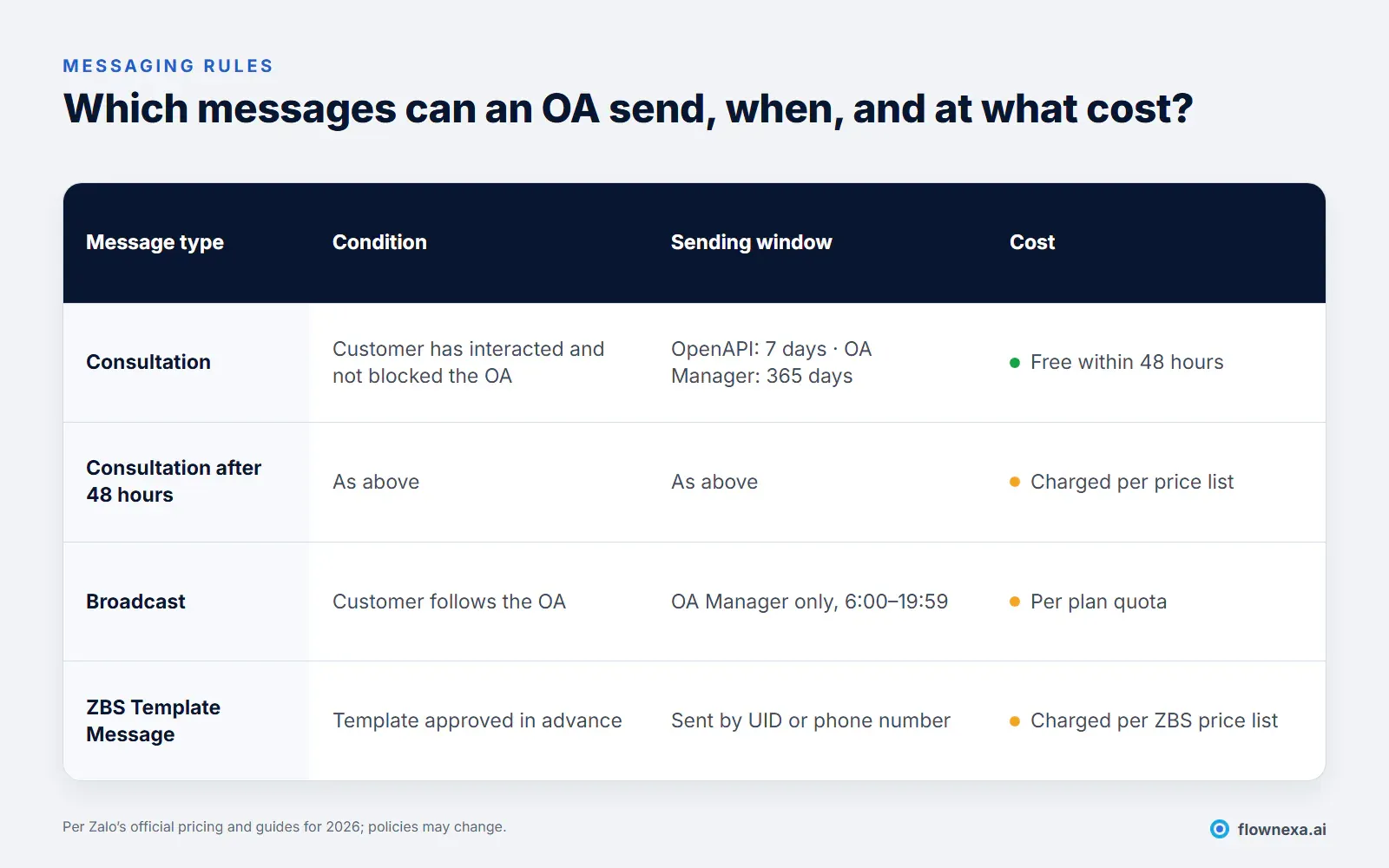
Three rules directly shape how a chatbot should be designed:
- The free 48-hour window. Consultation messages sent within 48 hours of the customer's last interaction are free. A chatbot replying as soon as the customer writes always stays inside this window, so most conversations incur no messaging fee.
- OpenAPI can only send within 7 days. Chatbots and other systems connected through the API can only send consultation messages within 7 days of the last interaction, while staff using the OA management console can send within 365 days. So "follow up after two weeks" scenarios cannot run automatically through the API.
- Broadcasts are not for chatbots. Broadcast messages can only be sent from the OA management console on the web, between 6:00 and 19:59, to people who follow the OA.
If you need to send transactional or after-sales notifications by phone number (order confirmations, appointment reminders), the right message type is the ZBS Template Message: templates must be approved in advance and are charged per the ZBS price list.
Total cost
What does it cost in total to run an AI chatbot on Zalo OA?
A Zalo chatbot budget has three independent parts:
| Item | Paid to | Note |
|---|---|---|
| Zalo OA plan (Growth or higher) | Zalo | 2,500,000 VND per year including VAT for Growth |
| Messages outside 48 hours, ZBS Template Messages | Zalo | Only when sending proactively or sending template notifications |
| AI chatbot service and Zalo channel setup | Chatbot provider | Ask whether the Zalo channel is included or priced separately |
With FlowNexa, the Chatbot Standard plan (8,900,000 VND per year, excluding VAT) covers the website chatbot; the Zalo OA channel is configured and quoted per deployment and shares the same knowledge base as the website. The business owns its OA and pays the OA plan directly to Zalo. See how much does an AI website chatbot cost? to compare the chatbot-side items.
Design
How do you make a Zalo chatbot work well?
- Reply within seconds. Zalo users message businesses the way they message friends; replying immediately keeps them engaged and stays inside the free window.
- One knowledge base for every channel. Prices and policies on Zalo must match your website and Messenger. Maintain one source of content instead of three separate sets of answers.
- A clear handoff to staff. When the chatbot is unsure or the customer asks, pass the conversation to staff in the OA management console with a summary so the customer does not repeat themselves. See designing the handoff.
- Keep context when customers switch channels. A customer may ask on Facebook and then message on Zalo; see preserving context across channels.
- Ask for consent before collecting details. When the chatbot asks for a phone number or address, explain the purpose and record that the customer agreed.
- Do not use the chatbot to spam. The 7-day rule and the fee for messages outside 48 hours send a clear signal: Zalo wants OAs to answer customers, not to message them in bulk.
Limits
Which limits should you know about in advance?
| Limit | Impact | How to handle it |
|---|---|---|
| API only on Growth and Comprehensive | Basic and Standard cannot run an external chatbot | Buy the right plan before go-live |
| OpenAPI can only send within 7 days | No automatic follow-up after a week | Staff follow up via the OA console, or use ZBS Template Messages |
| Messages outside 48 hours are charged | Heavy proactive messaging adds cost | Prioritise replying within the 48-hour window |
| API rate limit (100 requests/min on Growth) | Sudden traffic spikes may slow replies | Monitor traffic and upgrade when needed |
| No refunds, no plan transfers | A wrong plan choice is hard to undo | Check requirements carefully before buying |
Checklist
Checklist before putting a chatbot on your Zalo OA
- The OA is verified and approved by Zalo
- The OA is linked to a Zalo Business Solutions account with a balance
- The Growth or Comprehensive plan has been purchased
- The chatbot provider's app is authorised to receive events and send messages
- Chatbot content on Zalo shares one source with the website
- Staff have a process for taking over conversations in the OA console
- The consent wording for collecting phone numbers and addresses is agreed
- You know how the Zalo channel is priced in the chatbot contract
If you are unsure whether to start with Zalo, your website, or Messenger, read which channel to start a chatbot on and what data a business needs for an AI chatbot.
Q&A
Frequently asked questions
Can the Zalo OA Standard plan run an AI chatbot?
Not a third-party one. Under the price list effective 1 June 2026, API integration is only available on the Growth and Comprehensive plans. Standard suits businesses where staff reply manually in the OA console.
Does a chatbot replying on Zalo incur messaging fees?
Consultation messages sent within 48 hours of the customer's last interaction are free. A chatbot replying as soon as the customer writes always stays inside that window. Fees only apply to messages sent outside 48 hours once the plan's quota is used up.
Can a chatbot send a follow-up a few weeks later?
Not through the API. OA OpenAPI can only send consultation messages within 7 days of the customer's last interaction. After that, staff can message from the OA console (within 365 days), or the business can use approved ZBS Template Messages.
Can I attach a chatbot to a personal Zalo account?
A business chatbot should run on a Zalo Official Account, which has an official API, webhooks, staff permissions, and clear messaging policies. Automating a personal account is not a method Zalo supports for businesses.
How is Zalo's built-in chatbot different from a provider's AI chatbot?
The Growth plan includes scripted chatbot scenarios (10 of them), suited to menus and fixed answers. An AI chatbot understands free-form questions and answers from your business documents, with staff handoff when needed. The two can complement each other.
Should I buy a 6-month or a 1-year Zalo OA plan?
The yearly plan is about 11–12% cheaper per the price list, but there are no refunds. If you are trialling a chatbot, the 6-month Growth plan lowers the risk; switch to yearly once you have data.
Sources
- OA service price list, Zalo Business Solutions (effective 1 June 2026, in Vietnamese)
- Overview of message types on Zalo Official Account, Zalo OA (effective 1 January 2026, in Vietnamese)
- Official Account message webhook event, Zalo for Developers
- FlowNexa pricing, Chatbot Standard plan scope at the time of writing (November 2026)
FlowNexa
Put an AI chatbot on your Zalo OA
FlowNexa checks your OA requirements, recommends the right plan, and configures a chatbot that shares one knowledge base with your website.
Website, Zalo OA, and Messenger sharing one knowledge base.
Standard plan scope and separately quoted channels.
Talk through your OA and message volume.
