


Business Email Compromise: How to Stop Fake Payment-Request Emails
Five fake payment-request scenarios, a five-step verification process before any payment, Microsoft 365 defences (MFA, DMARC, impersonation protection), and what to do in the first hour after a loss.
Short answer: Business email compromise (BEC) is when fraudsters pose as a supplier, partner, or executive to get your finance team to send money to their account, usually citing a "change of bank details" or an "urgent payment". The most effective defence is not software but process: every request to change payee bank details or make an urgent transfer must be verified through the phone number already on file (never one from the email) and approved by a second person. Technical layers (MFA, SPF/DKIM/DMARC, impersonation protection in Microsoft 365) reduce how many fraudulent emails get through, but they cannot stop a case where a partner’s real mailbox has been taken over.
This article is for business owners, finance leads, and the people who run IT in small and mid-sized businesses.
Scale
How much damage does BEC do?
The most complete public figures come from the FBI’s Internet Crime Complaint Center (IC3). They are based on complaints filed in the United States but describe a fraud that happens in every country:
- 2025: IC3 received 24,768 BEC complaints with about US$3.05 billion in reported losses, second among online fraud types by loss.
- 2024: 21,442 complaints and about US$2.77 billion.
- October 2013 to December 2023: according to the IC3 alert "The $55 Billion Scam", exposed BEC losses inside and outside the US were about US$55.5 billion across more than 305,000 incidents.
- AI is already involved: the 2025 report notes that businesses reported more than US$30 million in losses to BEC scams involving AI, such as text generators writing executive-style emails or cloned voices requesting payments by phone.
Small and mid-sized businesses are attractive targets because one person often receives the email, updates supplier details, and initiates the payment. No malware or advanced skills are needed; just a convincing email at the right moment.
Scenarios
Five common BEC scenarios and their warning signs
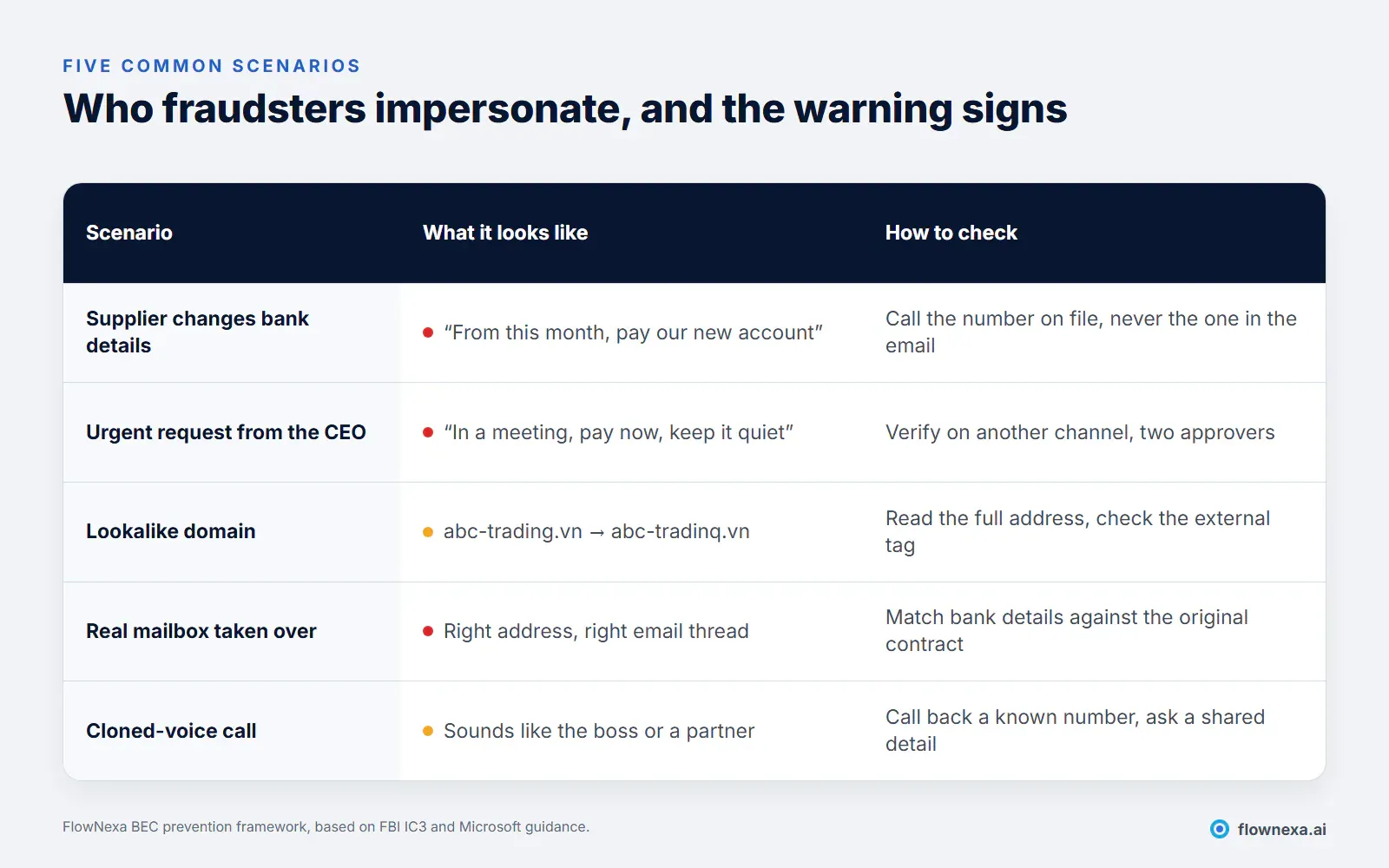
- A supplier "changes bank details". The email says payments should go to a new account from this cycle on, often citing an audit or a new bank. This is the most common scenario for businesses with many suppliers.
- The "CEO" needs an urgent transfer. A short, urgent email stressing secrecy ("we are negotiating, tell no one"), sent while the executive is travelling or after hours.
- A lookalike domain. The sender address differs from the real domain by one character or an added hyphen. On a phone, the display name easily misleads because the full address is hidden.
- A real mailbox taken over. The fraudster logs into a partner’s real mailbox, or one of your own staff’s, reads the thread, and steps in just as an invoice is due. The email comes from the right address and passes every technical check.
- A cloned-voice call. The email is followed by a "confirmation" call in a voice that sounds like the executive or partner. The IC3 2025 report explicitly mentions voice cloning used to request payments.
Scenario 4 is why you cannot rely on technology alone: when the email truly comes from the real mailbox, filters have nothing to block. Only independent verification catches it.
Process
The most important layer: verification before any payment
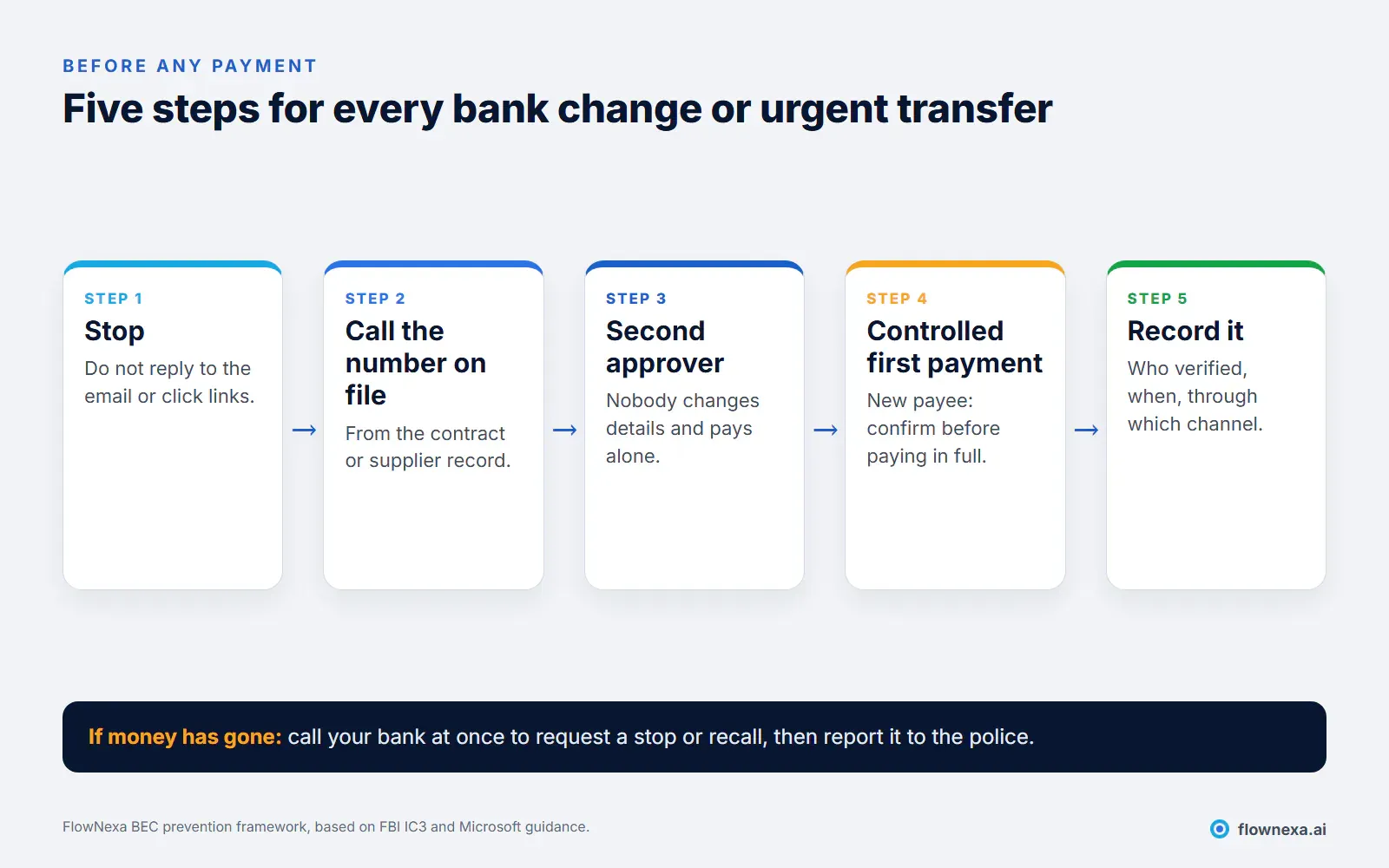
Apply this to every request to change payee bank details, add a new payee, or make an unscheduled urgent transfer:
- Stop. Do not reply to the email, click its links, or call any number it contains.
- Call the number on file. Use the number from the contract or the supplier record created earlier. IC3 recommends verifying account changes through a secondary channel.
- Second approver. The person who changes supplier details is not the person who approves the payment. Above a threshold, add another approval level.
- Controlled first payment. For a new payee, confirm through a known channel that the partner received it before sending further payments.
- Record it. Who verified, which number they called, and when. The record helps tracing and supports you when dealing with the bank.
This process is cheap, needs no software, and still works when every technical layer fails. If you already have an invoice approval flow, attach the verification step to it; invoice approval with SLAs and no bottlenecks suggests a design. When AI reads invoices, "bank details differ from the record, so stop for a human" should be one of the first controls, as in controls before AI-read invoices reach accounting.
Technology
Technical layers in Microsoft 365: fewer fraudulent emails getting through
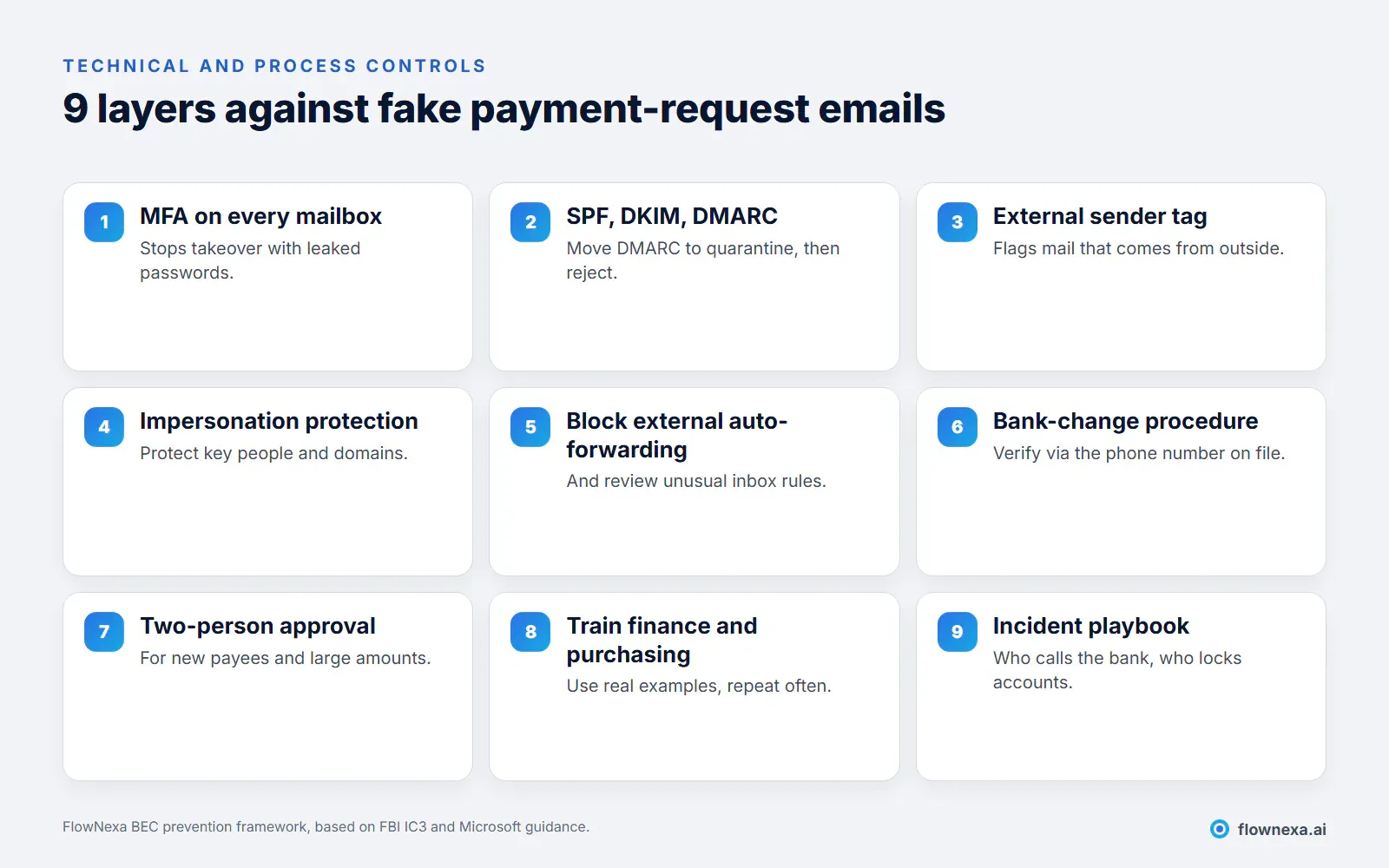
Technical layers reduce how many spoofed emails reach inboxes and how likely your own mailboxes are to be taken over:
1. MFA on every mailbox. Most mailbox takeovers start with a leaked password. Turn on multi-factor authentication for every account, including shared and executive accounts. Microsoft 365 security settings after deployment has the full list.
2. SPF, DKIM, DMARC. These let receivers check that email using your domain really came from you. Microsoft recommends a three-step DMARC rollout: start with p=none and monitor, move to p=quarantine, then p=reject, monitoring reports at each step; pct= can phase in enforcement gradually. The goal is p=reject for every domain and subdomain. Step-by-step: SPF, DKIM, and DMARC when business email lands in spam. Note that DMARC protects your domain from spoofing; it does not block lookalike domains fraudsters register themselves.
3. Anti-spoofing and impersonation protection. According to Microsoft’s documentation, every Microsoft 365 cloud mailbox gets basic anti-phishing features such as spoof intelligence, the first contact safety tip, and unauthenticated sender indicators. User and domain impersonation protection, along with mailbox intelligence, is available only in Microsoft Defender for Office 365. Microsoft 365 Business Premium includes Defender for Office 365 Plan 1; Business Standard does not. If you are considering an upgrade, see Business Standard vs Business Premium for SMEs.
4. External sender tags. Tagging mail from outside the organisation helps finance staff notice that "the CEO’s email" actually came from outside.
5. Block external auto-forwarding and review inbox rules. After taking over a mailbox, fraudsters often create forwarding rules or rules that hide replies. Check your external forwarding policy and regularly review unusual inbox rules, especially on finance mailboxes.
Also revoke access as soon as staff leave (offboarding checklist to revoke every access): a forgotten mailbox is an ideal way in.
People
Training finance and purchasing: short, real, repeated
The person who receives the fraudulent email makes the final call. Effective training for finance, purchasing, and executive assistants includes:
- Real examples of the five scenarios above, using supplier names and invoice formats familiar to your own business (with details masked).
- A one-sentence rule: "Bank change or urgent transfer? Call the number on file, however genuine the email looks."
- Permission to slow down: leadership states clearly that nobody is blamed for calling to verify, even if it delays the CEO’s own payment. Urgency and secrecy are the fraudster’s main tools.
- How to read the full address on desktop and mobile; IC3 recommends enabling full email address display.
- A simple reporting channel: one address or chat group for forwarding suspicious email to IT.
A short reminder every quarter works better than one long session a year.
Incident
If money has gone to a fraudster: what to do in the first hour
Speed decides whether money can be recovered. IC3 advises contacting your bank immediately to request a recall and reporting as soon as possible, whatever the amount.
- Call your bank at once with the transaction details, ask for a stop or recall, and ask it to contact the receiving bank.
- Report to the police, bringing the emails, statements, and call records.
- Preserve evidence: do not delete emails, and keep the full headers.
- Secure any suspect mailbox: reset the password, revoke sessions, check forwarding rules, and enable MFA if it is missing.
- Tell the partner through a known channel, since their mailbox may be the compromised one.
- Review which step of the process was skipped, and close the gap.
Put these steps into your IT incident response process, naming who calls the bank, who locks accounts, and who contacts partners.
Q&A
Frequently asked questions
If we have SPF, DKIM, and DMARC, are we safe from spoofing?
No. Those records stop fraudsters sending email that uses your exact domain. They do not block lookalike domains, mail from a real but compromised mailbox, or spoofing of a partner whose domain lacks DMARC.
Is Microsoft 365 Business Standard enough for a small business?
Business Standard includes basic anti-phishing layers such as spoof intelligence and the first contact safety tip. User and domain impersonation protection requires Defender for Office 365, included in Business Premium or available as an add-on. For small businesses, two-channel verification and MFA deliver the most protection for the cost.
How can we tell a compromised real mailbox from a spoofed one?
Often you cannot by looking, and you do not need to. The rule is to verify every bank change through the number on file, however genuine the email looks.
Does AI make BEC more dangerous?
Yes. The IC3 2025 report describes text generators producing emails in an executive’s style and voice cloning used to request payments. Spelling mistakes and clumsy phrasing are no longer reliable warning signs, which makes verification even more important.
Where should the two-person approval threshold be?
It depends on your payment volumes. A good rule: every new payee and every bank change needs two people regardless of amount; large payments to existing payees need extra approval above a threshold set by leadership.
Will the bank refund money lost to fraud?
There is no guarantee. Recovery depends on how fast you report and whether the money has already been moved on. That is why prevention through process matters more than any post-incident step.
Sources
- FBI IC3 2025 Internet Crime Report: 2025 BEC complaints and losses, BEC involving AI; the 2024 report gives the 2024 figures
- IC3 PSA "Business Email Compromise: The $55 Billion Scam", 11 September 2024: cumulative 2013–2023 losses and prevention tips
- Microsoft: anti-phishing policies, feature comparison for all cloud mailboxes and Defender for Office 365
- Microsoft: configure DMARC, the p=none, quarantine, reject rollout
- Microsoft: Business Premium security overview, Defender for Office 365 Plan 1
- Read and checked at the time of writing (November 2026)
FlowNexa
Check your business email defences
FlowNexa reviews MFA, SPF/DKIM/DMARC, anti-phishing policies, forwarding, and inbox rules in Microsoft 365, and suggests a payment verification process.
Deployment, security, and operation of Microsoft 365.
Assessment, hardening, and infrastructure monitoring.
Talk through your current email setup.
