


Microsoft 365 Copilot or a Custom AI Assistant: Which Should an SME Choose?
Copilot helps licensed staff work faster in Microsoft 365; a custom AI assistant answers correctly within one business scope. Prices, data scope, permission risks, and a checklist before enabling Copilot.
Short answer: Microsoft 365 Copilot helps licensed employees work faster with email, files, and meetings in Microsoft 365. A custom AI assistant answers correctly within one business scope from approved content, and can serve customers and data outside Microsoft. If the goal is personal productivity, start with Copilot Chat (included with eligible plans); if it is answering customers or looking up processes, you need a custom assistant.
"Should we buy Copilot?" comes up more and more in Microsoft 365 consultations. But many businesses are really asking two different questions: how can staff write emails and reports faster, and how can we have an "assistant" that answers correctly about our products, policies, and processes? The two questions have two different answers.
This article compares the options using Microsoft's official documentation, with costs, permission risks, and a preparation checklist.
What Copilot is
What can Microsoft 365 Copilot do for an SME?
According to Microsoft's documentation, Copilot combines three components: large language models, content in Microsoft Graph that the user has permission to access (email, chats, documents, calendars, meetings), and the familiar Microsoft 365 apps. The result is AI working inside Word, Excel, PowerPoint, Outlook, and Teams:
- Drafting emails, documents, and slides from notes or existing files.
- Summarising Teams meetings, long email threads, and lengthy documents.
- Analysing and explaining data in Excel.
- Answering questions over the user's own work data ("what did customer X agree to last week?").
Two important commitments from Microsoft: Copilot only surfaces organisational data that the user has at least view permission to, and prompts, responses, and data accessed through Microsoft Graph are not used to train foundation models. Microsoft also states that AI responses are not guaranteed to be 100% factual and users should review them before sending.
Cost
How much does Microsoft 365 Copilot cost a small business?
List prices on Microsoft's Copilot for business page (USD, at the time of writing):
| Plan | Paid yearly | Paid monthly | Note |
|---|---|---|---|
| Microsoft 365 Copilot Business (add-on) | $21.00, now from $18.00 per user/month | $25.20 per user/month | Added on top of an existing Microsoft 365 plan |
| Microsoft 365 Business Standard with Copilot | $23.50 per user/month | $28.20 per user/month | Bundle with email, Teams, Office apps |
| Microsoft 365 Business Premium with Copilot | $32.00 per user/month | $38.40 per user/month | Adds device management and advanced email protection |
Some advanced features are billed by usage, and each plan has a one-month trial. Prices in Vietnam through partners may differ because of tax and exchange rates.
Example: 20 employees on Copilot Business paid yearly at $21 is 20 × 21 × 12 = $5,040 a year; at the $18 promotional rate it is $4,320; paid monthly it is $6,048. Cost scales linearly with users, so the right question is who actually needs Copilot, not should the whole company have it.
Before spending, use Copilot Chat: according to Microsoft, it is a web-grounded assistant included at no additional cost with eligible Microsoft 365 plans. Many general drafting and summarising needs are met right there.
Comparison
How does Copilot differ from a custom AI assistant?
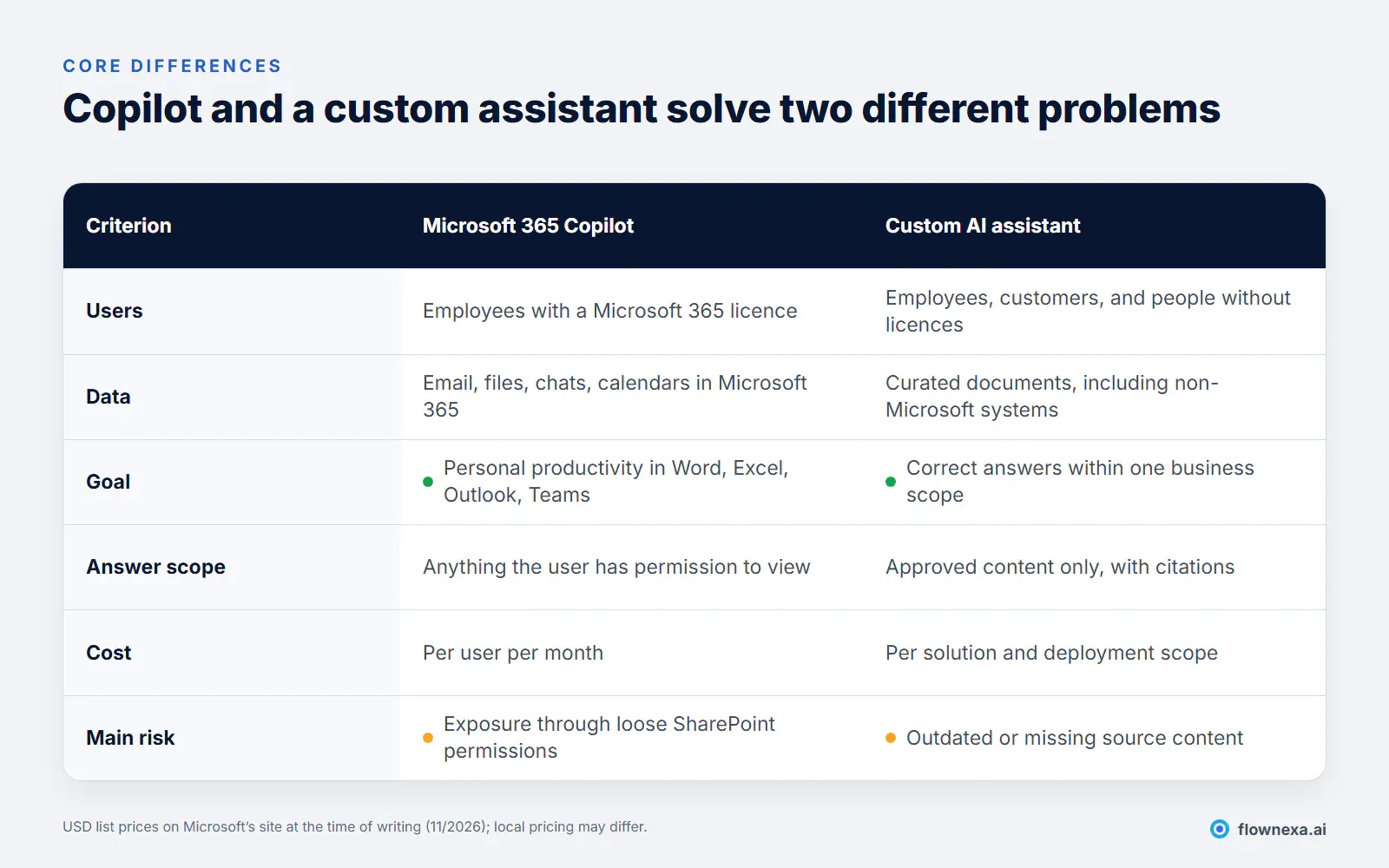
The most important difference is answer scope:
- Copilot answers from everything the user can view in Microsoft 365. That is powerful for personal productivity, but not suitable when you need answers based only on the latest approved policy.
- A custom AI assistant answers from a curated, controlled set of documents, cites a source for each answer, and can decline when a question is out of scope. See controlling citations in RAG.
The second difference is who uses it. Copilot is for employees with a Microsoft 365 licence. If you need AI to answer customers on your website or Zalo, or to serve staff who do not use Microsoft 365 (factory workers, contractors, branches on other systems), you need a custom assistant.
Deciding
Which option should a business start with?
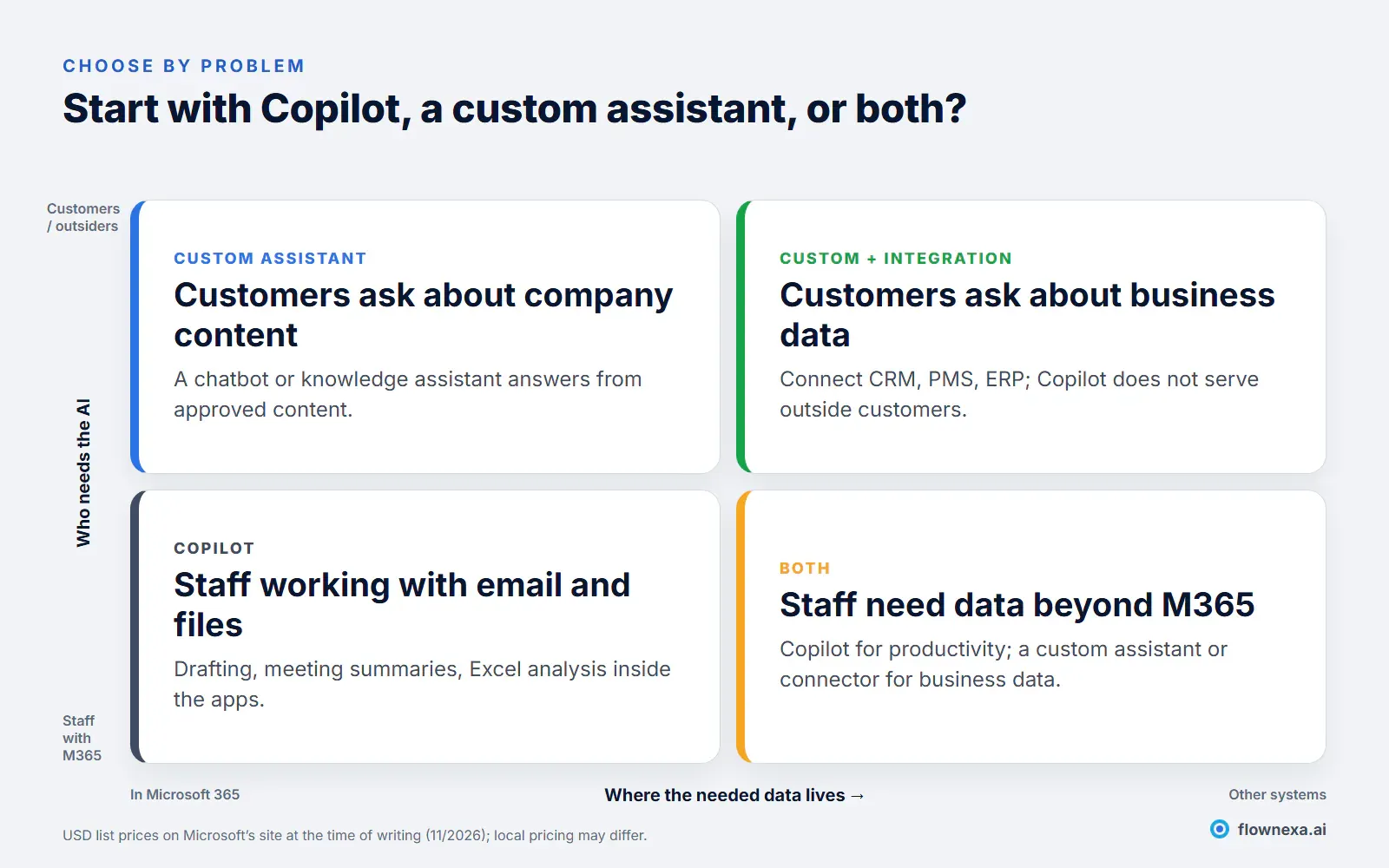
Some typical situations:
- Sales spends a lot of time on emails, quotes, and meeting summaries: Copilot for that team, starting with Copilot Chat.
- New staff keep asking about processes and policies: an internal knowledge assistant on a standardised document set. See internal AI for each department.
- Customers ask about prices, policies, or service status: a chatbot or customer-facing AI assistant, not Copilot.
- You need data from a CRM, PMS, or ERP: a custom assistant with integration; Copilot can use Microsoft Graph connectors or agents to reference external systems, but that requires configuration and permission checks.
If you are weighing building versus buying a custom assistant, see building an AI assistant in-house vs using an existing service and what an AI assistant costs.
Risk
What is the biggest risk of turning Copilot on?
Loose permissions. Copilot creates no new security gaps, but it exposes existing ones. Microsoft stresses that businesses should use the permission models in SharePoint and other Microsoft 365 services so the right people have access to the right content.
A common example: a payroll folder shared years ago with an "everyone in the organisation" link. Until now, almost nobody found it. With Copilot, an employee asking "what is the average salary in sales?" may get an answer, because technically they have permission to view that file.
Three other risks to note:
- Compromised accounts: an attacker with an employee's account now has a very powerful search tool. MFA and conditional access matter even more; see 12 Microsoft 365 security settings.
- Where data is processed: according to Microsoft, for customers outside the EU, queries may be processed in the US, the EU, or other regions. Businesses with specific data location requirements should check the terms before enabling it.
- Over-trusting answers: Copilot helps draft and summarise; users remain responsible for checking content before sending it to customers.
At the same time, without an official AI tool, staff may use personal tools with company data; see governing shadow AI without banning it.
Illustrative scenario
How should a 25-person business allocate these tools?
Picture a 25-person distribution company (an illustrative example, not a specific customer): 8 office staff on Microsoft 365, 12 warehouse and delivery staff who only use phones, and 5 salespeople who regularly answer customers through the website and Zalo.
| Group | Main need | Sensible choice |
|---|---|---|
| 5 salespeople | Drafting quotes, emails, call summaries | Copilot Business for 5 users: 5 × 21 × 12 = $1,260 a year |
| 3 admin and accounting staff | Writing documents, compiling figures | Start with Copilot Chat; upgrade once there is data |
| 12 warehouse and delivery staff | Looking up processes, return policies, safety rules | An internal knowledge assistant on their phones, no Microsoft 365 licence needed |
| Customers | Prices, order status, policies | A chatbot answering from approved content, handing off to sales when needed |
Compared with buying Copilot for all 25 people (25 × 21 × 12 = $6,300 a year), allocating by need costs less and covers the groups Copilot does not serve: staff without licences and external customers.
Measuring value
How do you know whether Copilot is worth the money?
Do not judge Copilot on a feeling that things "seem faster". During a 60-day pilot, measure:
- Time on repetitive tasks: drafting a quote email, writing meeting minutes, compiling a weekly report. Record the minutes before and after Copilot.
- Actual usage: how many people use Copilot daily, and for what. Unused licences are wasted spend; Microsoft provides usage reporting for the Copilot Business plan.
- Output quality: the share of drafts needing heavy edits, and factual errors caught before reaching customers.
- Permission incidents: whether Copilot surfaced content someone should not see. Each case is a sharing permission to fix.
Put it in money terms: if one person saves 2 hours a week at 40,000 VND an hour, the value is about 4.2 million VND a year, below the cost of a $21-a-month licence. Copilot pays off when users save more hours than that, or when faster, better customer responses create value that is hard to measure but clear.
Preparation
What should you prepare before buying Copilot?
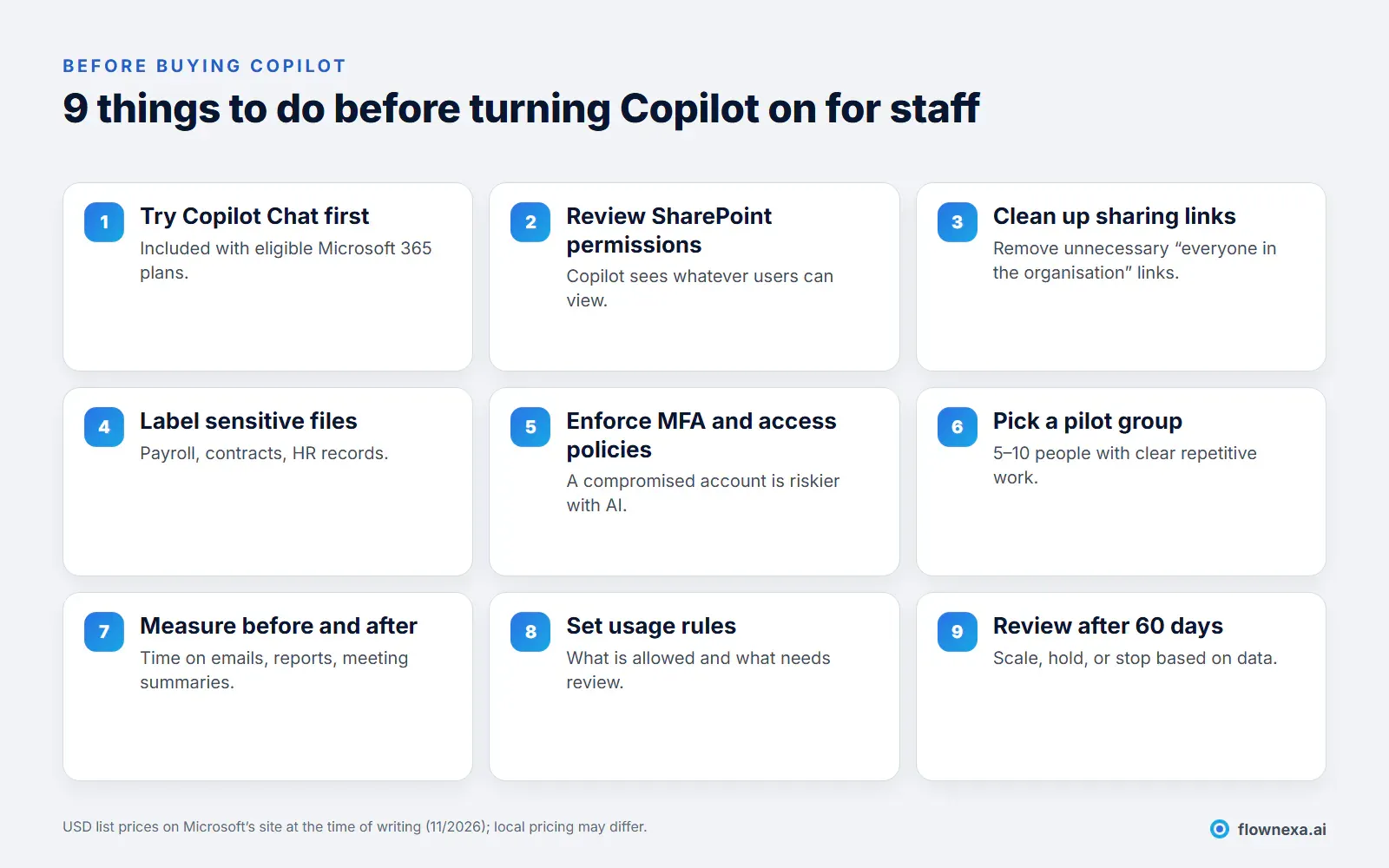
If your business is on Microsoft 365 Business Basic, note that it does not include desktop Office apps; see Business Basic vs Standard. If you also need device management and advanced email protection alongside Copilot, see Business Standard vs Business Premium.
For a custom AI assistant, the most important preparation is the content: choose the right sources, remove outdated versions, and assign an owner for updates. See standardising your knowledge base before RAG.
Q&A
Frequently asked questions
How is free Copilot Chat different from paid Microsoft 365 Copilot?
According to Microsoft, Copilot Chat is a web-grounded assistant included at no additional cost with eligible Microsoft 365 plans. The paid version adds work-data grounding through Microsoft Graph and Copilot inside Word, Excel, PowerPoint, Outlook, and Teams.
Can Copilot read colleagues' emails and files?
Only if the user already has permission to view that content. Copilot only surfaces data each user has at least view permission to. That is why sharing permissions in SharePoint, OneDrive, and Teams should be reviewed before enabling it.
Is company data used to train Microsoft's AI?
According to Microsoft's documentation, prompts, responses, and data accessed through Microsoft Graph are not used to train foundation models, including those used by Copilot.
Should we buy Copilot for every employee?
Usually not at first. Cost is per user, so pilot with 5–10 people who do a lot of drafting, summarising, and analysis, measure results over about 60 days, then expand.
Can Copilot replace a customer service chatbot?
No. Copilot serves licensed employees inside Microsoft 365. A chatbot answering customers on your website or Zalo needs to answer from approved content, hand off to staff when needed, and work for people outside the organisation.
Can we use both Copilot and a custom AI assistant?
Yes, and it is a common model: Copilot for office staff productivity, and a custom AI assistant for a business scope that needs controlled answers or serves customers.
Sources
- Microsoft Copilot Plans and Pricing for business, Microsoft (USD list prices at the time of writing, November 2026)
- Data, Privacy, and Security for Microsoft Copilot, Microsoft Learn
FlowNexa
The right AI tool for the right problem
FlowNexa reviews Microsoft 365 permissions before Copilot goes live, and deploys a custom AI assistant when you need controlled answers.
Microsoft 365 deployment, permissions, and security.
Q&A over internal documents with citations and permissions.
Talk through the AI needs of each team.
