


AI for SMEs in 2026: A Four-Level Roadmap from Chatbots to AI Agents
The complete guide for SMEs: four levels of AI adoption from chatbots, knowledge assistants, and automation to AI agents, plus how to choose a starting point, what it costs, which risks to control, and a 90-day plan.
Short answer: SMEs should adopt AI in four levels, each built on the one before: (1) a customer chatbot that answers from approved content, (2) an internal knowledge assistant, (3) process automation with AI steps, and (4) controlled AI agents. Start with one process that has high value, clear data, and results you can measure within 90 days, not with the most expensive AI tool.
When an AI project at a small or mid-sized business disappoints, the cause is rarely the AI model. It is usually a poor starting point: a process without usable data, no before-and-after measurement, or AI given the power to act before any controls exist.
This guide maps the in-depth articles on the FlowNexa blog for business owners, operations managers, and IT leads. By the end you will know which level your business is at, what to do next, and what to prepare.
The big picture
What can AI do for an SME, and what can it not do?
Generative AI is good at three kinds of work: understanding and answering in natural language, extracting and classifying information from text, and summarising and drafting. For SMEs, the value usually comes from freeing people from repetitive work: answering the same customer question many times a day, finding internal documents, or copying data from emails and invoices into other software.
AI cannot replace a process that is not defined. If your own team has not agreed on the returns policy, the price list, or the approval flow, AI will simply give wrong answers faster. AI also does not know your data on its own: every trustworthy answer rests on documents, systems, and rules that the business provides and maintains.
| AI does well | Needs human control |
|---|---|
| Answering repeat questions from approved content | Special quotes, discounts, contract commitments |
| Classifying emails, tickets, and requests | Financial decisions, payments, refunds |
| Extracting data from invoices and forms | Sensitive complaints |
| Summarising meetings and long documents | Legal, medical, and safety information |
| Drafting emails and content | Deleting or changing data that cannot be restored |
Reference framework
What are the four levels of AI adoption?
AI autonomy increases at each level, and so do the data and control requirements.
The four levels below are ordered by how much autonomy the AI has. A level does not have to wait for the previous one to be perfect, but it usually reuses the data, processes, and monitoring built there.
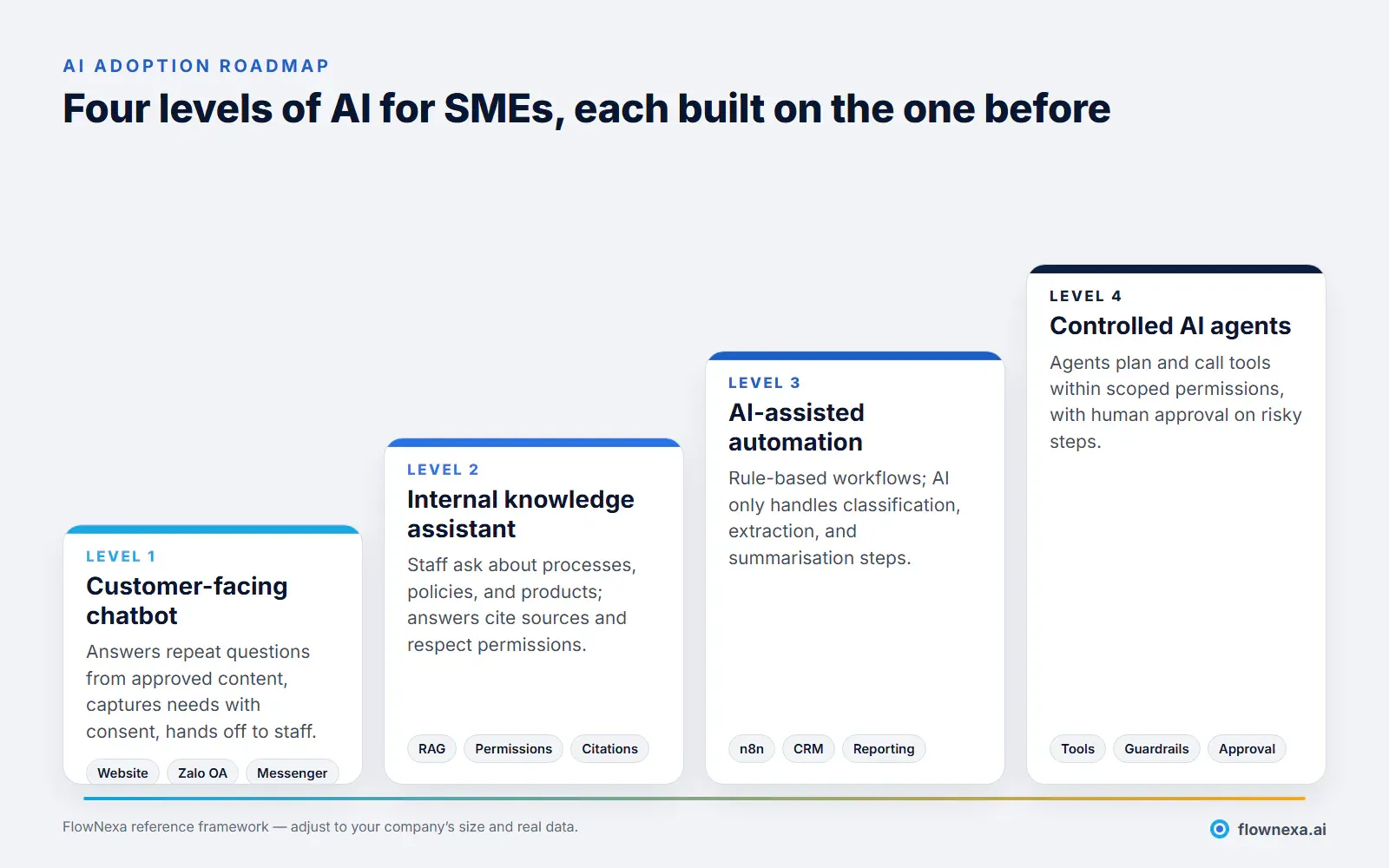
| Level 1: Chatbot | Level 2: Knowledge assistant | Level 3: AI-assisted automation | Level 4: AI agent | |
|---|---|---|---|---|
| Main users | Customers | Employees | Systems and processes | Employees delegating to the agent |
| What AI does | Answers, captures details | Answers with citations | Classifies and extracts inside a workflow | Plans and calls tools |
| Data needed | FAQs, policies, products | Internal documents with permissions | Business rules, system APIs | All of the above, plus clear permissions |
| Main risk | Wrong prices or policies | Documents shown to the wrong people | Duplicate or wrong data | Wrong actions, overreach |
| Metric to track | Self-resolution rate, qualified leads | Time to find information | Handling time, error rate | Work completed correctly |
Level 1
Customer chatbot: the lowest-risk place to start
An AI chatbot on your website, Zalo OA, or Messenger answers repeat questions from approved business content, captures customer needs with consent, and hands off to staff when a request goes beyond its scope. It is often a sensible first step because the scope is clear, results are easy to measure, and risk can be contained through the source content.
A good fit when: sales or support answer the same set of questions every day; customers message outside business hours; prices, policies, and product information are reasonably stable.
What to prepare: a list of real questions (from chat and email history), current policies and price lists, and rules for when to hand off to a person. Details: What data does a business need for an AI chatbot?
Common pitfall: measuring success by the number of conversations instead of resolved requests or qualified leads. Is your AI chatbot effective? 10 KPIs to track lists the metrics to use. Not sure your website needs a chatbot yet? Read When does a business website need an AI chatbot?
Level 2
Internal knowledge assistant: staff ask, documents answer
A knowledge assistant lets employees ask questions in plain language over internal documents: processes, HR policies, product specifications, technical guides. The common technique is RAG (Retrieval-Augmented Generation): the system finds the relevant passages, then the model answers from those passages and cites them.
A good fit when: new hires spend a lot of time asking colleagues; documents are scattered across many places; different departments give different answers to the same question.
What to prepare: clean up documents before loading them (remove outdated and duplicate versions, assign an owner for updates) and set up permissions so each employee only gets answers from documents they are allowed to see. See Standardise your knowledge base before RAG ingestion and Internal AI for each business department.
Common pitfall: assuming that having documents means the AI will answer correctly. Wrong answers usually come from conflicting documents, poor chunking, or weak retrieval; see Why AI gives wrong answers even with documents. The system also needs to know when it should refuse to answer.
Level 3
AI-assisted automation: AI as one step in a process
At this level, AI becomes one step in an automated process: incoming emails are classified and turned into tickets for the right team; invoice figures are extracted and wait for accounting approval; a report is compiled every morning from several sources. The workflow itself still runs on defined rules, often in a tool such as n8n; AI only handles the steps that require understanding language.
A good fit when: a process repeats at meaningful volume, inputs and outputs are clear, and results can be checked.
What to prepare: a description of the current process and its exceptions, API access to the systems involved (CRM, accounting, email), and what happens when the AI is unsure, such as a confidence threshold that routes the item to a reviewer. Which processes should use n8n, and which suit AI agents? helps draw the line.
Common pitfall: the workflow reports "success" while the business outcome fails, for example an email that was sent to the wrong person. Measure business results, not just technical status: Automation succeeds, but the business process fails.
Level 4
Controlled AI agents: delegate the goal, limit the permissions
An AI agent takes a goal, breaks it into steps, and calls tools (look up the CRM, create an order, send an email…) to complete it. The key difference from level 3: the order of steps is not pre-programmed but decided by the agent at run time. That brings flexibility, and it is exactly why agents need clear limits.
A good fit when: the work has many variations that are hard to write as fixed rules, the tools already have stable APIs, and the business already runs levels 2–3 well.
What to prepare: a minimal tool list; least-privilege permissions; a human approval step for risky actions (payments, deleting data, sending anything externally); and complete logs for traceability. See AI agent wrong tool calls: designing permissions and policy and Guardrails before AI agents run end to end in production.
Common pitfall: measuring ROI by model calls or tasks run. The right measure is work completed correctly without rework: AI agent ROI: measure completed work. Already running a chatbot? From chatbot to AI agent: when to upgrade helps you time the move.
Making the decision
Which level should your business start with?
There is no single "right" level for every business. The most practical approach is to list 5–10 processes that take up time, then score each on two axes: business value (time saved, revenue, fewer errors, customer experience) and readiness (documents exist and are accurate, rules are clear, someone owns it, results can be measured).
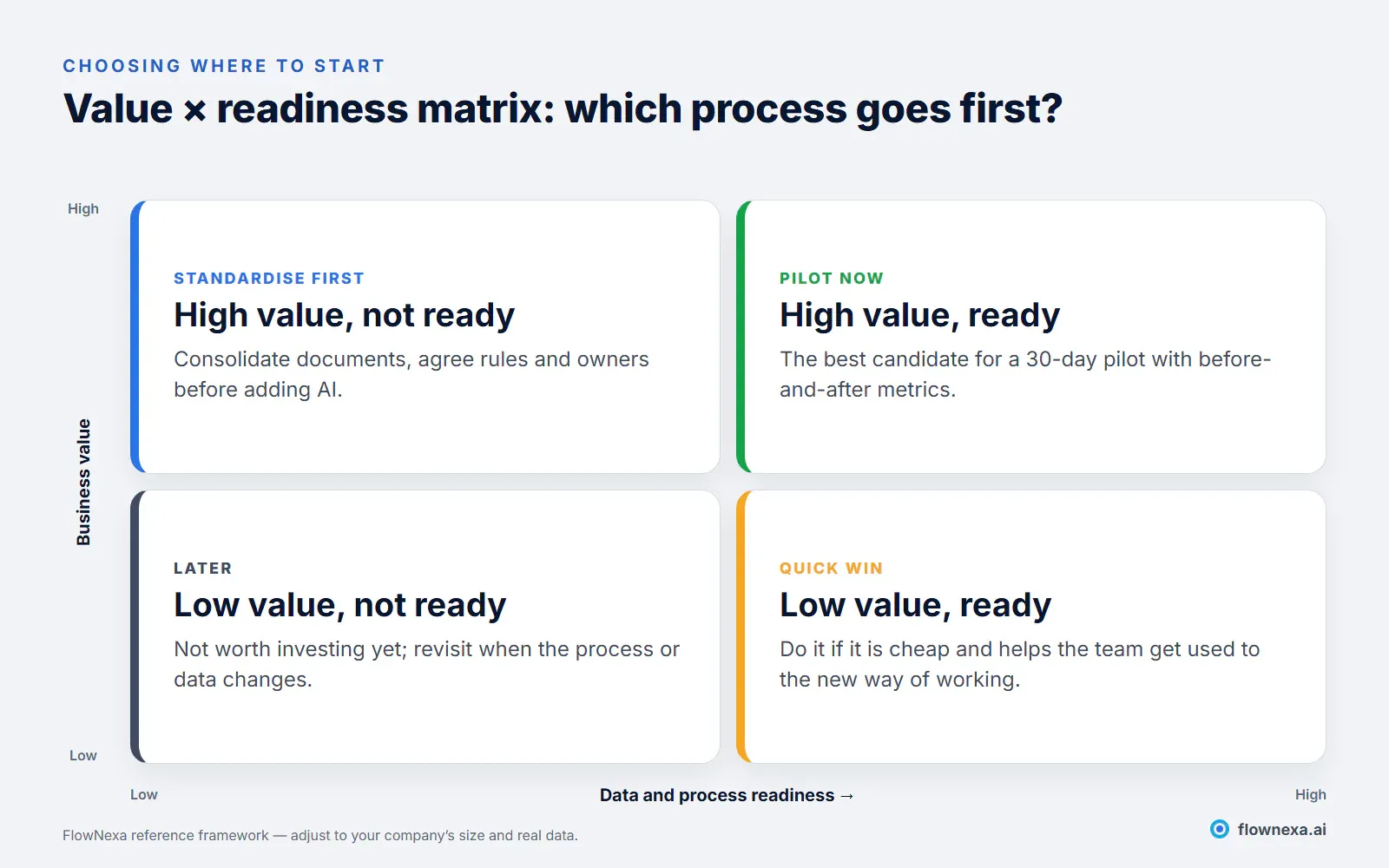
Five questions for a quick decision:
- How many times a week does this process run, and how many minutes does each run take?
- Is the correct answer or outcome written down anywhere?
- If the AI gets it wrong, what happens, and can it be undone?
- Who is responsible for updating the source data when things change?
- Which metric will measure the result, and what is its current baseline?
If you cannot answer questions 2 and 4, the process belongs in the "standardise first" quadrant. For many SMEs, a customer chatbot or an internal knowledge assistant satisfies both axes first, because the source material (FAQs, policies, product information) usually exists in some form. Where to start automating manual business processes offers a more detailed six-factor scoring matrix.
Budget
What does AI cost an SME?
AI cost is more than a software fee. When you budget, account for all five groups:
| Cost group | What it includes | Note |
|---|---|---|
| Platform and licences | Chatbot subscription, automation tools, per-user licences | Usually monthly, yearly, or per user |
| AI model (API) | Usage fees based on tokens processed | Varies with volume; set limits |
| Implementation | Discovery, configuration, integration, testing | One-off; grows with each system to connect |
| Data and content | Cleaning up documents, regular updates | The most commonly forgotten item |
| Operations | Monitoring, fixing wrong answers, user support | Needs a clearly named owner |
For reference, the FlowNexa Chatbot Standard plan in Vietnam costs 8,900,000 VND per year (excluding VAT), prepaid for 12 months, and includes the website chatbot; Zalo OA, Messenger, and multi-market deployments are quoted per scope. See pricing. How much does an AI website chatbot cost? and AI assistant cost: what businesses should budget for break down each item.
Risk management
Which AI risks need controls?
The OWASP Top 10 for LLM Applications (2025) is a good reference for technical risks. For SMEs, these five deserve controls from day one:
- Wrong answers that sound convincing: restrict the AI to approved content, require citations, and let it say "I'm not sure" and hand off to a person.
- Sensitive data exposure: apply per-user permissions, keep unnecessary data out of the system, and follow applicable personal data protection rules when collecting customer information.
- Prompt injection: content from emails, attachments, or websites can carry hidden instructions meant to steer the AI. See AI reading email attachments: malware and hidden instructions.
- Excessive agency: give the AI only the minimum tools and permissions, with approval steps for irreversible actions.
- Shadow AI: employees using personal AI tools with company data. Outright bans rarely work; see governing shadow AI without banning it.
At the governance level, the NIST AI Risk Management Framework (version 1.0 released in January 2023, with the generative AI profile NIST-AI-600-1 in 2024) organises the work into four functions: Govern, Map, Measure, and Manage. It becomes useful once a business runs several AI applications at the same time.
Action plan
A 90-day roadmap for your first AI project
A good pilot has a small scope, clear metrics, and stop criteria. The 30/60/90-day framework below is how FlowNexa recommends approaching a company's first AI project.
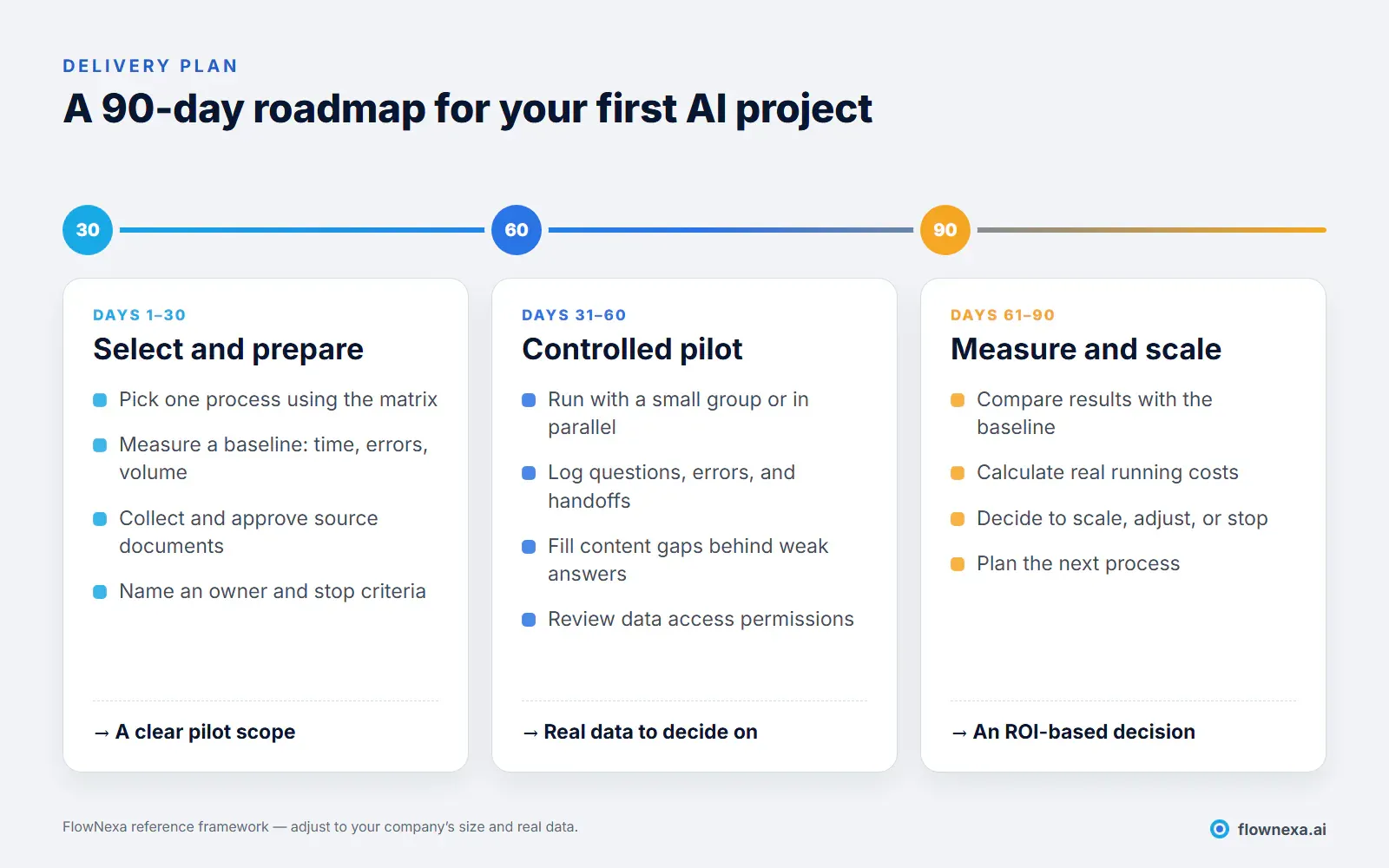
Stop criteria matter as much as success criteria. Before you start, write down that if the correct-answer rate is below an agreed threshold after 60 days, or running costs exceed the value saved, the project will stop or narrow its scope. That keeps AI a controlled investment rather than an open-ended experiment.
Checklist
Checklist before you start an AI project
- You have chosen one specific process, not "AI for the whole company"
- You have baseline figures: volume, handling time, error rate
- Source documents have been reviewed and have an owner for updates
- You have decided which data must not go into the AI system
- There are rules for when the AI must hand off to a person
- Success metrics and stop criteria are agreed
- Running costs are budgeted, not just implementation costs
- Affected employees know what the AI will and will not do
Q&A
Frequently asked questions
Does an SME need its own technical team to adopt AI?
Not necessarily. For chatbots and knowledge assistants, a business can use a service that is deployed and operated for it; the internal work is mainly providing, approving, and updating content. Automation and AI agents need someone who understands the process and has access to the systems involved, either in-house or a delivery partner.
Should we use ChatGPT or deploy our own business chatbot?
Personal AI tools suit employees for drafting, summarising, or general research. A customer-facing chatbot has to answer from your own documents and policies, with content controls, staff handoff, and conversation history, which personal tools are not designed for. See How a business website chatbot differs from ChatGPT.
How soon will we see results from a first AI project?
With a small scope and ready data, a pilot can produce its first figures within a few weeks. The 90-day framework gives you enough data to decide whether to scale or stop, instead of judging by impressions.
Will AI replace employees?
At the levels described here, AI mainly takes over repetitive work so people can focus on judgement, customer relationships, and exceptions. Risky decisions should still have a human approver.
Is business data safe when it goes into AI?
It depends on the implementation: where data is stored, who can access it, whether the model provider uses it for training, and how long logs are kept. Ask your delivery partner to answer these points in writing before you sign.
Should we roll out several levels at once?
Usually not. Each level needs its own data, process, and owner. Doing one level well and then reusing its documents, permissions, and monitoring for the next is faster and less risky.
Sources
- OWASP Top 10 for LLM Applications 2025, OWASP Gen AI Security Project
- NIST AI Risk Management Framework, National Institute of Standards and Technology
- FlowNexa pricing, Standard chatbot plan price at the time of writing (November 2026)
FlowNexa
Choose your first AI step
FlowNexa reviews your processes, scores priorities, and proposes a 90-day pilot with clear metrics.
An AI chatbot for your website, Zalo OA, and Messenger that answers from approved content.
Q&A over internal documents with citations and permissions.
Workflows with AI steps, exception handling, and business-outcome metrics.
Talk through the process you want to start with.
